> ## Documentation Index
> Fetch the complete documentation index at: https://link.datarelay.run/llms.txt
> Use this file to discover all available pages before exploring further.
# Firewall & NAT
> Deploy the Data Relay Link server directly on the Internet or behind a firewall with DNAT.
# Firewall & NAT
The remote **client** normally does not need inbound port forwarding. The **Data Relay Link server side** still needs a reachable public entry point for control, enrollment, and published service ports.
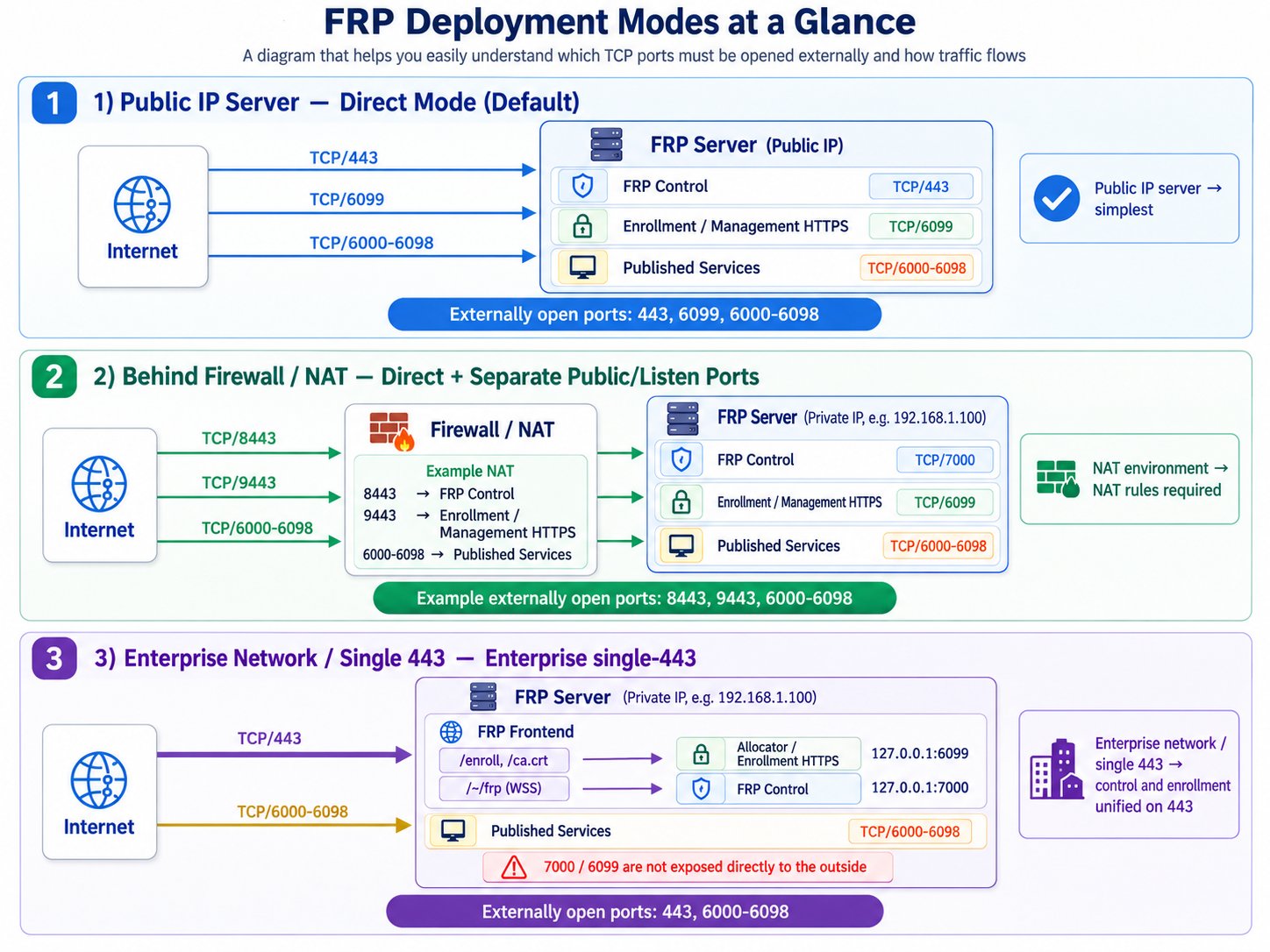 The diagram is useful for separating **where the server lives** from **which Data Relay Link mode it uses**. A private server behind DNAT can still run Direct mode; Enterprise single-443 is a different transport layout for constrained client networks.
## Topology A — server has a public IP
```mermaid theme={null}
flowchart LR
C[Remote client\nbehind NAT] -->|outbound 443 / 6099| S[Data Relay Link server\npublic IP]
U[Internet user] -->|assigned 6000-6098 port| S
```
Direct defaults:
```text theme={null}
TCP 443 Data Relay Link control
TCP 6099 Enrollment / management HTTPS
TCP 6000-6098 Published services
```
## Topology B — server is private behind a firewall
```mermaid theme={null}
flowchart LR
C[Remote client] -->|public 8443 / 9443| F[Firewall / NAT\n203.0.113.10]
U[Internet user] -->|public service port| F
F -->|8443 -> 443| S[Data Relay Link server\n192.0.2.50]
F -->|9443 -> 6099| S
F -->|6000-6098 -> same ports| S
```
Example DNAT:
```text theme={null}
203.0.113.10:8443 -> 192.0.2.50:443
203.0.113.10:9443 -> 192.0.2.50:6099
203.0.113.10:6000-6098 -> 192.0.2.50:6000-6098
```
The client configuration must use the **public** endpoints (`203.0.113.10:8443`, `:9443` in this example), not the private server address.
## Enterprise single-443 behind a firewall
In single-443, the public firewall only forwards the frontend control/enrollment endpoint on TCP 443. The internal backends remain loopback-only on the Data Relay Link server:
```text theme={null}
Public firewall TCP 443 -> Data Relay Link server TCP 443 frontend
Data Relay Link server 127.0.0.1:7000 -> relay backend
Data Relay Link server 127.0.0.1:6099 -> enrollment/management backend
Published service ports -> 6000-6098 (normally 1:1)
```
**Do not DNAT public TCP 7000 or 6099 to the server in Enterprise single-443.** Those are internal backend listeners in this topology. Exposing them defeats the intended single-443 boundary.
The distinction between a **public port** and a **local listen/backend port** matters when the server is behind NAT. Always configure the client with the public endpoint and configure the firewall to forward to the intended local listener.
## Why published service ports should stay 1:1
```mermaid theme={null}
flowchart LR
R[Server registry\nService public port = 6001] --> F[Firewall]
F --> S[Private Data Relay Link server\nlisten 6001]
```
Keeping public `6001 -> internal 6001` means the product's persistent reservation is also the port users actually connect to.
If an external firewall arbitrarily remaps every service port, the registry and Internet-facing endpoint stop matching, which makes operations and troubleshooting harder.
## Who is responsible for what?
| Component | Data Relay Link configures it? |
| ------------------------------------ | ------------------------------ |
| Data Relay Link server/client config | **Yes** |
| Service-port reservation | **Yes** |
| AWS Security Group | No |
| OCI Security List / NSG | No |
| External firewall/DNAT | No |
| UFW/firewalld/iptables | No |
| DNS record | No |
| SSH account/key | No |
## Hairpin NAT / split DNS
An internal user may fail to reach `fw.example.com` if that hostname resolves to the firewall's public IP and the firewall does not support hairpin NAT.
```mermaid theme={null}
flowchart LR
I[Internal user] -->|fw.example.com -> public IP| F[Firewall]
F -. hairpin required .-> S[Internal Data Relay Link server]
```
If hairpin NAT is unavailable, use split DNS or another appropriate internal routing design.
## Troubleshooting NAT
Check in this order:
1. public DNS/IP points to the correct firewall
2. public control port DNATs to the expected server listen port
3. public enrollment HTTPS DNATs correctly
4. published service port stays open and preferably 1:1
5. local `drlink doctor` reports a healthy topology
6. the client can reach the **public** endpoints from its own network
The diagram is useful for separating **where the server lives** from **which Data Relay Link mode it uses**. A private server behind DNAT can still run Direct mode; Enterprise single-443 is a different transport layout for constrained client networks.
## Topology A — server has a public IP
```mermaid theme={null}
flowchart LR
C[Remote client\nbehind NAT] -->|outbound 443 / 6099| S[Data Relay Link server\npublic IP]
U[Internet user] -->|assigned 6000-6098 port| S
```
Direct defaults:
```text theme={null}
TCP 443 Data Relay Link control
TCP 6099 Enrollment / management HTTPS
TCP 6000-6098 Published services
```
## Topology B — server is private behind a firewall
```mermaid theme={null}
flowchart LR
C[Remote client] -->|public 8443 / 9443| F[Firewall / NAT\n203.0.113.10]
U[Internet user] -->|public service port| F
F -->|8443 -> 443| S[Data Relay Link server\n192.0.2.50]
F -->|9443 -> 6099| S
F -->|6000-6098 -> same ports| S
```
Example DNAT:
```text theme={null}
203.0.113.10:8443 -> 192.0.2.50:443
203.0.113.10:9443 -> 192.0.2.50:6099
203.0.113.10:6000-6098 -> 192.0.2.50:6000-6098
```
The client configuration must use the **public** endpoints (`203.0.113.10:8443`, `:9443` in this example), not the private server address.
## Enterprise single-443 behind a firewall
In single-443, the public firewall only forwards the frontend control/enrollment endpoint on TCP 443. The internal backends remain loopback-only on the Data Relay Link server:
```text theme={null}
Public firewall TCP 443 -> Data Relay Link server TCP 443 frontend
Data Relay Link server 127.0.0.1:7000 -> relay backend
Data Relay Link server 127.0.0.1:6099 -> enrollment/management backend
Published service ports -> 6000-6098 (normally 1:1)
```
**Do not DNAT public TCP 7000 or 6099 to the server in Enterprise single-443.** Those are internal backend listeners in this topology. Exposing them defeats the intended single-443 boundary.
The distinction between a **public port** and a **local listen/backend port** matters when the server is behind NAT. Always configure the client with the public endpoint and configure the firewall to forward to the intended local listener.
## Why published service ports should stay 1:1
```mermaid theme={null}
flowchart LR
R[Server registry\nService public port = 6001] --> F[Firewall]
F --> S[Private Data Relay Link server\nlisten 6001]
```
Keeping public `6001 -> internal 6001` means the product's persistent reservation is also the port users actually connect to.
If an external firewall arbitrarily remaps every service port, the registry and Internet-facing endpoint stop matching, which makes operations and troubleshooting harder.
## Who is responsible for what?
| Component | Data Relay Link configures it? |
| ------------------------------------ | ------------------------------ |
| Data Relay Link server/client config | **Yes** |
| Service-port reservation | **Yes** |
| AWS Security Group | No |
| OCI Security List / NSG | No |
| External firewall/DNAT | No |
| UFW/firewalld/iptables | No |
| DNS record | No |
| SSH account/key | No |
## Hairpin NAT / split DNS
An internal user may fail to reach `fw.example.com` if that hostname resolves to the firewall's public IP and the firewall does not support hairpin NAT.
```mermaid theme={null}
flowchart LR
I[Internal user] -->|fw.example.com -> public IP| F[Firewall]
F -. hairpin required .-> S[Internal Data Relay Link server]
```
If hairpin NAT is unavailable, use split DNS or another appropriate internal routing design.
## Troubleshooting NAT
Check in this order:
1. public DNS/IP points to the correct firewall
2. public control port DNATs to the expected server listen port
3. public enrollment HTTPS DNATs correctly
4. published service port stays open and preferably 1:1
5. local `drlink doctor` reports a healthy topology
6. the client can reach the **public** endpoints from its own network