> ## Documentation Index
> Fetch the complete documentation index at: https://link.datarelay.run/llms.txt
> Use this file to discover all available pages before exploring further.
# Client Enrollment
> Enroll remote clients with Zero-Touch or a manual Enrollment Code.
# Client Enrollment
Enrollment is the secure **first-time pairing** of a client with the Data Relay Link server. It establishes persistent management identity; it is not the same thing as the published SSH/web connection itself.
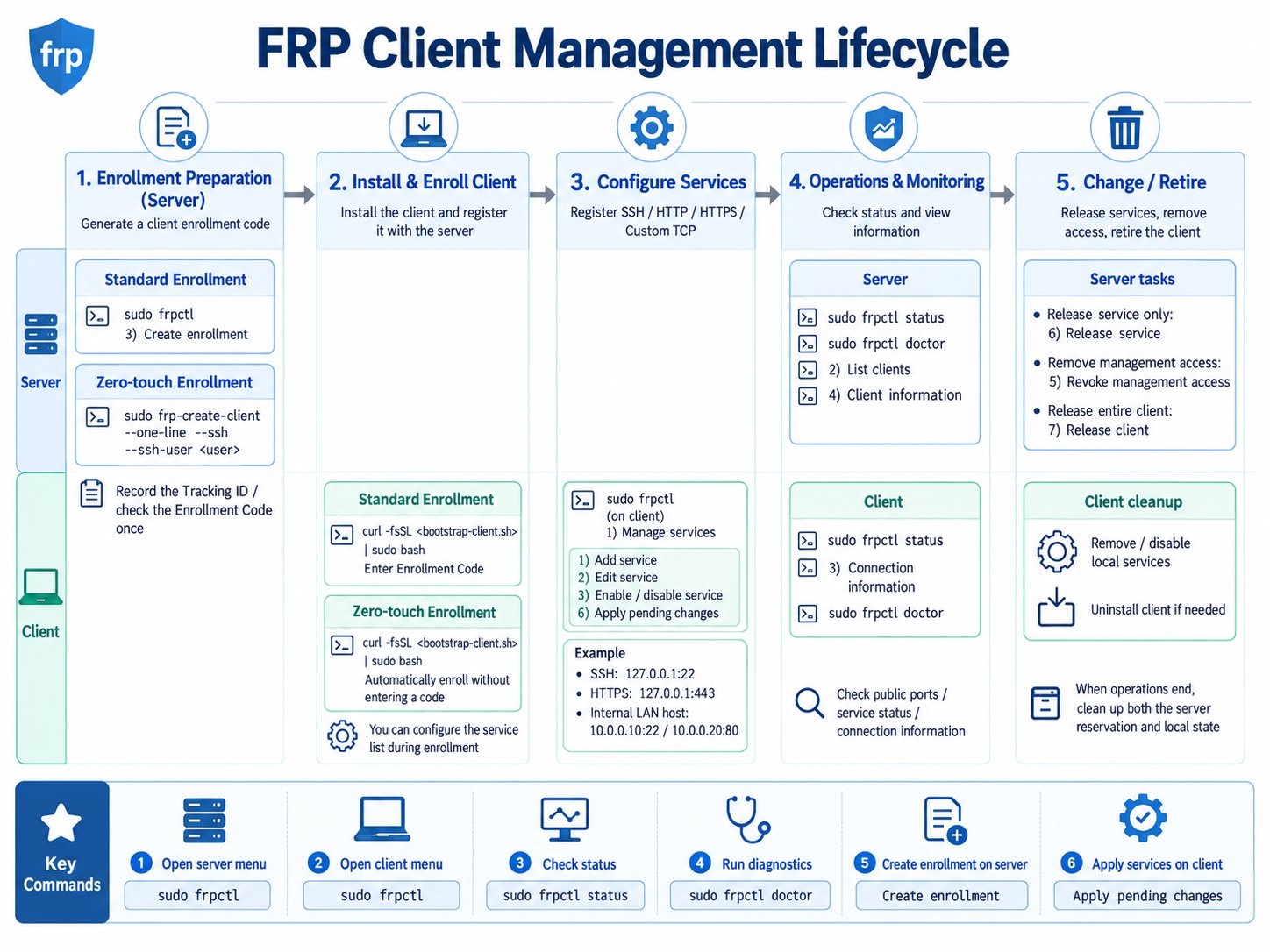 The lifecycle view helps separate first-time enrollment from normal service changes, updates, and final client/port retirement.
## Choose the workflow
| Workflow | Use it when | Typical operator experience |
| -------------------------- | -------------------------------------------------------- | -------------------------------------------------------- |
| **Zero-Touch** | the server admin should predefine the initial profile | remote user runs one generated command |
| **Manual Enrollment Code** | the remote operator should choose services interactively | remote user runs installer and enters a short-lived code |
```mermaid theme={null}
flowchart TD
A[New client] --> B{Who should choose\ninitial services?}
B -->|Server admin| Z[Zero-Touch]
B -->|Remote operator| M[Manual Enrollment Code]
Z --> E[Secure enrollment]
M --> E
E --> I[Persistent CLIENT ID + management identity]
I --> T[Outbound Data Relay Link tunnel]
```
## Zero-Touch
The easiest interactive CLI path is:
```bash theme={null}
sudo drlink
```
Then:
```text theme={null}
create zero-touch
```
For an explicit SSH profile:
```bash theme={null}
sudo drlink create enrollment \
--one-line \
--ssh \
--ssh-user \
--label branch-a
```
The generated bootstrap command contains a short-lived credential. Send it only through an appropriate private channel.
The SSH user must already exist. Data Relay Link does not create users, enable SSH, change passwords, or install SSH keys.
## Manual Enrollment Code
On the server:
```bash theme={null}
sudo drlink create enrollment
```
The server produces enrollment information including a short-lived Enrollment Code, allocator URL, CA trust/fingerprint material, and a client bootstrap command.
The remote user runs the generated command and enters the Enrollment Code when prompted.
Typical service choices include:
```text theme={null}
SSH
HTTP
HTTPS
Custom TCP
```
The server owns the public service-port assignment. The client chooses the target host and target port.
## Trust establishment
```mermaid theme={null}
sequenceDiagram
participant C as Client
participant S as Server
C->>S: Enrollment Code / Bootstrap Ticket
S-->>C: CA bootstrap information
C->>C: Verify CA fingerprint / certificate
C->>S: Verified HTTPS enrollment
S-->>C: Persistent management identity + configuration
```
After that, normal supported operations use the persistent identity rather than repeatedly using the first-install secret.
## Verify enrollment
Server:
```bash theme={null}
sudo drlink show enrollments
sudo drlink show clients
sudo drlink show client
```
Client:
```bash theme={null}
sudo drlink show status
sudo drlink show services
sudo drlink doctor
```
## Stable v2.2.1 enrollment lifecycle
Use the non-secret enrollment ID to revoke an active credential:
```bash theme={null}
sudo drlink revoke enrollment
```
`show enrollments` never prints the secret itself. Enrollment retention/purge and lifecycle behavior documented by the v2.2.1 CLI are part of the stable release contract; mutable `main` may contain later changes.
## Persistent identity
A successful enrollment creates a persistent CLIENT ID and management identity. Normal service edits, reboots, and supported updates do not require re-enrollment.
The lifecycle view helps separate first-time enrollment from normal service changes, updates, and final client/port retirement.
## Choose the workflow
| Workflow | Use it when | Typical operator experience |
| -------------------------- | -------------------------------------------------------- | -------------------------------------------------------- |
| **Zero-Touch** | the server admin should predefine the initial profile | remote user runs one generated command |
| **Manual Enrollment Code** | the remote operator should choose services interactively | remote user runs installer and enters a short-lived code |
```mermaid theme={null}
flowchart TD
A[New client] --> B{Who should choose\ninitial services?}
B -->|Server admin| Z[Zero-Touch]
B -->|Remote operator| M[Manual Enrollment Code]
Z --> E[Secure enrollment]
M --> E
E --> I[Persistent CLIENT ID + management identity]
I --> T[Outbound Data Relay Link tunnel]
```
## Zero-Touch
The easiest interactive CLI path is:
```bash theme={null}
sudo drlink
```
Then:
```text theme={null}
create zero-touch
```
For an explicit SSH profile:
```bash theme={null}
sudo drlink create enrollment \
--one-line \
--ssh \
--ssh-user \
--label branch-a
```
The generated bootstrap command contains a short-lived credential. Send it only through an appropriate private channel.
The SSH user must already exist. Data Relay Link does not create users, enable SSH, change passwords, or install SSH keys.
## Manual Enrollment Code
On the server:
```bash theme={null}
sudo drlink create enrollment
```
The server produces enrollment information including a short-lived Enrollment Code, allocator URL, CA trust/fingerprint material, and a client bootstrap command.
The remote user runs the generated command and enters the Enrollment Code when prompted.
Typical service choices include:
```text theme={null}
SSH
HTTP
HTTPS
Custom TCP
```
The server owns the public service-port assignment. The client chooses the target host and target port.
## Trust establishment
```mermaid theme={null}
sequenceDiagram
participant C as Client
participant S as Server
C->>S: Enrollment Code / Bootstrap Ticket
S-->>C: CA bootstrap information
C->>C: Verify CA fingerprint / certificate
C->>S: Verified HTTPS enrollment
S-->>C: Persistent management identity + configuration
```
After that, normal supported operations use the persistent identity rather than repeatedly using the first-install secret.
## Verify enrollment
Server:
```bash theme={null}
sudo drlink show enrollments
sudo drlink show clients
sudo drlink show client
```
Client:
```bash theme={null}
sudo drlink show status
sudo drlink show services
sudo drlink doctor
```
## Stable v2.2.1 enrollment lifecycle
Use the non-secret enrollment ID to revoke an active credential:
```bash theme={null}
sudo drlink revoke enrollment
```
`show enrollments` never prints the secret itself. Enrollment retention/purge and lifecycle behavior documented by the v2.2.1 CLI are part of the stable release contract; mutable `main` may contain later changes.
## Persistent identity
A successful enrollment creates a persistent CLIENT ID and management identity. Normal service edits, reboots, and supported updates do not require re-enrollment.