Outcome: An operator creates a Server backup, validates it, restores when necessary and verifies inventory, identity continuity, access policy and real application reachability.
A restore replaces security-sensitive persistent state and can interrupt clients. Perform the restore step only during an explicitly approved recovery window on the intended Server, after reviewing the archive and target version. Do not use this procedure to test casually on a production instance.
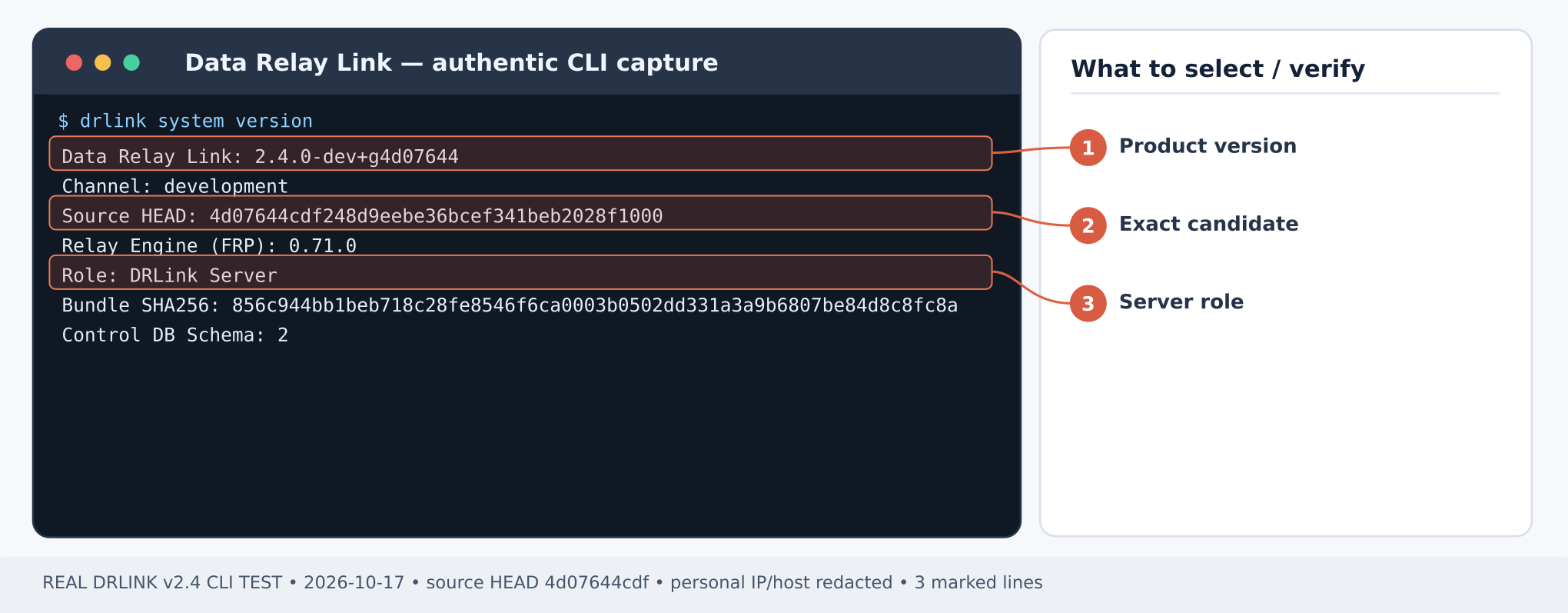
Figure 1. Captured product build identity: check product version and DRLink Server role. CLI output example; sensitive addresses and hostnames are masked.Server shell:
sudo drlink system versionsudo drlink show statussudo drlink system diagnosticssudo drlink show managed-hostssudo drlink show remote-accesssudo drlink show internet-accesssudo drlink show ai-access
Record the installed version, active Managed Hosts, Remote Service endpoints and policy modes. A backup from an unrelated release is not automatically compatible.
Figure 2. Server System menu: 3 Backup & Restore, 5 Diagnostics, 8 Version Information. CLI output example; sensitive addresses and hostnames are masked.Server REPL:
system backup
Record the exact archive path printed by the product. Use the built-in workflow: /var/lib/drlink/drlink.db and the PKI, secrets, policies, registry and reservations must form a consistent snapshot. Copy the archive to secure off-host storage using your approved encrypted transfer/backup mechanism, never to a public docs repository. Do not copy only the live SQLite file (WAL consistency risk).
sudo drlink system backup validate <exact-backup-archive-path>
Expected: successful integrity/format/version validation. This is read-only and must complete before a restore. A corrupt or incompatible archive is not a recovery candidate.
sudo drlink system restore <validated-backup-archive-path>
Review the product’s confirmation and access-impact information; do not automatically answer Yes. The product should snapshot and validate its state transition and report any incomplete rollback honestly. Record all failure evidence before attempting another recovery.
Step 5 — verify identity and real traffic after restoration
Figure 3. Real Agent diagnostics excerpt: inspect runtime/Server connectivity after recovery. CLI output example; sensitive addresses and hostnames are masked.Server REPL:
show statusshow managed-hostsshow remote-accessshow internet-accessshow ai-accesssystem diagnosticssystem revisions
On each affected Agent Host:
show agentshow remote-servicessystem diagnosticssystem synchronize
Check that immutable Managed Host identities, Remote Service IDs and public endpoint reservations were preserved wherever compatible, and that Agents reconnected/reconciled the active generation. Then run an actual approved SSH or Internet Access application request plus one intentionally denied policy request as in the corresponding playbooks.
Backup validation FAIL: do not restore. Keep evidence and obtain a healthy compatible archive.
Agent missing after restore: check original identity/trust, management connectivity and Agent sync; do not immediately re-enroll and lose the identity history.
Policy changed unexpectedly: compare current revision and backup baseline before authorizing another mutation. Never reset Remote Access policy merely to restore connectivity, because initial Remote Access is ALLOW.
Service appears HEALTHY without real traffic: verify the application’s endpoint separately. Runtime/heartbeat status alone does not prove the destination is reachable.
After restore, backup-time host presence and proxy health require fresh Agent verification. Connected Agents reconcile when the Server lacks current Remote Service verification; run diagnostics/synchronize and test real traffic. Keep both the archive and error evidence if restore or rollback fails.Current CLI inventory · MCP compatibility
Last modified on October 28, 2026
{"docsConfig":{"theme":"mint","$schema":"https://mintlify.com/docs.json","name":"DataRelay Link","description":"Lightweight secure connectivity for isolated and restricted networks with controlled remote access and agentless outbound egress.","colors":{"primary":"#C2410C","light":"#FB923C","dark":"#C75A00"},"logo":{"light":"https://mintcdn.com/data-relay/QdSvVfPZ7NEJSOWl/logo/light.svg?fit=max\u0026auto=format\u0026n=QdSvVfPZ7NEJSOWl\u0026q=85\u0026s=888463e35ab49f73f9b174030b3263d6","dark":"https://mintcdn.com/data-relay/QdSvVfPZ7NEJSOWl/logo/dark.svg?fit=max\u0026auto=format\u0026n=QdSvVfPZ7NEJSOWl\u0026q=85\u0026s=78944f5be2786c960ab6daaaf7ca870b","href":"https://link.datarelay.run"},"favicon":"https://mintcdn.com/data-relay/QdSvVfPZ7NEJSOWl/favicon.svg?fit=max\u0026auto=format\u0026n=QdSvVfPZ7NEJSOWl\u0026q=85\u0026s=d6f1dea7850d21b0c157e4be3317c226","appearance":{"default":"system","strict":false},"navbar":{"links":[{"href":"https://datarelay.run/","label":"DataRelay"},{"href":"https://link.datarelay.run/","label":"Link"},{"href":"https://control.datarelay.run/","label":"Control"},{"href":"https://grant.datarelay.run/","label":"Grant"},{"href":"https://engineering.datarelay.run/","label":"Engineering"},{"href":"https://github.com/datarelay-labs/datarelay-link","type":"github"}]},"search":{"prompt":"Search DataRelay Link docs..."},"seo":{"metatags":{"canonical":"https://link.datarelay.run"},"indexing":"navigable"},"metadata":{"timestamp":true},"styling":{"latex":false},"navigation":{"languages":[{"language":"en","href":""},{"language":"ko","href":"ko"}]}},"deployment":{"deploymentMetadataValue":{"subdomain":"data-relay","hasAudioNarration":false,"actualSubdomain":"data-relay","customDomains":["link.datarelay.run"],"gitSource":{"type":"github","owner":"datarelay-labs","repo":"datarelay-link-docs","deployBranch":"main","contentDirectory":"","isPrivate":false,"mountPath":"","label":""},"chroma":{"latestBuiltDeploymentHistoryId":"6ae2b51eefa5e7bcbb87bc8e","collectionId":"a1f69361-66ae-435c-96ea-5f84e3b497ae","liveDeploymentHistoryId":"6ae2b51eefa5e7bcbb87bc8e","schemaVersion":"v3"},"entitlements":{"AI_CHAT":{"status":"DISABLED"}},"buildId":"6ae2b51eefa5e7bcbb87bc8e","clientVersion":"0.0.4044","searchFilterCounts":[{"language":"en","tag":"Practical Use Cases","count":13},{"language":"ko","tag":"실습: 활용 사례","count":13},{"language":"en","tag":"Getting Started","count":11},{"language":"ko","tag":"시작하기","count":10},{"language":"en","tag":"Security \u0026 Reference","count":9},{"language":"ko","tag":"보안 \u0026 참고","count":8},{"language":"en","tag":"Operations","count":7},{"language":"ko","tag":"운영 \u0026 문제 해결","count":7},{"language":"en","tag":"Remote Services \u0026 Access","count":5},{"language":"ko","tag":"Remote Service \u0026 Access","count":5},{"language":"en","tag":"AI Access","count":4},{"language":"ko","tag":"AI Access","count":4},{"language":"en","tag":"Deployment","count":3},{"language":"en","tag":"CLI \u0026 Configuration","count":3},{"language":"en","tag":"Managed Hosts \u0026 Objects","count":3},{"language":"ko","tag":"배포","count":3},{"language":"ko","tag":"CLI \u0026 Configuration","count":3},{"language":"ko","tag":"Managed Host \u0026 Object","count":3},{"language":"en","tag":"Internet Access","count":1},{"language":"ko","tag":"Internet Access","count":1}]},"assistantConfig":{"enableAskAiButton":false,"enableStarterQuestions":false,"enableContextualStarterQuestions":false,"enableAskAiSearchBar":true},"basePath":"","hasChatPermissions":false,"hasWebMcpPermissions":false,"toggles":[{"name":"kill-isr","enabled":true,"variant":{"name":"disabled","enabled":false,"feature_enabled":true},"impressionData":false},{"name":"agent-mintlify-slack","enabled":true,"variant":{"name":"disabled","enabled":false,"feature_enabled":true},"impressionData":false},{"name":"agent-integrations-settings","enabled":true,"variant":{"name":"disabled","enabled":false,"feature_enabled":true},"impressionData":false},{"name":"automations-pr-grouping","enabled":true,"variant":{"name":"disabled","enabled":false,"feature_enabled":true},"impressionData":false},{"name":"custom-prefix","enabled":true,"variant":{"name":"disabled","enabled":false,"feature_enabled":true},"impressionData":false},{"name":"analytics-v7","enabled":true,"variant":{"name":"disabled","enabled":false,"feature_enabled":true},"impressionData":false},{"name":"user-flows-analytics","enabled":true,"variant":{"name":"disabled","enabled":false,"feature_enabled":true},"impressionData":false},{"name":"no-publish-flow","enabled":true,"variant":{"name":"disabled","enabled":false,"feature_enabled":true},"impressionData":false},{"name":"workos-onboarding","enabled":true,"variant":{"name":"disabled","enabled":false,"feature_enabled":true},"impressionData":false},{"name":"llms-txt-v2","enabled":true,"variant":{"name":"disabled","enabled":false,"feature_enabled":true},"impressionData":false},{"name":"snapshot-serving-live","enabled":true,"variant":{"name":"disabled","enabled":false,"feature_enabled":true},"impressionData":false},{"name":"stripTemperatureMiddleware","enabled":true,"variant":{"name":"disabled","enabled":false,"feature_enabled":true},"impressionData":false},{"name":"support-platform-pylon-zendesk","enabled":true,"variant":{"name":"disabled","enabled":false,"feature_enabled":true},"impressionData":false},{"name":"snapshot-serving","enabled":true,"variant":{"name":"disabled","enabled":false,"feature_enabled":true},"impressionData":false},{"name":"instant-rollback","enabled":true,"variant":{"name":"disabled","enabled":false,"feature_enabled":true},"impressionData":false},{"name":"granular-notifications-server","enabled":true,"variant":{"name":"disabled","enabled":false,"feature_enabled":true},"impressionData":false},{"name":"granular-notifications","enabled":true,"variant":{"name":"disabled","enabled":false,"feature_enabled":true},"impressionData":false},{"name":"automations-fable","enabled":true,"variant":{"name":"disabled","enabled":false,"feature_enabled":true},"impressionData":false},{"name":"fixed-ai-action-pricing","enabled":true,"variant":{"name":"disabled","enabled":false,"feature_enabled":true},"impressionData":false},{"name":"automation-resolve-merge-conflict","enabled":true,"variant":{"name":"disabled","enabled":false,"feature_enabled":true},"impressionData":false},{"name":"scoped-publishing","enabled":true,"variant":{"name":"disabled","enabled":false,"feature_enabled":true},"impressionData":false},{"name":"mintql","enabled":true,"variant":{"name":"disabled","enabled":false,"feature_enabled":true},"impressionData":false},{"name":"page-level-analytics","enabled":true,"variant":{"name":"disabled","enabled":false,"feature_enabled":true},"impressionData":false},{"name":"editor-version-history-v2","enabled":true,"variant":{"name":"disabled","enabled":false,"feature_enabled":true},"impressionData":false},{"name":"billing-page-v2","enabled":true,"variant":{"name":"disabled","enabled":false,"feature_enabled":true},"impressionData":false},{"name":"full-page-search","enabled":true,"variant":{"name":"disabled","enabled":false,"feature_enabled":true},"impressionData":false},{"name":"workspace-projects","enabled":true,"variant":{"name":"disabled","enabled":false,"feature_enabled":true},"impressionData":false},{"name":"assistant-v5","enabled":true,"variant":{"name":"disabled","enabled":false,"feature_enabled":true},"impressionData":false},{"name":"byok-sep-25","enabled":true,"variant":{"name":"disabled","enabled":false,"feature_enabled":true},"impressionData":false},{"name":"fork-pr-previews","enabled":true,"variant":{"name":"disabled","enabled":false,"feature_enabled":true},"impressionData":false},{"name":"revalidation-jwt","enabled":true,"variant":{"name":"disabled","enabled":false,"feature_enabled":true},"impressionData":false},{"name":"vite-origin","enabled":true,"variant":{"name":"disabled","enabled":false,"feature_enabled":true},"impressionData":false},{"name":"billing-updated-9-15","enabled":true,"variant":{"name":"disabled","enabled":false,"feature_enabled":true},"impressionData":false},{"name":"workos-sso-scim","enabled":true,"variant":{"name":"disabled","enabled":false,"feature_enabled":true},"impressionData":false},{"name":"hobby-abuse-scan","enabled":true,"variant":{"name":"disabled","enabled":false,"feature_enabled":true},"impressionData":false},{"name":"dashboard-inbox","enabled":true,"variant":{"name":"disabled","enabled":false,"feature_enabled":true},"impressionData":false},{"name":"workos-signup","enabled":true,"variant":{"name":"disabled","enabled":false,"feature_enabled":true},"impressionData":false},{"name":"turbopuffer-dual-write","enabled":true,"variant":{"name":"disabled","enabled":false,"feature_enabled":true},"impressionData":false},{"name":"workos-enabled","enabled":true,"variant":{"name":"disabled","enabled":false,"feature_enabled":true},"impressionData":false},{"name":"approve-review-flow","enabled":true,"variant":{"name":"disabled","enabled":false,"feature_enabled":true},"impressionData":false},{"name":"sso-setup-deadline-banner","enabled":true,"variant":{"name":"disabled","enabled":false,"feature_enabled":true},"impressionData":false}],"googleFontsInlined":false},"customCss":[{"filePath":"style.css","content":":root{--dr-brand:#C2410C;--dr-brand-hover:#9A3412;--dr-brand-soft:#FFF7ED;--dr-product-accent:#0369A1;--dr-bg:#FFFFFF;--dr-surface:#FFFFFF;--dr-surface-subtle:#FAFAF9;--dr-ink:#1C1917;--dr-muted:#57534E;--dr-border:#E7E5E4;--dr-border-strong:#D6D3D1;--dr-shadow-sm:0 1px 2px rgb(28 25 23 / 0.05);--dr-shadow-md:0 14px 34px rgb(28 25 23 / 0.09);--dr-radius-sm:10px;--dr-radius-md:16px;--dr-radius-lg:24px}.dark{--dr-brand:#FB923C;--dr-brand-hover:#FDBA74;--dr-brand-soft:#2A160D;--dr-product-accent:#38BDF8;--dr-bg:#0C0A09;--dr-surface:#141210;--dr-surface-subtle:#1C1917;--dr-ink:#FAFAF9;--dr-muted:#C7C2BC;--dr-border:#292524;--dr-border-strong:#44403C;--dr-shadow-sm:0 1px 2px rgb(0 0 0 / 0.25);--dr-shadow-md:0 18px 42px rgb(0 0 0 / 0.32)}html{scroll-behavior:smooth}body{text-rendering:optimizeLegibility;-webkit-font-smoothing:antialiased}#navbar-transition{background:rgb(255 255 255/.9)!important;border-color:rgb(120 113 108/.16)!important;backdrop-filter:blur(16px) saturate(150%);-webkit-backdrop-filter:blur(16px) saturate(150%)}.dark #navbar-transition{background:rgb(12 10 9/.88)!important;border-color:rgb(231 229 228/.1)!important}.nav-logo{height:2rem!important}body,main h1,main h2{color:var(--dr-ink)}main h1{letter-spacing:-.038em;font-weight:760;line-height:1.08}main h2{letter-spacing:-.025em;font-weight:700}main h3{letter-spacing:-.015em}main li,main p{line-height:1.72}main blockquote{border-left:3px solid var(--dr-product-accent)!important;background:var(--dr-surface-subtle);border-radius:0 var(--dr-radius-sm) var(--dr-radius-sm) 0;padding:.8rem 1rem}main pre{border:1px solid var(--dr-border)!important;border-radius:var(--dr-radius-md)!important;box-shadow:var(--dr-shadow-sm)}main table{border-color:var(--dr-border)!important;border-radius:var(--dr-radius-sm)}.dr-hero-kicker{display:inline-flex;align-items:center;gap:.5rem;margin:0 0 1rem;padding:.42rem .7rem;border:1px solid #fed7aa;border-radius:999px;background:#fff7ed;color:#9a3412;font-size:.72rem;font-weight:760;letter-spacing:.12em;text-transform:uppercase}.dark .dr-hero-kicker{border-color:#7c2d12;background:#2a160d;color:#fdba74}.dr-hero-kicker+h1{max-width:950px;margin-top:0!important;font-size:clamp(2.7rem,6vw,4.85rem)!important;line-height:.98!important;letter-spacing:-.055em!important}.dr-hero-actions{display:flex;flex-wrap:wrap;gap:.7rem;margin:1.55rem 0 1.35rem}.dr-button{display:inline-flex;min-height:2.75rem;align-items:center;justify-content:center;border-radius:.72rem;padding:.68rem 1rem;border:1px solid transparent;font-size:.9rem;font-weight:680;line-height:1;text-decoration:none!important;transition:transform 150ms ease,border-color 150ms ease,background-color 150ms ease,box-shadow 150ms ease}.dr-button:hover{transform:translateY(-1px)}.dr-button-primary{background:var(--dr-brand);color:#fff!important;box-shadow:0 6px 18px rgb(194 65 12/.2)}.dr-button-primary:hover{background:var(--dr-brand-hover)}.dark .dr-button-primary{color:#1c1917!important}.dr-button-secondary{background:var(--dr-surface);color:var(--dr-ink)!important;border-color:var(--dr-border-strong);box-shadow:var(--dr-shadow-sm)}.dr-button-secondary:hover{border-color:var(--dr-product-accent)}.dr-family-strip{display:flex;align-items:center;gap:.35rem;margin:0 0 2rem;padding:.4rem;width:fit-content;max-width:100%;overflow-x:auto;border:1px solid var(--dr-border);border-radius:.85rem;background:var(--dr-surface-subtle);scrollbar-width:none}.dr-family-strip::-webkit-scrollbar{display:none}.dr-family-strip .dr-family-current,.dr-family-strip a{display:inline-flex;align-items:center;min-height:2rem;padding:.42rem .68rem;border-radius:.56rem;white-space:nowrap;color:var(--dr-muted)!important;font-size:.78rem;font-weight:650;text-decoration:none!important}.dr-family-strip a:hover{color:var(--dr-ink)!important;background:var(--dr-surface)}.dr-family-strip .dr-family-current{color:#fff!important;background:var(--dr-product-accent);box-shadow:var(--dr-shadow-sm)}.dark .dr-family-strip .dr-family-current{color:#0c0a09!important}.card{border-color:var(--dr-border)!important;border-radius:var(--dr-radius-md)!important;background:var(--dr-surface)!important;box-shadow:var(--dr-shadow-sm);transition:transform 160ms ease,box-shadow 160ms ease,border-color 160ms ease!important}.card:hover{transform:translateY(-2px);border-color:var(--dr-product-accent)!important;box-shadow:var(--dr-shadow-md)}[data-component-part=card-title]{letter-spacing:-.012em}[data-component-part=card-icon]{color:var(--dr-product-accent)!important}.callout{border-radius:var(--dr-radius-md)!important}footer{border-top-color:var(--dr-border)!important}:where(a, button, input, select, textarea):focus-visible{outline:3px solid var(--dr-product-accent)!important;outline-offset:3px!important}@media (max-width:768px){.dr-hero-kicker+h1{font-size:clamp(2.35rem,13vw,3.55rem)!important}.dr-hero-actions{display:grid;grid-template-columns:1fr}.dr-button,.dr-family-strip{width:100%}}@media (prefers-reduced-motion:reduce){html{scroll-behavior:auto}.card,.dr-button{transition:none!important}.card:hover,.dr-button:hover{transform:none}}"}],"page":{"pagePath":"use-cases/backup-recovery","slug":"/use-cases/backup-recovery","pageMetadata":{"title":"Use case: Backup and restore","description":"Protect Server identities, policies and service reservations, then verify recovery.","href":"/use-cases/backup-recovery"},"description":{"compiledSource":"\"use strict\";\nconst {jsx: _jsx} = arguments[0];\nconst {useMDXComponents: _provideComponents} = arguments[0];\nfunction _createMdxContent(props) {\n const _components = {\n p: \"p\",\n ..._provideComponents(),\n ...props.components\n };\n return _jsx(_components.p, {\n children: \"Protect Server identities, policies and service reservations, then verify recovery.\"\n });\n}\nfunction MDXContent(props = {}) {\n const {wrapper: MDXLayout} = {\n ..._provideComponents(),\n ...props.components\n };\n return MDXLayout ? _jsx(MDXLayout, {\n ...props,\n children: _jsx(_createMdxContent, {\n ...props\n })\n }) : _createMdxContent(props);\n}\nreturn {\n default: MDXContent\n};\n","frontmatter":{},"scope":{}},"pageType":"default","mdx":{"mdxSource":{"compiledSource":"\"use strict\";const{Fragment:_Fragment,jsx:_jsx,jsxs:_jsxs}=arguments[0];const{useMDXComponents:_provideComponents}=arguments[0];function _createMdxContent(props){const _components={a:`a`,code:`code`,em:`em`,li:`li`,p:`p`,pre:`pre`,span:`span`,strong:`strong`,ul:`ul`,..._provideComponents(),...props.components},{CodeBlock,Heading,OptimizedImage,Warning}=_components;if(!CodeBlock)_missingMdxReference(`CodeBlock`,true);if(!Heading)_missingMdxReference(`Heading`,true);if(!OptimizedImage)_missingMdxReference(`OptimizedImage`,true);if(!Warning)_missingMdxReference(`Warning`,true);return _jsxs(_Fragment,{children:[_jsx(Heading,{level:`1`,id:`back-up-and-recover-the-drlink-server-safely`,children:`Back up and recover the DRLink Server safely`}),`\n`,_jsxs(_components.p,{children:[_jsx(_components.strong,{children:`Outcome:`}),` An operator creates a Server backup, validates it, restores when necessary and verifies inventory, identity continuity, access policy and real application reachability.`]}),`\n`,_jsx(Warning,{children:_jsxs(_components.p,{children:[`A restore replaces security-sensitive persistent state and can interrupt clients. Perform the restore step `,_jsx(_components.strong,{children:`only`}),` during an explicitly approved recovery window on the intended Server, after reviewing the archive and target version. Do not use this procedure to test casually on a production instance.`]})}),`\n`,_jsx(Heading,{level:`2`,id:`step-1-—-inspect-the-healthy-state`,children:`Step 1 — inspect the healthy state`}),`\n`,_jsx(OptimizedImage,{src:`https://mintcdn.com/data-relay/RzAl7zFhuZCRSIKj/images/cli-captures/server-version.png?fit=max\u0026auto=format\u0026n=RzAl7zFhuZCRSIKj\u0026q=85\u0026s=d8f38d05298dbc579aa0e9b5d4515f32`,alt:`Real Data Relay Link CLI capture — Captured product build identity: check product version and DRLink Server role.`,\"data-og-width\":`2040`,width:`2040`,\"data-og-height\":`797`,height:`797`,\"data-path\":`images/cli-captures/server-version.png`,\"data-optimize\":`true`,\"data-opv\":`3`,srcset:`https://mintcdn.com/data-relay/RzAl7zFhuZCRSIKj/images/cli-captures/server-version.png?w=280\u0026fit=max\u0026auto=format\u0026n=RzAl7zFhuZCRSIKj\u0026q=85\u0026s=4416f16d33d7e0e305e3f10187812fcb 280w, https://mintcdn.com/data-relay/RzAl7zFhuZCRSIKj/images/cli-captures/server-version.png?w=560\u0026fit=max\u0026auto=format\u0026n=RzAl7zFhuZCRSIKj\u0026q=85\u0026s=1d6fa0c3584ef8eef6fd38cecd5e2c35 560w, https://mintcdn.com/data-relay/RzAl7zFhuZCRSIKj/images/cli-captures/server-version.png?w=840\u0026fit=max\u0026auto=format\u0026n=RzAl7zFhuZCRSIKj\u0026q=85\u0026s=54a7ad5edec759c583d444c98de5256b 840w, https://mintcdn.com/data-relay/RzAl7zFhuZCRSIKj/images/cli-captures/server-version.png?w=1100\u0026fit=max\u0026auto=format\u0026n=RzAl7zFhuZCRSIKj\u0026q=85\u0026s=73e94b281f655e746f3474362fb111e2 1100w, https://mintcdn.com/data-relay/RzAl7zFhuZCRSIKj/images/cli-captures/server-version.png?w=1650\u0026fit=max\u0026auto=format\u0026n=RzAl7zFhuZCRSIKj\u0026q=85\u0026s=e7ec1e4e3636dd5d00d3709db8a530bb 1650w, https://mintcdn.com/data-relay/RzAl7zFhuZCRSIKj/images/cli-captures/server-version.png?w=2500\u0026fit=max\u0026auto=format\u0026n=RzAl7zFhuZCRSIKj\u0026q=85\u0026s=6d4d668ec41255f0b9cb83b1749a091a 2500w`}),`\n`,_jsx(_components.p,{children:_jsx(_components.em,{children:`Figure 1. Captured product build identity: check product version and DRLink Server role. CLI output example; sensitive addresses and hostnames are masked.`})}),`\n`,_jsx(_components.p,{children:_jsx(_components.strong,{children:`Server shell:`})}),`\n`,_jsx(CodeBlock,{filename:``,numberOfLines:`7`,language:`shellscript`,children:_jsx(_components.pre,{className:`shiki shiki-themes github-light-default dark-plus`,style:{backgroundColor:`#ffffff`,\"--shiki-dark-bg\":`#0B0C0E`,color:`#1f2328`,\"--shiki-dark\":`#D4D4D4`},language:`shellscript`,children:_jsxs(_components.code,{language:`shellscript`,numberOfLines:`7`,children:[_jsxs(_components.span,{className:`line`,children:[_jsx(_components.span,{style:{color:`#953800`,\"--shiki-dark\":`#DCDCAA`},children:`sudo`}),_jsx(_components.span,{style:{color:`#0A3069`,\"--shiki-dark\":`#CE9178`},children:` drlink`}),_jsx(_components.span,{style:{color:`#0A3069`,\"--shiki-dark\":`#CE9178`},children:` system`}),_jsx(_components.span,{style:{color:`#0A3069`,\"--shiki-dark\":`#CE9178`},children:` version`})]}),`\n`,_jsxs(_components.span,{className:`line`,children:[_jsx(_components.span,{style:{color:`#953800`,\"--shiki-dark\":`#DCDCAA`},children:`sudo`}),_jsx(_components.span,{style:{color:`#0A3069`,\"--shiki-dark\":`#CE9178`},children:` drlink`}),_jsx(_components.span,{style:{color:`#0A3069`,\"--shiki-dark\":`#CE9178`},children:` show`}),_jsx(_components.span,{style:{color:`#0A3069`,\"--shiki-dark\":`#CE9178`},children:` status`})]}),`\n`,_jsxs(_components.span,{className:`line`,children:[_jsx(_components.span,{style:{color:`#953800`,\"--shiki-dark\":`#DCDCAA`},children:`sudo`}),_jsx(_components.span,{style:{color:`#0A3069`,\"--shiki-dark\":`#CE9178`},children:` drlink`}),_jsx(_components.span,{style:{color:`#0A3069`,\"--shiki-dark\":`#CE9178`},children:` system`}),_jsx(_components.span,{style:{color:`#0A3069`,\"--shiki-dark\":`#CE9178`},children:` diagnostics`})]}),`\n`,_jsxs(_components.span,{className:`line`,children:[_jsx(_components.span,{style:{color:`#953800`,\"--shiki-dark\":`#DCDCAA`},children:`sudo`}),_jsx(_components.span,{style:{color:`#0A3069`,\"--shiki-dark\":`#CE9178`},children:` drlink`}),_jsx(_components.span,{style:{color:`#0A3069`,\"--shiki-dark\":`#CE9178`},children:` show`}),_jsx(_components.span,{style:{color:`#0A3069`,\"--shiki-dark\":`#CE9178`},children:` managed-hosts`})]}),`\n`,_jsxs(_components.span,{className:`line`,children:[_jsx(_components.span,{style:{color:`#953800`,\"--shiki-dark\":`#DCDCAA`},children:`sudo`}),_jsx(_components.span,{style:{color:`#0A3069`,\"--shiki-dark\":`#CE9178`},children:` drlink`}),_jsx(_components.span,{style:{color:`#0A3069`,\"--shiki-dark\":`#CE9178`},children:` show`}),_jsx(_components.span,{style:{color:`#0A3069`,\"--shiki-dark\":`#CE9178`},children:` remote-access`})]}),`\n`,_jsxs(_components.span,{className:`line`,children:[_jsx(_components.span,{style:{color:`#953800`,\"--shiki-dark\":`#DCDCAA`},children:`sudo`}),_jsx(_components.span,{style:{color:`#0A3069`,\"--shiki-dark\":`#CE9178`},children:` drlink`}),_jsx(_components.span,{style:{color:`#0A3069`,\"--shiki-dark\":`#CE9178`},children:` show`}),_jsx(_components.span,{style:{color:`#0A3069`,\"--shiki-dark\":`#CE9178`},children:` internet-access`})]}),`\n`,_jsxs(_components.span,{className:`line`,children:[_jsx(_components.span,{style:{color:`#953800`,\"--shiki-dark\":`#DCDCAA`},children:`sudo`}),_jsx(_components.span,{style:{color:`#0A3069`,\"--shiki-dark\":`#CE9178`},children:` drlink`}),_jsx(_components.span,{style:{color:`#0A3069`,\"--shiki-dark\":`#CE9178`},children:` show`}),_jsx(_components.span,{style:{color:`#0A3069`,\"--shiki-dark\":`#CE9178`},children:` ai-access`})]}),`\n`]})})}),`\n`,_jsx(_components.p,{children:`Record the installed version, active Managed Hosts, Remote Service endpoints and policy modes. A backup from an unrelated release is not automatically compatible.`}),`\n`,_jsx(Heading,{level:`2`,id:`step-2-—-create-and-securely-retain-the-backup`,children:`Step 2 — create and securely retain the backup`}),`\n`,_jsx(OptimizedImage,{src:`https://mintcdn.com/data-relay/RzAl7zFhuZCRSIKj/images/cli-captures/server-system-menu.png?fit=max\u0026auto=format\u0026n=RzAl7zFhuZCRSIKj\u0026q=85\u0026s=1671593497d20f954b4279441e133a91`,alt:`Real Data Relay Link CLI capture — Server System menu: 3 Backup \u0026 Restore, 5 Diagnostics, 8 Version Information.`,\"data-og-width\":`2040`,width:`2040`,\"data-og-height\":`913`,height:`913`,\"data-path\":`images/cli-captures/server-system-menu.png`,\"data-optimize\":`true`,\"data-opv\":`3`,srcset:`https://mintcdn.com/data-relay/RzAl7zFhuZCRSIKj/images/cli-captures/server-system-menu.png?w=280\u0026fit=max\u0026auto=format\u0026n=RzAl7zFhuZCRSIKj\u0026q=85\u0026s=cff595312da5d9b753575113c3d7f80f 280w, https://mintcdn.com/data-relay/RzAl7zFhuZCRSIKj/images/cli-captures/server-system-menu.png?w=560\u0026fit=max\u0026auto=format\u0026n=RzAl7zFhuZCRSIKj\u0026q=85\u0026s=dcd05ad412e85cfbc1ab9ff0eb5a3ef5 560w, https://mintcdn.com/data-relay/RzAl7zFhuZCRSIKj/images/cli-captures/server-system-menu.png?w=840\u0026fit=max\u0026auto=format\u0026n=RzAl7zFhuZCRSIKj\u0026q=85\u0026s=12dd931eb32262380d6a57c70ce196ea 840w, https://mintcdn.com/data-relay/RzAl7zFhuZCRSIKj/images/cli-captures/server-system-menu.png?w=1100\u0026fit=max\u0026auto=format\u0026n=RzAl7zFhuZCRSIKj\u0026q=85\u0026s=f4db352f6b13a3acbdd46387a634b932 1100w, https://mintcdn.com/data-relay/RzAl7zFhuZCRSIKj/images/cli-captures/server-system-menu.png?w=1650\u0026fit=max\u0026auto=format\u0026n=RzAl7zFhuZCRSIKj\u0026q=85\u0026s=5f193766ba7dc6223e13d195e252176b 1650w, https://mintcdn.com/data-relay/RzAl7zFhuZCRSIKj/images/cli-captures/server-system-menu.png?w=2500\u0026fit=max\u0026auto=format\u0026n=RzAl7zFhuZCRSIKj\u0026q=85\u0026s=93765af78df200ee1706d2f8e1ee70e1 2500w`}),`\n`,_jsx(_components.p,{children:_jsx(_components.em,{children:`Figure 2. Server System menu: 3 Backup \u0026 Restore, 5 Diagnostics, 8 Version Information. CLI output example; sensitive addresses and hostnames are masked.`})}),`\n`,_jsx(_components.p,{children:_jsx(_components.strong,{children:`Server REPL:`})}),`\n`,_jsx(CodeBlock,{filename:``,numberOfLines:`2`,language:`text`,children:_jsx(_components.pre,{className:`shiki shiki-themes github-light-default dark-plus`,style:{backgroundColor:`#ffffff`,\"--shiki-dark-bg\":`#0B0C0E`,color:`#1f2328`,\"--shiki-dark\":`#D4D4D4`},language:`text`,children:_jsxs(_components.code,{language:`text`,numberOfLines:`2`,children:[_jsx(_components.span,{className:`line`,children:_jsx(_components.span,{children:`system backup`})}),`\n`,_jsx(_components.span,{className:`line`,children:_jsx(_components.span,{})})]})})}),`\n`,_jsxs(_components.p,{children:[`Record the `,_jsx(_components.strong,{children:`exact archive path printed by the product`}),`. Use the built-in workflow: `,_jsx(_components.strong,{children:`/var/lib/drlink/drlink.db`}),` and the PKI, secrets, policies, registry and reservations must form a consistent snapshot. Copy the archive to secure off-host storage using your approved encrypted transfer/backup mechanism, never to a public docs repository. Do not copy only the live SQLite file (WAL consistency risk).`]}),`\n`,_jsx(Heading,{level:`2`,id:`step-3-—-validate-the-archive-before-recovery`,children:`Step 3 — validate the archive before recovery`}),`\n`,_jsxs(_components.p,{children:[_jsx(_components.strong,{children:`Server shell`}),`, using the output path from Step 2:`]}),`\n`,_jsx(CodeBlock,{filename:``,numberOfLines:`1`,language:`shellscript`,children:_jsx(_components.pre,{className:`shiki shiki-themes github-light-default dark-plus`,style:{backgroundColor:`#ffffff`,\"--shiki-dark-bg\":`#0B0C0E`,color:`#1f2328`,\"--shiki-dark\":`#D4D4D4`},language:`shellscript`,children:_jsxs(_components.code,{language:`shellscript`,numberOfLines:`1`,children:[_jsxs(_components.span,{className:`line`,children:[_jsx(_components.span,{style:{color:`#953800`,\"--shiki-dark\":`#DCDCAA`},children:`sudo`}),_jsx(_components.span,{style:{color:`#0A3069`,\"--shiki-dark\":`#CE9178`},children:` drlink`}),_jsx(_components.span,{style:{color:`#0A3069`,\"--shiki-dark\":`#CE9178`},children:` system`}),_jsx(_components.span,{style:{color:`#0A3069`,\"--shiki-dark\":`#CE9178`},children:` backup`}),_jsx(_components.span,{style:{color:`#0A3069`,\"--shiki-dark\":`#CE9178`},children:` validate`}),_jsx(_components.span,{style:{color:`#CF222E`,\"--shiki-dark\":`#D4D4D4`},children:` \u003c`}),_jsx(_components.span,{style:{color:`#0A3069`,\"--shiki-dark\":`#CE9178`},children:`exact-backup-archive-pat`}),_jsx(_components.span,{style:{color:`#0A3069`,\"--shiki-dark\":`#CE9178`},children:`h`}),_jsx(_components.span,{style:{color:`#CF222E`,\"--shiki-dark\":`#D4D4D4`},children:`>`})]}),`\n`]})})}),`\n`,_jsxs(_components.p,{children:[`Expected: successful integrity/format/version validation. This is read-only and must complete `,_jsx(_components.strong,{children:`before`}),` a restore. A corrupt or incompatible archive is not a recovery candidate.`]}),`\n`,_jsx(Heading,{level:`2`,id:`step-4-—-restore-only-when-authorized`,children:`Step 4 — restore only when authorized`}),`\n`,_jsx(_components.p,{children:`Under the approved recovery plan:`}),`\n`,_jsx(CodeBlock,{filename:``,numberOfLines:`1`,language:`shellscript`,children:_jsx(_components.pre,{className:`shiki shiki-themes github-light-default dark-plus`,style:{backgroundColor:`#ffffff`,\"--shiki-dark-bg\":`#0B0C0E`,color:`#1f2328`,\"--shiki-dark\":`#D4D4D4`},language:`shellscript`,children:_jsxs(_components.code,{language:`shellscript`,numberOfLines:`1`,children:[_jsxs(_components.span,{className:`line`,children:[_jsx(_components.span,{style:{color:`#953800`,\"--shiki-dark\":`#DCDCAA`},children:`sudo`}),_jsx(_components.span,{style:{color:`#0A3069`,\"--shiki-dark\":`#CE9178`},children:` drlink`}),_jsx(_components.span,{style:{color:`#0A3069`,\"--shiki-dark\":`#CE9178`},children:` system`}),_jsx(_components.span,{style:{color:`#0A3069`,\"--shiki-dark\":`#CE9178`},children:` restore`}),_jsx(_components.span,{style:{color:`#CF222E`,\"--shiki-dark\":`#D4D4D4`},children:` \u003c`}),_jsx(_components.span,{style:{color:`#0A3069`,\"--shiki-dark\":`#CE9178`},children:`validated-backup-archive-pat`}),_jsx(_components.span,{style:{color:`#0A3069`,\"--shiki-dark\":`#CE9178`},children:`h`}),_jsx(_components.span,{style:{color:`#CF222E`,\"--shiki-dark\":`#D4D4D4`},children:`>`})]}),`\n`]})})}),`\n`,_jsxs(_components.p,{children:[`Review the product’s confirmation and access-impact information; `,_jsx(_components.strong,{children:`do not automatically answer Yes`}),`. The product should snapshot and validate its state transition and report any incomplete rollback honestly. Record all failure evidence before attempting another recovery.`]}),`\n`,_jsx(Heading,{level:`2`,id:`step-5-—-verify-identity-and-real-traffic-after-restoration`,children:`Step 5 — verify identity and real traffic after restoration`}),`\n`,_jsx(OptimizedImage,{src:`https://mintcdn.com/data-relay/RzAl7zFhuZCRSIKj/images/cli-captures/agent-diagnostics.png?fit=max\u0026auto=format\u0026n=RzAl7zFhuZCRSIKj\u0026q=85\u0026s=0c1d10cec03dbbd66d89afde396e95a4`,alt:`Real Data Relay Link CLI capture — Real Agent diagnostics excerpt: inspect runtime/Server connectivity after recovery.`,\"data-og-width\":`2040`,width:`2040`,\"data-og-height\":`1300`,height:`1300`,\"data-path\":`images/cli-captures/agent-diagnostics.png`,\"data-optimize\":`true`,\"data-opv\":`3`,srcset:`https://mintcdn.com/data-relay/RzAl7zFhuZCRSIKj/images/cli-captures/agent-diagnostics.png?w=280\u0026fit=max\u0026auto=format\u0026n=RzAl7zFhuZCRSIKj\u0026q=85\u0026s=89482ae998040ae02255ce68b63b3590 280w, https://mintcdn.com/data-relay/RzAl7zFhuZCRSIKj/images/cli-captures/agent-diagnostics.png?w=560\u0026fit=max\u0026auto=format\u0026n=RzAl7zFhuZCRSIKj\u0026q=85\u0026s=ba1d9f67605b019c057588ba88bedf89 560w, https://mintcdn.com/data-relay/RzAl7zFhuZCRSIKj/images/cli-captures/agent-diagnostics.png?w=840\u0026fit=max\u0026auto=format\u0026n=RzAl7zFhuZCRSIKj\u0026q=85\u0026s=475baca3a45273bbc132d0cf601d11a1 840w, https://mintcdn.com/data-relay/RzAl7zFhuZCRSIKj/images/cli-captures/agent-diagnostics.png?w=1100\u0026fit=max\u0026auto=format\u0026n=RzAl7zFhuZCRSIKj\u0026q=85\u0026s=5850f3a5e61f59cc1dd1e83630b1d4db 1100w, https://mintcdn.com/data-relay/RzAl7zFhuZCRSIKj/images/cli-captures/agent-diagnostics.png?w=1650\u0026fit=max\u0026auto=format\u0026n=RzAl7zFhuZCRSIKj\u0026q=85\u0026s=6ffbd0ad6d69a3616e374b8ad67d07eb 1650w, https://mintcdn.com/data-relay/RzAl7zFhuZCRSIKj/images/cli-captures/agent-diagnostics.png?w=2500\u0026fit=max\u0026auto=format\u0026n=RzAl7zFhuZCRSIKj\u0026q=85\u0026s=e0a48329efce83261f25bd33d773c26d 2500w`}),`\n`,_jsx(_components.p,{children:_jsx(_components.em,{children:`Figure 3. Real Agent diagnostics excerpt: inspect runtime/Server connectivity after recovery. CLI output example; sensitive addresses and hostnames are masked.`})}),`\n`,_jsx(_components.p,{children:_jsx(_components.strong,{children:`Server REPL:`})}),`\n`,_jsx(CodeBlock,{filename:``,numberOfLines:`8`,language:`text`,children:_jsx(_components.pre,{className:`shiki shiki-themes github-light-default dark-plus`,style:{backgroundColor:`#ffffff`,\"--shiki-dark-bg\":`#0B0C0E`,color:`#1f2328`,\"--shiki-dark\":`#D4D4D4`},language:`text`,children:_jsxs(_components.code,{language:`text`,numberOfLines:`8`,children:[_jsx(_components.span,{className:`line`,children:_jsx(_components.span,{children:`show status`})}),`\n`,_jsx(_components.span,{className:`line`,children:_jsx(_components.span,{children:`show managed-hosts`})}),`\n`,_jsx(_components.span,{className:`line`,children:_jsx(_components.span,{children:`show remote-access`})}),`\n`,_jsx(_components.span,{className:`line`,children:_jsx(_components.span,{children:`show internet-access`})}),`\n`,_jsx(_components.span,{className:`line`,children:_jsx(_components.span,{children:`show ai-access`})}),`\n`,_jsx(_components.span,{className:`line`,children:_jsx(_components.span,{children:`system diagnostics`})}),`\n`,_jsx(_components.span,{className:`line`,children:_jsx(_components.span,{children:`system revisions`})}),`\n`,_jsx(_components.span,{className:`line`,children:_jsx(_components.span,{})})]})})}),`\n`,_jsxs(_components.p,{children:[`On `,_jsx(_components.strong,{children:`each affected Agent Host`}),`:`]}),`\n`,_jsx(CodeBlock,{filename:``,numberOfLines:`5`,language:`text`,children:_jsx(_components.pre,{className:`shiki shiki-themes github-light-default dark-plus`,style:{backgroundColor:`#ffffff`,\"--shiki-dark-bg\":`#0B0C0E`,color:`#1f2328`,\"--shiki-dark\":`#D4D4D4`},language:`text`,children:_jsxs(_components.code,{language:`text`,numberOfLines:`5`,children:[_jsx(_components.span,{className:`line`,children:_jsx(_components.span,{children:`show agent`})}),`\n`,_jsx(_components.span,{className:`line`,children:_jsx(_components.span,{children:`show remote-services`})}),`\n`,_jsx(_components.span,{className:`line`,children:_jsx(_components.span,{children:`system diagnostics`})}),`\n`,_jsx(_components.span,{className:`line`,children:_jsx(_components.span,{children:`system synchronize`})}),`\n`,_jsx(_components.span,{className:`line`,children:_jsx(_components.span,{})})]})})}),`\n`,_jsxs(_components.p,{children:[`Check that immutable Managed Host identities, Remote Service IDs and public endpoint reservations were preserved wherever compatible, and that Agents reconnected/reconciled the active generation. Then run an `,_jsx(_components.strong,{children:`actual approved SSH or Internet Access application request`}),` plus one intentionally denied policy request as in the corresponding playbooks.`]}),`\n`,_jsx(Heading,{level:`2`,id:`failure-response`,children:`Failure response`}),`\n`,_jsxs(_components.ul,{children:[`\n`,_jsxs(_components.li,{children:[_jsx(_components.strong,{children:`Backup validation FAIL:`}),` do not restore. Keep evidence and obtain a healthy compatible archive.`]}),`\n`,_jsxs(_components.li,{children:[_jsx(_components.strong,{children:`Agent missing after restore:`}),` check original identity/trust, management connectivity and Agent sync; do not immediately re-enroll and lose the identity history.`]}),`\n`,_jsxs(_components.li,{children:[_jsx(_components.strong,{children:`Policy changed unexpectedly:`}),` compare current revision and backup baseline before authorizing another mutation. Never reset Remote Access policy merely to restore connectivity, because initial Remote Access is ALLOW.`]}),`\n`,_jsxs(_components.li,{children:[_jsx(_components.strong,{children:`Service appears HEALTHY without real traffic:`}),` verify the application’s endpoint separately. Runtime/heartbeat status alone does not prove the destination is reachable.`]}),`\n`]}),`\n`,_jsxs(_components.p,{children:[`See `,_jsx(_components.a,{href:`/operations/backup-restore`,children:`backup/restore reference`}),` and `,_jsx(_components.a,{href:`/troubleshooting/overview`,children:`troubleshooting`}),` for further recovery boundaries.`]}),`\n`,_jsx(Heading,{level:`2`,id:`current-behavior-check-—-2026-10-28`,children:`Current behavior check — 2026-10-28`}),`\n`,_jsx(_components.p,{children:`After restore, backup-time host presence and proxy health require fresh Agent verification. Connected Agents reconcile when the Server lacks current Remote Service verification; run diagnostics/synchronize and test real traffic. Keep both the archive and error evidence if restore or rollback fails.`}),`\n`,_jsxs(_components.p,{children:[_jsx(_components.a,{href:`/drlink/cli-reference`,children:`Current CLI inventory`}),` · `,_jsx(_components.a,{href:`/reference/mcp-validation`,children:`MCP compatibility`})]})]})}function MDXContent(props={}){const{wrapper:MDXLayout}={..._provideComponents(),...props.components};return MDXLayout?_jsx(MDXLayout,{...props,children:_jsx(_createMdxContent,{...props})}):_createMdxContent(props)}return{default:MDXContent};function _missingMdxReference(id,component){throw new Error(`Expected `+(component?`component`:`object`)+\" `\"+id+\"` to be defined: you likely forgot to import, pass, or provide it.\")}","frontmatter":{},"scope":{"config":{},"pageMetadata":{"title":"Use case: Backup and restore","description":"Protect Server identities, policies and service reservations, then verify recovery.","href":"/use-cases/backup-recovery"}}},"mdxSourceWithNoJs":null},"mdxExtracts":{"tableOfContents":[{"title":"Back up and recover the DRLink Server safely","slug":"back-up-and-recover-the-drlink-server-safely","depth":1,"children":[]},{"title":"Step 1 — inspect the healthy state","slug":"step-1-—-inspect-the-healthy-state","depth":2,"children":[]},{"title":"Step 2 — create and securely retain the backup","slug":"step-2-—-create-and-securely-retain-the-backup","depth":2,"children":[]},{"title":"Step 3 — validate the archive before recovery","slug":"step-3-—-validate-the-archive-before-recovery","depth":2,"children":[]},{"title":"Step 4 — restore only when authorized","slug":"step-4-—-restore-only-when-authorized","depth":2,"children":[]},{"title":"Step 5 — verify identity and real traffic after restoration","slug":"step-5-—-verify-identity-and-real-traffic-after-restoration","depth":2,"children":[]},{"title":"Failure response","slug":"failure-response","depth":2,"children":[]},{"title":"Current behavior check — 2026-10-28","slug":"current-behavior-check-—-2026-10-28","depth":2,"children":[]}],"codeExamples":{}},"jsLinks":[],"subdomain":"data-relay","siteName":"DataRelay Link","title":"Use case: Backup and restore - DataRelay Link","navMaps":{"firstHrefInVersion":{},"firstHrefInLanguage":{"en":{"href":"/use-cases/backup-recovery","matchLevel":0},"ko":{"href":"/ko/use-cases/backup-recovery","matchLevel":1}}},"lastModified":"2026-10-28T14:45:52.478Z","gitLastModified":"2026-10-28T14:44:41.000Z","originalFileLocation":"use-cases/backup-recovery.mdx","locale":"en"},"headHtml":"\u003cscript data-mint-head>(function(){var d=document.documentElement,p=null;if(!p){try{p=localStorage.getItem(\"isDarkMode\")}catch(e){}if(p==='true')p='dark';else if(p==='false')p='light';if(p!=='light'\u0026\u0026p!=='dark'\u0026\u0026p!=='system')p=\"system\"}var r=p==='system'?(matchMedia(\"(prefers-color-scheme: dark)\").matches?'dark':'light'):p;d.classList.remove(r==='dark'?'light':'dark');d.classList.add(r);d.setAttribute(\"data-theme-preference\",p)})();\u003c/script>\u003cmeta data-mint-head name=\"description\" content=\"Protect Server identities, policies and service reservations, then verify recovery.\">\u003cmeta data-mint-head name=\"application-name\" content=\"DataRelay Link\">\u003cmeta data-mint-head name=\"generator\" content=\"Mintlify\">\u003clink data-mint-head rel=\"icon\" type=\"image/png\" sizes=\"192x192\" href=\"/mintlify-assets/_mintlify/favicons/data-relay/gMMMsFWCyqO9qwwH/_generated/favicon/android-chrome-192x192.png\" media=\"(prefers-color-scheme: light)\">\u003clink data-mint-head rel=\"apple-touch-icon\" type=\"image/png\" sizes=\"180x180\" href=\"/mintlify-assets/_mintlify/favicons/data-relay/gMMMsFWCyqO9qwwH/_generated/favicon/apple-touch-icon.png\">\u003clink data-mint-head rel=\"icon\" type=\"image/png\" sizes=\"16x16\" href=\"/mintlify-assets/_mintlify/favicons/data-relay/gMMMsFWCyqO9qwwH/_generated/favicon/favicon-16x16.png\" media=\"(prefers-color-scheme: light)\">\u003clink data-mint-head rel=\"icon\" type=\"image/png\" sizes=\"32x32\" href=\"/mintlify-assets/_mintlify/favicons/data-relay/gMMMsFWCyqO9qwwH/_generated/favicon/favicon-32x32.png\" media=\"(prefers-color-scheme: light)\">\u003clink data-mint-head rel=\"shortcut icon\" type=\"image/x-icon\" href=\"/mintlify-assets/_mintlify/favicons/data-relay/gMMMsFWCyqO9qwwH/_generated/favicon/favicon.ico\" media=\"(prefers-color-scheme: light)\">\u003clink data-mint-head rel=\"icon\" type=\"image/png\" sizes=\"192x192\" href=\"/mintlify-assets/_mintlify/favicons/data-relay/gMMMsFWCyqO9qwwH/_generated/favicon-dark/android-chrome-192x192.png\" media=\"(prefers-color-scheme: dark)\">\u003clink data-mint-head rel=\"icon\" type=\"image/png\" sizes=\"16x16\" href=\"/mintlify-assets/_mintlify/favicons/data-relay/gMMMsFWCyqO9qwwH/_generated/favicon-dark/favicon-16x16.png\" media=\"(prefers-color-scheme: dark)\">\u003clink data-mint-head rel=\"icon\" type=\"image/png\" sizes=\"32x32\" href=\"/mintlify-assets/_mintlify/favicons/data-relay/gMMMsFWCyqO9qwwH/_generated/favicon-dark/favicon-32x32.png\" media=\"(prefers-color-scheme: dark)\">\u003clink data-mint-head rel=\"shortcut icon\" type=\"image/x-icon\" href=\"/mintlify-assets/_mintlify/favicons/data-relay/gMMMsFWCyqO9qwwH/_generated/favicon-dark/favicon.ico\" media=\"(prefers-color-scheme: dark)\">\u003cmeta data-mint-head property=\"og:title\" content=\"Use case: Backup and restore - DataRelay Link\">\u003cmeta data-mint-head property=\"og:description\" content=\"Protect Server identities, policies and service reservations, then verify recovery.\">\u003cmeta data-mint-head property=\"og:site_name\" content=\"DataRelay Link\">\u003cmeta data-mint-head property=\"og:url\" content=\"https://link.datarelay.run/use-cases/backup-recovery\">\u003cmeta data-mint-head property=\"og:type\" content=\"website\">\u003cmeta data-mint-head property=\"og:image\" content=\"https://data-relay.mintlify.app/_mintlify/api/og/v2?division=Practical+Use+Cases\u0026amp;title=Use+case%3A+Backup+and+restore\u0026amp;description=Protect+Server+identities%2C+policies+and+service+reservations%2C+then+verify+recovery.\u0026amp;theme=60d049ab3c70b24e2c2b6ae4\u0026amp;signature=448d71a6dbba423559571f9c4f33e7700056bbe9d3a23bc73e3ace0d88487e65\">\u003cmeta data-mint-head property=\"og:image:width\" content=\"1200\">\u003cmeta data-mint-head property=\"og:image:height\" content=\"630\">\u003cmeta data-mint-head name=\"twitter:card\" content=\"summary_large_image\">\u003cmeta data-mint-head name=\"twitter:title\" content=\"Use case: Backup and restore - DataRelay Link\">\u003cmeta data-mint-head name=\"twitter:description\" content=\"Protect Server identities, policies and service reservations, then verify recovery.\">\u003cmeta data-mint-head name=\"twitter:image\" content=\"https://data-relay.mintlify.app/_mintlify/api/og/v2?division=Practical+Use+Cases\u0026amp;title=Use+case%3A+Backup+and+restore\u0026amp;description=Protect+Server+identities%2C+policies+and+service+reservations%2C+then+verify+recovery.\u0026amp;theme=60d049ab3c70b24e2c2b6ae4\u0026amp;signature=448d71a6dbba423559571f9c4f33e7700056bbe9d3a23bc73e3ace0d88487e65\">\u003cmeta data-mint-head name=\"twitter:image:width\" content=\"1200\">\u003cmeta data-mint-head name=\"twitter:image:height\" content=\"630\">\u003cmeta data-mint-head name=\"msapplication-config\" content=\"/mintlify-assets/_mintlify/favicons/data-relay/gMMMsFWCyqO9qwwH/_generated/favicon/browserconfig.xml\">\u003cmeta data-mint-head name=\"apple-mobile-web-app-title\" content=\"DataRelay Link\">\u003cmeta data-mint-head name=\"msapplication-TileColor\" content=\"#C2410C\">\u003clink data-mint-head rel=\"canonical\" href=\"https://link.datarelay.run/use-cases/backup-recovery\">\u003clink data-mint-head rel=\"alternate\" type=\"application/xml\" href=\"/sitemap.xml\">\u003clink data-mint-head rel=\"alternate\" type=\"text/markdown\" href=\"/use-cases/backup-recovery.md\">\u003clink data-mint-head rel=\"alternate\" hreflang=\"en\" href=\"https://link.datarelay.run/use-cases/backup-recovery\">\u003clink data-mint-head rel=\"alternate\" hreflang=\"ko\" href=\"https://link.datarelay.run/ko/use-cases/backup-recovery\">\u003clink data-mint-head rel=\"alternate\" hreflang=\"x-default\" href=\"https://link.datarelay.run/use-cases/backup-recovery\">\u003cscript data-mint-head type=\"application/ld+json\">{\"@context\":\"https://schema.org\",\"@graph\":[{\"@type\":\"Organization\",\"@id\":\"https://link.datarelay.run/#organization\",\"name\":\"DataRelay Link\",\"url\":\"https://link.datarelay.run\",\"logo\":{\"@type\":\"ImageObject\",\"url\":\"https://mintcdn.com/data-relay/QdSvVfPZ7NEJSOWl/logo/light.svg?fit=max\u0026auto=format\u0026n=QdSvVfPZ7NEJSOWl\u0026q=85\u0026s=888463e35ab49f73f9b174030b3263d6\"}},{\"@type\":\"WebSite\",\"@id\":\"https://link.datarelay.run#website\",\"name\":\"DataRelay Link\",\"url\":\"https://link.datarelay.run\",\"publisher\":{\"@id\":\"https://link.datarelay.run/#organization\"}},{\"@type\":\"WebPage\",\"@id\":\"https://link.datarelay.run/use-cases/backup-recovery#webpage\",\"url\":\"https://link.datarelay.run/use-cases/backup-recovery\",\"name\":\"Use case: Backup and restore\",\"description\":\"Protect Server identities, policies and service reservations, then verify recovery.\",\"dateModified\":\"2026-10-28T14:44:41.000Z\",\"isPartOf\":{\"@id\":\"https://link.datarelay.run#website\"},\"breadcrumb\":{\"@id\":\"https://link.datarelay.run/use-cases/backup-recovery#breadcrumb\"}},{\"@type\":\"BreadcrumbList\",\"@id\":\"https://link.datarelay.run/use-cases/backup-recovery#breadcrumb\",\"itemListElement\":[{\"@type\":\"ListItem\",\"position\":1,\"name\":\"Practical Use Cases\",\"item\":\"https://link.datarelay.run/use-cases/index\"},{\"@type\":\"ListItem\",\"position\":2,\"name\":\"Use case: Backup and restore\",\"item\":\"https://link.datarelay.run/use-cases/backup-recovery\"}]},{\"@type\":[\"Article\",\"TechArticle\"],\"@id\":\"https://link.datarelay.run/use-cases/backup-recovery#article\",\"headline\":\"Use case: Backup and restore\",\"name\":\"Use case: Backup and restore\",\"description\":\"Protect Server identities, policies and service reservations, then verify recovery.\",\"url\":\"https://link.datarelay.run/use-cases/backup-recovery\",\"mainEntityOfPage\":{\"@id\":\"https://link.datarelay.run/use-cases/backup-recovery#webpage\"},\"dateModified\":\"2026-10-28T14:44:41.000Z\",\"publisher\":{\"@id\":\"https://link.datarelay.run/#organization\"},\"isPartOf\":{\"@id\":\"https://link.datarelay.run#website\"}}]}\u003c/script>\u003cscript data-mint-head type=\"application/ld+json\">{\"@context\":\"https://schema.org\",\"@type\":\"WebSite\",\"name\":\"DataRelay Link\",\"creator\":{\"@type\":\"Organization\",\"name\":\"Mintlify\",\"url\":\"https://mintlify.com\"}}\u003c/script>","siteName":"DataRelay Link","nav":{"global":null,"languages":[{"language":"en","groups":[{"group":"Getting Started","icon":"rocket","pages":[{"title":"DataRelay Link","href":""},{"title":"What is DataRelay Link?","sidebarTitle":"What is DataRelay Link?","href":"/getting-started/overview"},{"title":"Concepts \u0026 Mental Model","sidebarTitle":"Concepts \u0026 Mental Model","icon":"diagram-project","href":"/getting-started/concepts"},{"title":"OCI Free Tier Server Preparation","sidebarTitle":"OCI Free Tier Server","icon":"cloud","href":"/getting-started/oci-free-tier-server"},{"title":"OCI Network and VM","sidebarTitle":"OCI Network \u0026 VM","icon":"cloud","href":"/getting-started/oci-network-vm"},{"title":"Install DataRelay Link on OCI","sidebarTitle":"Install DataRelay Link","icon":"server","href":"/getting-started/oci-drlink-install"},{"title":"Quick Start","href":"/getting-started/quickstart"},{"title":"Server Installation","href":"/getting-started/server-installation"},{"title":"Linux Agent Host","sidebarTitle":"Linux Agent Host","href":"/getting-started/linux-client"},{"title":"macOS Agent Host","sidebarTitle":"macOS Agent Host","href":"/getting-started/macos-client"},{"title":"Windows Agent Host","sidebarTitle":"Windows Agent Host","href":"/getting-started/windows-client"}]},{"group":"Practical Use Cases","icon":"list-check","pages":[{"title":"Scenario Playbooks","sidebarTitle":"Use Cases","href":"/use-cases/index"},{"title":"Use case: Remote SSH through NAT","href":"/use-cases/remote-ssh"},{"title":"Use case: One LAN gateway, multiple services","href":"/use-cases/lan-relay"},{"title":"Use case: Private HTTPS console","href":"/use-cases/private-web"},{"title":"Use case: Office-only Remote Access","href":"/use-cases/office-allowlist"},{"title":"Use case: Fixed TCP remote database","href":"/use-cases/fixed-tcp-database"},{"title":"Use case: Ubuntu APT in a restricted network","href":"/use-cases/ubuntu-updates"},{"title":"Use case: Git and HTTPS API from a restricted host","href":"/use-cases/github-egress"},{"title":"Use case: Read-only AI / MCP access","href":"/use-cases/ai-readonly"},{"title":"Use case: AI Server files, Git and jobs","href":"/use-cases/ai-server-control"},{"title":"Use case: Enroll multiple branch hosts","href":"/use-cases/bulk-onboarding"},{"title":"Use case: ConfigurationBundle safely","description":"Validate, diff, apply and export a reviewed v2.4 Server configuration change.","href":"/use-cases/configuration-bundle"},{"title":"Use case: Backup and restore","href":"/use-cases/backup-recovery"}]},{"group":"Managed Hosts \u0026 Objects","icon":"network-wired","pages":[{"title":"Managed Host Enrollment","description":"Enroll a host as a Managed Host and establish its DRLink Agent management identity.","sidebarTitle":"Managed Host Enrollment","href":"/guides/enrollment"},{"title":"Zero-Touch Enrollment","href":"/guides/zero-touch"},{"title":"Objects \u0026 Groups","sidebarTitle":"Objects \u0026 Groups","href":"/guides/groups"}]},{"group":"Remote Services \u0026 Access","icon":"arrow-right-to-bracket","pages":[{"title":"SSH","href":"/guides/ssh"},{"title":"Remote Services","sidebarTitle":"Remote Services","href":"/guides/services"},{"title":"HTTP \u0026 HTTPS","href":"/guides/http-https"},{"title":"Custom TCP \u0026 LAN Targets","href":"/guides/custom-tcp-lan"},{"title":"Remote Access","href":"/guides/remote-access"}]},{"group":"Internet Access","icon":"globe","pages":[{"title":"Internet Access","href":"/guides/internet-access"}]},{"group":"AI Access","icon":"robot","pages":[{"title":"AI Access \u0026 MCP","href":"/guides/ai-access"},{"title":"Claude \u0026 ChatGPT MCP Setup","href":"/guides/mcp-clients"},{"title":"MCP Tool Reference","href":"/reference/mcp-tools"},{"title":"MCP Compatibility","href":"/reference/mcp-validation"}]},{"group":"CLI \u0026 Configuration","icon":"terminal","pages":[{"title":"drlink Guide","href":"/drlink/overview"},{"title":"CLI Reference","href":"/drlink/cli-reference"},{"title":"ConfigurationBundle","href":"/drlink/configuration-bundle"}]},{"group":"Deployment","icon":"route","pages":[{"title":"Deployment Modes","href":"/deployment/modes"},{"title":"Firewall \u0026 NAT","href":"/deployment/firewall-nat"},{"title":"DNS \u0026 Public Hostname","href":"/deployment/dns-hostname"}]},{"group":"Operations","icon":"screwdriver-wrench","pages":[{"title":"Operations Overview","sidebarTitle":"Operations Overview","icon":"screwdriver-wrench","href":"/operations/maintenance"},{"title":"Updates","href":"/operations/updates"},{"title":"Backup \u0026 Restore","href":"/operations/backup-restore"},{"title":"Diagnostics","href":"/operations/diagnostics"},{"title":"Lifecycle Semantics","href":"/operations/lifecycle"},{"title":"Troubleshooting","href":"/troubleshooting/overview"},{"title":"Feedback","href":"/feedback/index"}]},{"group":"Security \u0026 Reference","icon":"shield-halved","pages":[{"title":"Security Overview","href":"/security/overview"},{"title":"Architecture","sidebarTitle":"Architecture","icon":"sitemap","href":"/reference/architecture"},{"title":"DataRelay Link and Managed Alternatives","sidebarTitle":"Compare Alternatives","href":"/reference/alternatives"},{"title":"Supported Platforms","href":"/reference/platforms"},{"title":"Network Ports","href":"/reference/network-ports"},{"title":"Version \u0026 Updates","href":"/reference/release-status"},{"title":"Glossary","sidebarTitle":"Glossary","icon":"book-open","href":"/reference/glossary"},{"title":"Known Limits","href":"/reference/limitations"},{"title":"License","sidebarTitle":"License","icon":"scale-balanced","href":"/reference/license"}]}]},{"language":"ko","pages":[{"title":"ko","href":"/ko/use-cases/backup-recovery"}]}]},"basePath":"","title":"Use case: Backup and restore - DataRelay Link","buildId":"dpl_DeHjVRGfFnhYQwHnfC2pjeXXv8h9","deploymentId":"dpl_DeHjVRGfFnhYQwHnfC2pjeXXv8h9","dynamics":["a74be98ba7"],"chunks":["zoom-image-lightbox-BG6oD64b.js","lightbox-handle-r17bVUz3.js"]}