Outcome: A small operator team enrolls two branch PCs/servers securely and collects them in one Managed Host Group without changing their service permissions or network identity.
Each destination must have outbound connectivity to the Server’s enrollment/control endpoints and permission to install the platform-specific Agent. Follow Linux, Windows or macOS requirements before running the generated installer. The Server must already be installed from a product distribution.
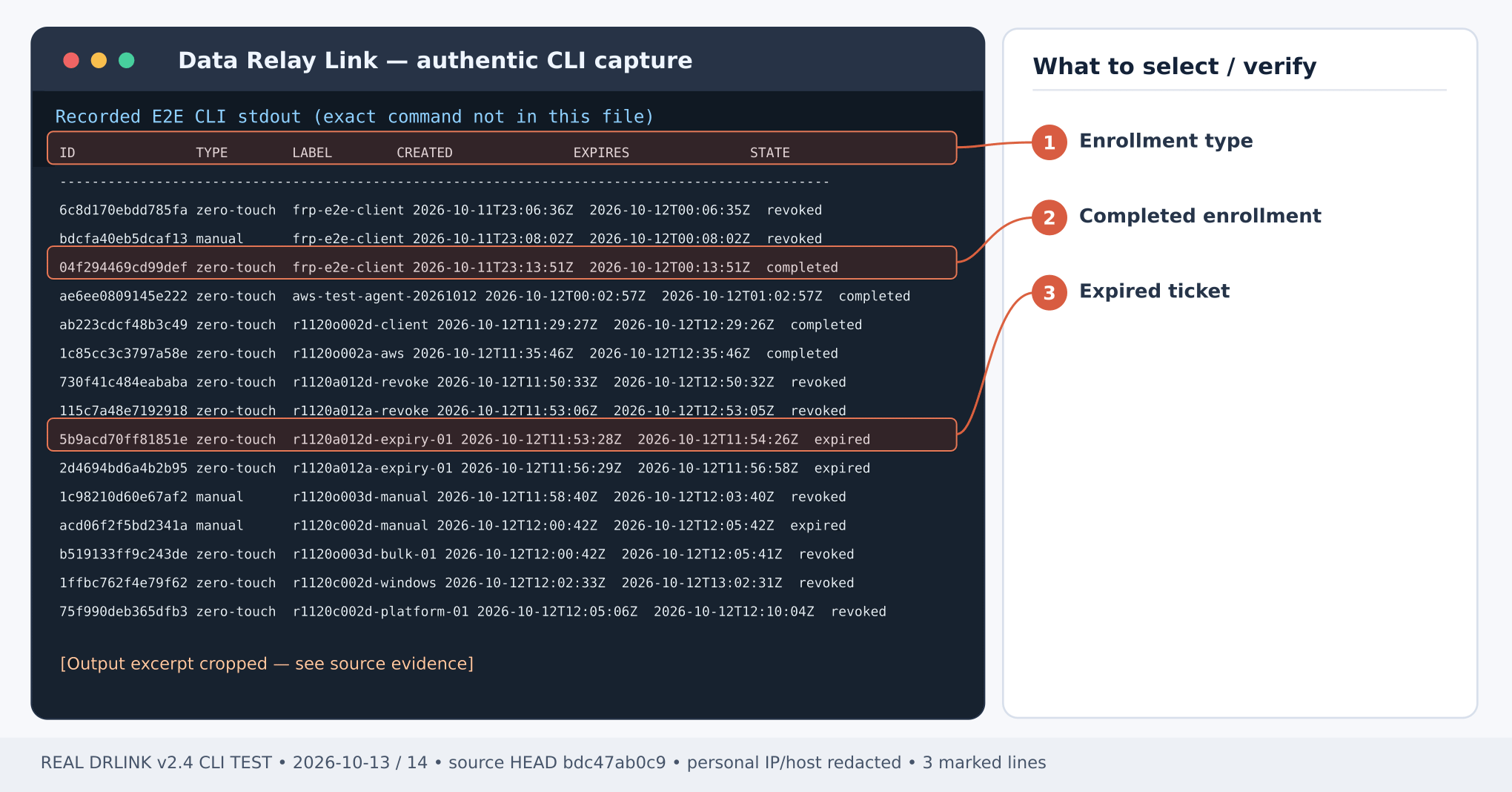
Figure 1. Real enrollment list excerpt: completed, expired and revoked states; no raw enrollment tickets displayed. CLI output example; sensitive addresses and hostnames are masked.Server REPL:
show enrollmentsset enrollment bulk
The interactive enrollment wizard supports a count or UTF-8 CSV workflow; at most 10 codes per batch and 10 active unused codes. The CSV header is exactly:
label,ssh_user,notebranch-a,operator,Branch A Linuxbranch-b,,Branch B management-only
Set TTL according to the wizard (default 1 hour, maximum 24 hours). ssh_user is optional: an empty value selects management-only enrollment. Never assume the OS account exists merely because its hint was entered.
Send the individual generated enrollment/installation command to the corresponding authorized site administrator by a secure channel. Each ticket/code is single-use, short-lived and credential-sensitive. Execute the matching generated command on the correct host; do not reuse a consumed ticket or paste an illustrative made-up URL.On each Agent Host shell after installation:
sudo drlink show statussudo drlink show agentsudo drlink system diagnostics
Expect Agent Host role, real enrollment identity and healthy control connectivity. For Windows/macOS use the supported platform’s documented CLI invocation rather than assuming the Linux sudo syntax.
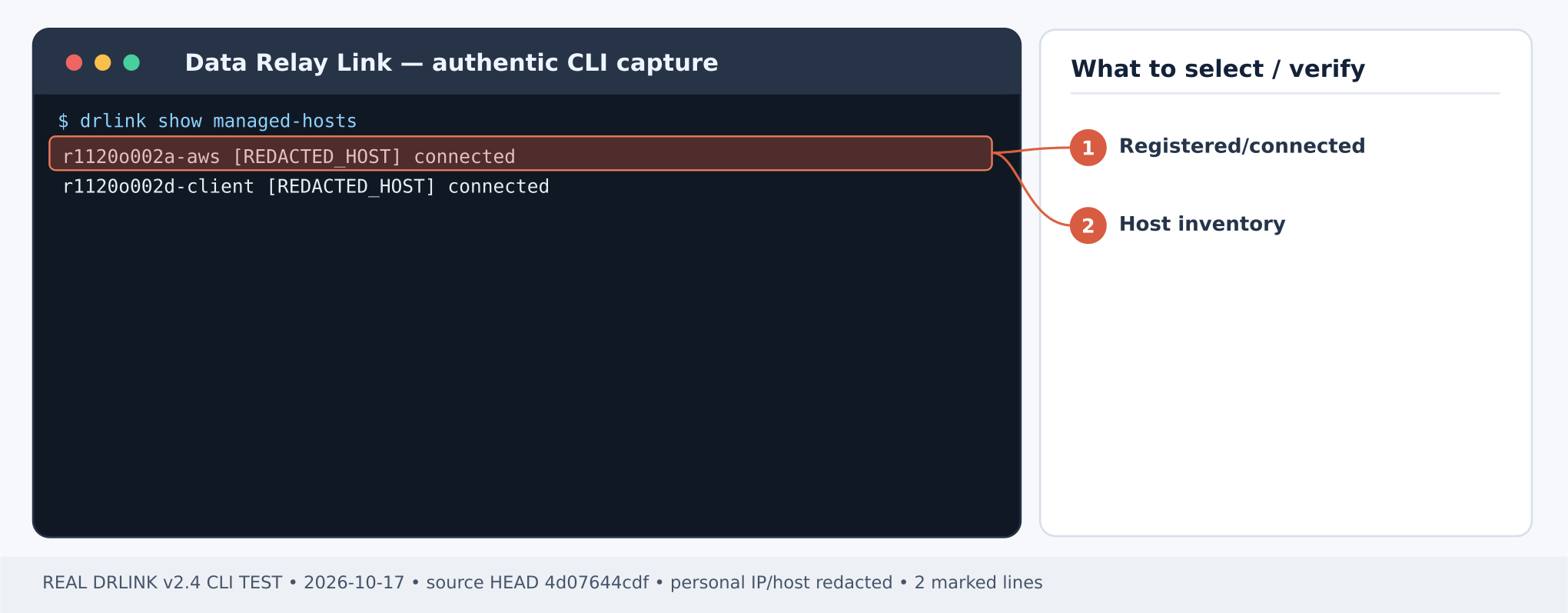
Figure 2. Actual Server Managed Host inventory: confirm registered host rows and connected status. CLI output example; sensitive addresses and hostnames are masked.Server REPL:
show managed-hostsshow managed-host branch-ashow managed-host branch-bshow enrollments
Resolve any actual assigned Managed Host names/immutable IDs before proceeding; enrollment labels need not be accepted as privileged identity selectors automatically. Reissuance requires a new enrollment credential; reinstalling from an already consumed code is not a recovery mechanism.
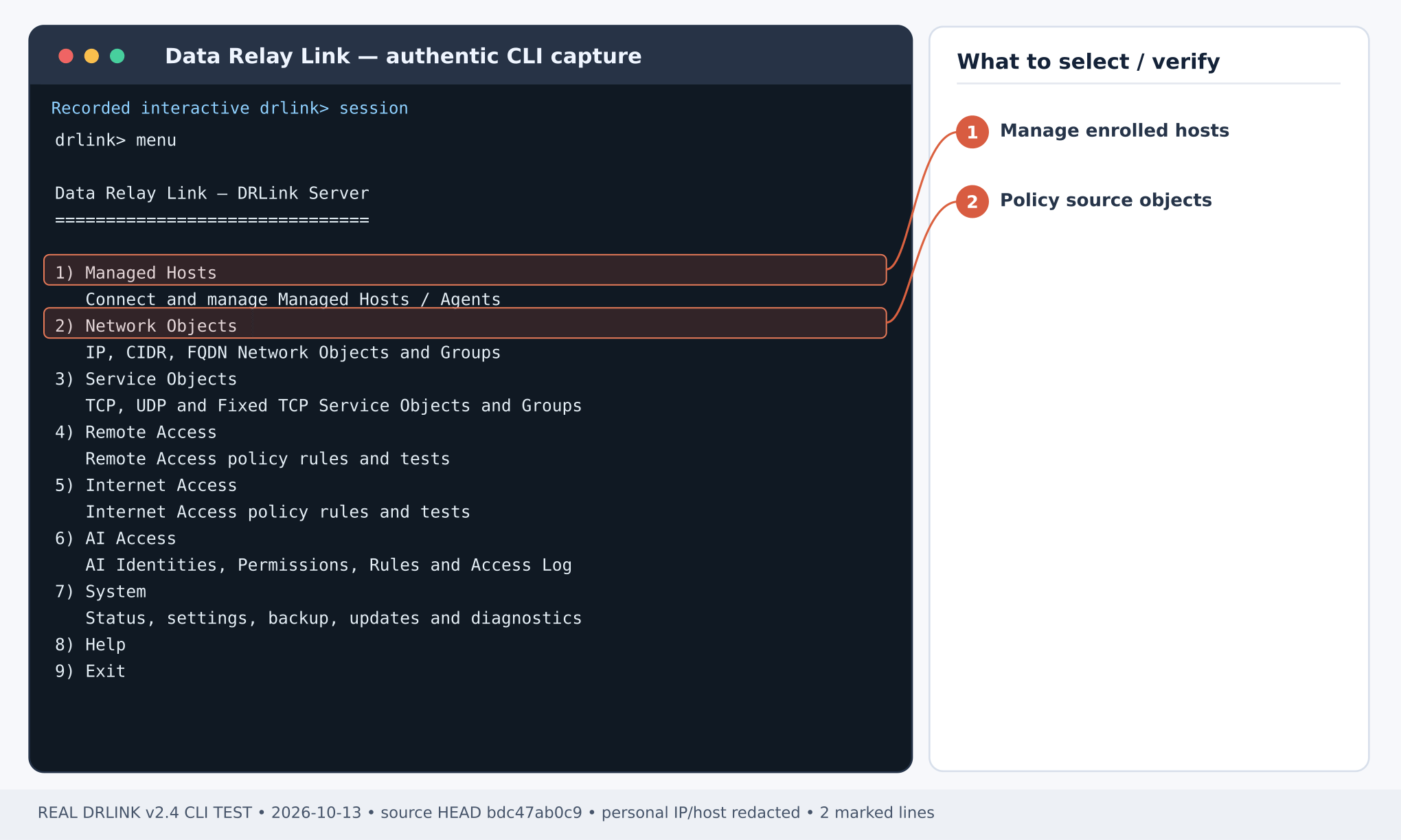
Figure 3. Real Server CLI menu: choose 1 Managed Hosts for registered hosts and inventory operations. Actual CLI output example.Server REPL:
set managed-host-group branchesset managed-host branch-a group branchesset managed-host branch-b group branchesshow managed-host-groupsshow managed-host-group branches
A Managed Host Group organizes registered host inventory. It is not a Network Group used as an access-policy selector. Membership alone never creates Remote Services, broadens Remote Access, or rewrites clients.
Check that both actual hosts appear in the group, their immutable Managed Host identities are preserved and no unintended Remote Service was automatically published. If enrollment fails, inspect show enrollments, expiration/revocation state and Agent system diagnostics; do not log or disclose secret ticket material. To adjust only metadata, use unset managed-host branch-b group branches. Deleting a Managed Host is a separate irreversible trust/endpoint retirement and requires explicit review.
The UTF-8 CSV header is label,ssh_user,note. A blank ssh_user means management-only enrollment. Zero-Touch can use a verified numeric-IP/private-CA compact launcher without DNS; failed prerequisites must not issue a ticket. Managed Host Group membership is inventory metadata, separate from Network Group policy membership.Current CLI inventory · MCP compatibility
The CSV row branch-a,operator,... automatically configures SSH/22 and its public endpoint. branch-b,,... is management-only and publishes no SSH. Inspect show remote-services on each Agent; do not recreate branch-a SSH manually. A blank ssh_user in bulk has different semantics from a blank username in single-host SSH only.
Last modified on October 29, 2026
{"docsConfig":{"theme":"mint","$schema":"https://mintlify.com/docs.json","name":"DataRelay Link","description":"Lightweight secure connectivity for isolated and restricted networks with controlled remote access and agentless outbound egress.","colors":{"primary":"#C2410C","light":"#FB923C","dark":"#C75A00"},"logo":{"light":"https://mintcdn.com/data-relay/QdSvVfPZ7NEJSOWl/logo/light.svg?fit=max\u0026auto=format\u0026n=QdSvVfPZ7NEJSOWl\u0026q=85\u0026s=888463e35ab49f73f9b174030b3263d6","dark":"https://mintcdn.com/data-relay/QdSvVfPZ7NEJSOWl/logo/dark.svg?fit=max\u0026auto=format\u0026n=QdSvVfPZ7NEJSOWl\u0026q=85\u0026s=78944f5be2786c960ab6daaaf7ca870b","href":"https://link.datarelay.run"},"favicon":"https://mintcdn.com/data-relay/QdSvVfPZ7NEJSOWl/favicon.svg?fit=max\u0026auto=format\u0026n=QdSvVfPZ7NEJSOWl\u0026q=85\u0026s=d6f1dea7850d21b0c157e4be3317c226","appearance":{"default":"system","strict":false},"navbar":{"links":[{"href":"https://datarelay.run/","label":"DataRelay"},{"href":"https://link.datarelay.run/","label":"Link"},{"href":"https://control.datarelay.run/","label":"Control"},{"href":"https://grant.datarelay.run/","label":"Grant"},{"href":"https://engineering.datarelay.run/","label":"Engineering"},{"href":"https://github.com/datarelay-labs/datarelay-link","type":"github"}]},"search":{"prompt":"Search DataRelay Link docs..."},"seo":{"metatags":{"canonical":"https://link.datarelay.run"},"indexing":"navigable"},"metadata":{"timestamp":true},"styling":{"latex":false},"navigation":{"languages":[{"language":"en","href":""},{"language":"ko","href":"ko"}]}},"deployment":{"deploymentMetadataValue":{"subdomain":"data-relay","hasAudioNarration":false,"actualSubdomain":"data-relay","customDomains":["link.datarelay.run"],"gitSource":{"type":"github","owner":"datarelay-labs","repo":"datarelay-link-docs","deployBranch":"main","contentDirectory":"","isPrivate":false,"mountPath":"","label":""},"chroma":{"latestBuiltDeploymentHistoryId":"6ae2b51eefa5e7bcbb87bc8e","collectionId":"a1f69361-66ae-435c-96ea-5f84e3b497ae","liveDeploymentHistoryId":"6ae2b51eefa5e7bcbb87bc8e","schemaVersion":"v3"},"entitlements":{"AI_CHAT":{"status":"DISABLED"}},"buildId":"6ae2b51eefa5e7bcbb87bc8e","clientVersion":"0.0.4044","searchFilterCounts":[{"language":"en","tag":"Practical Use Cases","count":13},{"language":"ko","tag":"실습: 활용 사례","count":13},{"language":"en","tag":"Getting Started","count":11},{"language":"ko","tag":"시작하기","count":10},{"language":"en","tag":"Security \u0026 Reference","count":9},{"language":"ko","tag":"보안 \u0026 참고","count":8},{"language":"en","tag":"Operations","count":7},{"language":"ko","tag":"운영 \u0026 문제 해결","count":7},{"language":"en","tag":"Remote Services \u0026 Access","count":5},{"language":"ko","tag":"Remote Service \u0026 Access","count":5},{"language":"en","tag":"AI Access","count":4},{"language":"ko","tag":"AI Access","count":4},{"language":"en","tag":"Deployment","count":3},{"language":"en","tag":"CLI \u0026 Configuration","count":3},{"language":"en","tag":"Managed Hosts \u0026 Objects","count":3},{"language":"ko","tag":"배포","count":3},{"language":"ko","tag":"CLI \u0026 Configuration","count":3},{"language":"ko","tag":"Managed Host \u0026 Object","count":3},{"language":"en","tag":"Internet Access","count":1},{"language":"ko","tag":"Internet Access","count":1}]},"assistantConfig":{"enableAskAiButton":false,"enableStarterQuestions":false,"enableContextualStarterQuestions":false,"enableAskAiSearchBar":true},"basePath":"","hasChatPermissions":false,"hasWebMcpPermissions":false,"toggles":[{"name":"kill-isr","enabled":true,"variant":{"name":"disabled","enabled":false,"feature_enabled":true},"impressionData":false},{"name":"agent-mintlify-slack","enabled":true,"variant":{"name":"disabled","enabled":false,"feature_enabled":true},"impressionData":false},{"name":"agent-integrations-settings","enabled":true,"variant":{"name":"disabled","enabled":false,"feature_enabled":true},"impressionData":false},{"name":"automations-pr-grouping","enabled":true,"variant":{"name":"disabled","enabled":false,"feature_enabled":true},"impressionData":false},{"name":"custom-prefix","enabled":true,"variant":{"name":"disabled","enabled":false,"feature_enabled":true},"impressionData":false},{"name":"analytics-v7","enabled":true,"variant":{"name":"disabled","enabled":false,"feature_enabled":true},"impressionData":false},{"name":"user-flows-analytics","enabled":true,"variant":{"name":"disabled","enabled":false,"feature_enabled":true},"impressionData":false},{"name":"no-publish-flow","enabled":true,"variant":{"name":"disabled","enabled":false,"feature_enabled":true},"impressionData":false},{"name":"workos-onboarding","enabled":true,"variant":{"name":"disabled","enabled":false,"feature_enabled":true},"impressionData":false},{"name":"llms-txt-v2","enabled":true,"variant":{"name":"disabled","enabled":false,"feature_enabled":true},"impressionData":false},{"name":"snapshot-serving-live","enabled":true,"variant":{"name":"disabled","enabled":false,"feature_enabled":true},"impressionData":false},{"name":"stripTemperatureMiddleware","enabled":true,"variant":{"name":"disabled","enabled":false,"feature_enabled":true},"impressionData":false},{"name":"support-platform-pylon-zendesk","enabled":true,"variant":{"name":"disabled","enabled":false,"feature_enabled":true},"impressionData":false},{"name":"snapshot-serving","enabled":true,"variant":{"name":"disabled","enabled":false,"feature_enabled":true},"impressionData":false},{"name":"instant-rollback","enabled":true,"variant":{"name":"disabled","enabled":false,"feature_enabled":true},"impressionData":false},{"name":"granular-notifications-server","enabled":true,"variant":{"name":"disabled","enabled":false,"feature_enabled":true},"impressionData":false},{"name":"granular-notifications","enabled":true,"variant":{"name":"disabled","enabled":false,"feature_enabled":true},"impressionData":false},{"name":"automations-fable","enabled":true,"variant":{"name":"disabled","enabled":false,"feature_enabled":true},"impressionData":false},{"name":"fixed-ai-action-pricing","enabled":true,"variant":{"name":"disabled","enabled":false,"feature_enabled":true},"impressionData":false},{"name":"automation-resolve-merge-conflict","enabled":true,"variant":{"name":"disabled","enabled":false,"feature_enabled":true},"impressionData":false},{"name":"scoped-publishing","enabled":true,"variant":{"name":"disabled","enabled":false,"feature_enabled":true},"impressionData":false},{"name":"mintql","enabled":true,"variant":{"name":"disabled","enabled":false,"feature_enabled":true},"impressionData":false},{"name":"page-level-analytics","enabled":true,"variant":{"name":"disabled","enabled":false,"feature_enabled":true},"impressionData":false},{"name":"editor-version-history-v2","enabled":true,"variant":{"name":"disabled","enabled":false,"feature_enabled":true},"impressionData":false},{"name":"billing-page-v2","enabled":true,"variant":{"name":"disabled","enabled":false,"feature_enabled":true},"impressionData":false},{"name":"full-page-search","enabled":true,"variant":{"name":"disabled","enabled":false,"feature_enabled":true},"impressionData":false},{"name":"workspace-projects","enabled":true,"variant":{"name":"disabled","enabled":false,"feature_enabled":true},"impressionData":false},{"name":"assistant-v5","enabled":true,"variant":{"name":"disabled","enabled":false,"feature_enabled":true},"impressionData":false},{"name":"byok-sep-25","enabled":true,"variant":{"name":"disabled","enabled":false,"feature_enabled":true},"impressionData":false},{"name":"fork-pr-previews","enabled":true,"variant":{"name":"disabled","enabled":false,"feature_enabled":true},"impressionData":false},{"name":"revalidation-jwt","enabled":true,"variant":{"name":"disabled","enabled":false,"feature_enabled":true},"impressionData":false},{"name":"vite-origin","enabled":true,"variant":{"name":"disabled","enabled":false,"feature_enabled":true},"impressionData":false},{"name":"billing-updated-9-15","enabled":true,"variant":{"name":"disabled","enabled":false,"feature_enabled":true},"impressionData":false},{"name":"workos-sso-scim","enabled":true,"variant":{"name":"disabled","enabled":false,"feature_enabled":true},"impressionData":false},{"name":"hobby-abuse-scan","enabled":true,"variant":{"name":"disabled","enabled":false,"feature_enabled":true},"impressionData":false},{"name":"dashboard-inbox","enabled":true,"variant":{"name":"disabled","enabled":false,"feature_enabled":true},"impressionData":false},{"name":"workos-signup","enabled":true,"variant":{"name":"disabled","enabled":false,"feature_enabled":true},"impressionData":false},{"name":"turbopuffer-dual-write","enabled":true,"variant":{"name":"disabled","enabled":false,"feature_enabled":true},"impressionData":false},{"name":"workos-enabled","enabled":true,"variant":{"name":"disabled","enabled":false,"feature_enabled":true},"impressionData":false},{"name":"approve-review-flow","enabled":true,"variant":{"name":"disabled","enabled":false,"feature_enabled":true},"impressionData":false},{"name":"sso-setup-deadline-banner","enabled":true,"variant":{"name":"disabled","enabled":false,"feature_enabled":true},"impressionData":false}],"googleFontsInlined":false},"customCss":[{"filePath":"style.css","content":":root{--dr-brand:#C2410C;--dr-brand-hover:#9A3412;--dr-brand-soft:#FFF7ED;--dr-product-accent:#0369A1;--dr-bg:#FFFFFF;--dr-surface:#FFFFFF;--dr-surface-subtle:#FAFAF9;--dr-ink:#1C1917;--dr-muted:#57534E;--dr-border:#E7E5E4;--dr-border-strong:#D6D3D1;--dr-shadow-sm:0 1px 2px rgb(28 25 23 / 0.05);--dr-shadow-md:0 14px 34px rgb(28 25 23 / 0.09);--dr-radius-sm:10px;--dr-radius-md:16px;--dr-radius-lg:24px}.dark{--dr-brand:#FB923C;--dr-brand-hover:#FDBA74;--dr-brand-soft:#2A160D;--dr-product-accent:#38BDF8;--dr-bg:#0C0A09;--dr-surface:#141210;--dr-surface-subtle:#1C1917;--dr-ink:#FAFAF9;--dr-muted:#C7C2BC;--dr-border:#292524;--dr-border-strong:#44403C;--dr-shadow-sm:0 1px 2px rgb(0 0 0 / 0.25);--dr-shadow-md:0 18px 42px rgb(0 0 0 / 0.32)}html{scroll-behavior:smooth}body{text-rendering:optimizeLegibility;-webkit-font-smoothing:antialiased}#navbar-transition{background:rgb(255 255 255/.9)!important;border-color:rgb(120 113 108/.16)!important;backdrop-filter:blur(16px) saturate(150%);-webkit-backdrop-filter:blur(16px) saturate(150%)}.dark #navbar-transition{background:rgb(12 10 9/.88)!important;border-color:rgb(231 229 228/.1)!important}.nav-logo{height:2rem!important}body,main h1,main h2{color:var(--dr-ink)}main h1{letter-spacing:-.038em;font-weight:760;line-height:1.08}main h2{letter-spacing:-.025em;font-weight:700}main h3{letter-spacing:-.015em}main li,main p{line-height:1.72}main blockquote{border-left:3px solid var(--dr-product-accent)!important;background:var(--dr-surface-subtle);border-radius:0 var(--dr-radius-sm) var(--dr-radius-sm) 0;padding:.8rem 1rem}main pre{border:1px solid var(--dr-border)!important;border-radius:var(--dr-radius-md)!important;box-shadow:var(--dr-shadow-sm)}main table{border-color:var(--dr-border)!important;border-radius:var(--dr-radius-sm)}.dr-hero-kicker{display:inline-flex;align-items:center;gap:.5rem;margin:0 0 1rem;padding:.42rem .7rem;border:1px solid #fed7aa;border-radius:999px;background:#fff7ed;color:#9a3412;font-size:.72rem;font-weight:760;letter-spacing:.12em;text-transform:uppercase}.dark .dr-hero-kicker{border-color:#7c2d12;background:#2a160d;color:#fdba74}.dr-hero-kicker+h1{max-width:950px;margin-top:0!important;font-size:clamp(2.7rem,6vw,4.85rem)!important;line-height:.98!important;letter-spacing:-.055em!important}.dr-hero-actions{display:flex;flex-wrap:wrap;gap:.7rem;margin:1.55rem 0 1.35rem}.dr-button{display:inline-flex;min-height:2.75rem;align-items:center;justify-content:center;border-radius:.72rem;padding:.68rem 1rem;border:1px solid transparent;font-size:.9rem;font-weight:680;line-height:1;text-decoration:none!important;transition:transform 150ms ease,border-color 150ms ease,background-color 150ms ease,box-shadow 150ms ease}.dr-button:hover{transform:translateY(-1px)}.dr-button-primary{background:var(--dr-brand);color:#fff!important;box-shadow:0 6px 18px rgb(194 65 12/.2)}.dr-button-primary:hover{background:var(--dr-brand-hover)}.dark .dr-button-primary{color:#1c1917!important}.dr-button-secondary{background:var(--dr-surface);color:var(--dr-ink)!important;border-color:var(--dr-border-strong);box-shadow:var(--dr-shadow-sm)}.dr-button-secondary:hover{border-color:var(--dr-product-accent)}.dr-family-strip{display:flex;align-items:center;gap:.35rem;margin:0 0 2rem;padding:.4rem;width:fit-content;max-width:100%;overflow-x:auto;border:1px solid var(--dr-border);border-radius:.85rem;background:var(--dr-surface-subtle);scrollbar-width:none}.dr-family-strip::-webkit-scrollbar{display:none}.dr-family-strip .dr-family-current,.dr-family-strip a{display:inline-flex;align-items:center;min-height:2rem;padding:.42rem .68rem;border-radius:.56rem;white-space:nowrap;color:var(--dr-muted)!important;font-size:.78rem;font-weight:650;text-decoration:none!important}.dr-family-strip a:hover{color:var(--dr-ink)!important;background:var(--dr-surface)}.dr-family-strip .dr-family-current{color:#fff!important;background:var(--dr-product-accent);box-shadow:var(--dr-shadow-sm)}.dark .dr-family-strip .dr-family-current{color:#0c0a09!important}.card{border-color:var(--dr-border)!important;border-radius:var(--dr-radius-md)!important;background:var(--dr-surface)!important;box-shadow:var(--dr-shadow-sm);transition:transform 160ms ease,box-shadow 160ms ease,border-color 160ms ease!important}.card:hover{transform:translateY(-2px);border-color:var(--dr-product-accent)!important;box-shadow:var(--dr-shadow-md)}[data-component-part=card-title]{letter-spacing:-.012em}[data-component-part=card-icon]{color:var(--dr-product-accent)!important}.callout{border-radius:var(--dr-radius-md)!important}footer{border-top-color:var(--dr-border)!important}:where(a, button, input, select, textarea):focus-visible{outline:3px solid var(--dr-product-accent)!important;outline-offset:3px!important}@media (max-width:768px){.dr-hero-kicker+h1{font-size:clamp(2.35rem,13vw,3.55rem)!important}.dr-hero-actions{display:grid;grid-template-columns:1fr}.dr-button,.dr-family-strip{width:100%}}@media (prefers-reduced-motion:reduce){html{scroll-behavior:auto}.card,.dr-button{transition:none!important}.card:hover,.dr-button:hover{transform:none}}"}],"page":{"pagePath":"use-cases/bulk-onboarding","slug":"/use-cases/bulk-onboarding","pageMetadata":{"title":"Use case: Enroll multiple branch hosts","description":"Issue multiple one-time Agent enrollments and manage inventory without broad fleet automation.","href":"/use-cases/bulk-onboarding"},"description":{"compiledSource":"\"use strict\";\nconst {jsx: _jsx} = arguments[0];\nconst {useMDXComponents: _provideComponents} = arguments[0];\nfunction _createMdxContent(props) {\n const _components = {\n p: \"p\",\n ..._provideComponents(),\n ...props.components\n };\n return _jsx(_components.p, {\n children: \"Issue multiple one-time Agent enrollments and manage inventory without broad fleet automation.\"\n });\n}\nfunction MDXContent(props = {}) {\n const {wrapper: MDXLayout} = {\n ..._provideComponents(),\n ...props.components\n };\n return MDXLayout ? _jsx(MDXLayout, {\n ...props,\n children: _jsx(_createMdxContent, {\n ...props\n })\n }) : _createMdxContent(props);\n}\nreturn {\n default: MDXContent\n};\n","frontmatter":{},"scope":{}},"pageType":"default","mdx":{"mdxSource":{"compiledSource":"\"use strict\";const{Fragment:_Fragment,jsx:_jsx,jsxs:_jsxs}=arguments[0];const{useMDXComponents:_provideComponents}=arguments[0];function _createMdxContent(props){const _components={a:`a`,code:`code`,em:`em`,p:`p`,pre:`pre`,span:`span`,strong:`strong`,..._provideComponents(),...props.components},{CodeBlock,Heading,OptimizedImage}=_components;if(!CodeBlock)_missingMdxReference(`CodeBlock`,true);if(!Heading)_missingMdxReference(`Heading`,true);if(!OptimizedImage)_missingMdxReference(`OptimizedImage`,true);return _jsxs(_Fragment,{children:[_jsx(Heading,{level:`1`,id:`enroll-and-organize-several-remote-hosts`,children:`Enroll and organize several remote hosts`}),`\n`,_jsxs(_components.p,{children:[_jsx(_components.strong,{children:`Outcome:`}),` A small operator team enrolls two branch PCs/servers securely and collects them in one Managed Host Group without changing their service permissions or network identity.`]}),`\n`,_jsx(Heading,{level:`2`,id:`step-1-—-prepare-each-site`,children:`Step 1 — prepare each site`}),`\n`,_jsxs(_components.p,{children:[`Each destination must have outbound connectivity to the Server’s enrollment/control endpoints and permission to install the platform-specific Agent. Follow `,_jsx(_components.a,{href:`/getting-started/linux-client`,children:`Linux`}),`, `,_jsx(_components.a,{href:`/getting-started/windows-client`,children:`Windows`}),` or `,_jsx(_components.a,{href:`/getting-started/macos-client`,children:`macOS`}),` requirements before running the generated installer. The Server must already be installed from a product distribution.`]}),`\n`,_jsx(Heading,{level:`2`,id:`step-2-—-issue-a-bounded-enrollment-batch`,children:`Step 2 — issue a bounded enrollment batch`}),`\n`,_jsx(OptimizedImage,{src:`https://mintcdn.com/data-relay/RzAl7zFhuZCRSIKj/images/cli-captures/enrollment-inventory.png?fit=max\u0026auto=format\u0026n=RzAl7zFhuZCRSIKj\u0026q=85\u0026s=ff39ebcccf74d3459bf376430d61cc12`,alt:`Real Data Relay Link CLI capture — Real enrollment list excerpt: completed, expired and revoked states; no raw enrollment tickets displayed.`,\"data-og-width\":`2040`,width:`2040`,\"data-og-height\":`1068`,height:`1068`,\"data-path\":`images/cli-captures/enrollment-inventory.png`,\"data-optimize\":`true`,\"data-opv\":`3`,srcset:`https://mintcdn.com/data-relay/RzAl7zFhuZCRSIKj/images/cli-captures/enrollment-inventory.png?w=280\u0026fit=max\u0026auto=format\u0026n=RzAl7zFhuZCRSIKj\u0026q=85\u0026s=b61ab92836f31b02db4ba49973e927e5 280w, https://mintcdn.com/data-relay/RzAl7zFhuZCRSIKj/images/cli-captures/enrollment-inventory.png?w=560\u0026fit=max\u0026auto=format\u0026n=RzAl7zFhuZCRSIKj\u0026q=85\u0026s=97045e42981d1e9a57e92697aec7d4d1 560w, https://mintcdn.com/data-relay/RzAl7zFhuZCRSIKj/images/cli-captures/enrollment-inventory.png?w=840\u0026fit=max\u0026auto=format\u0026n=RzAl7zFhuZCRSIKj\u0026q=85\u0026s=33ef470a25abf1c2db367d7c475831be 840w, https://mintcdn.com/data-relay/RzAl7zFhuZCRSIKj/images/cli-captures/enrollment-inventory.png?w=1100\u0026fit=max\u0026auto=format\u0026n=RzAl7zFhuZCRSIKj\u0026q=85\u0026s=1cc33103481324aaeb85f8f82643cafe 1100w, https://mintcdn.com/data-relay/RzAl7zFhuZCRSIKj/images/cli-captures/enrollment-inventory.png?w=1650\u0026fit=max\u0026auto=format\u0026n=RzAl7zFhuZCRSIKj\u0026q=85\u0026s=ed93c4ed7eca3871d4476ba60250dc84 1650w, https://mintcdn.com/data-relay/RzAl7zFhuZCRSIKj/images/cli-captures/enrollment-inventory.png?w=2500\u0026fit=max\u0026auto=format\u0026n=RzAl7zFhuZCRSIKj\u0026q=85\u0026s=7091120947fa9297013fdbbc6352d42f 2500w`}),`\n`,_jsx(_components.p,{children:_jsx(_components.em,{children:`Figure 1. Real enrollment list excerpt: completed, expired and revoked states; no raw enrollment tickets displayed. CLI output example; sensitive addresses and hostnames are masked.`})}),`\n`,_jsx(_components.p,{children:_jsx(_components.strong,{children:`Server REPL:`})}),`\n`,_jsx(CodeBlock,{filename:``,numberOfLines:`3`,language:`text`,children:_jsx(_components.pre,{className:`shiki shiki-themes github-light-default dark-plus`,style:{backgroundColor:`#ffffff`,\"--shiki-dark-bg\":`#0B0C0E`,color:`#1f2328`,\"--shiki-dark\":`#D4D4D4`},language:`text`,children:_jsxs(_components.code,{language:`text`,numberOfLines:`3`,children:[_jsx(_components.span,{className:`line`,children:_jsx(_components.span,{children:`show enrollments`})}),`\n`,_jsx(_components.span,{className:`line`,children:_jsx(_components.span,{children:`set enrollment bulk`})}),`\n`,_jsx(_components.span,{className:`line`,children:_jsx(_components.span,{})})]})})}),`\n`,_jsxs(_components.p,{children:[`The interactive enrollment wizard supports a `,_jsx(_components.strong,{children:`count`}),` or `,_jsx(_components.strong,{children:`UTF-8 CSV`}),` workflow; at most `,_jsx(_components.strong,{children:`10 codes per batch`}),` and `,_jsx(_components.strong,{children:`10 active unused codes`}),`. The CSV header is exactly:`]}),`\n`,_jsx(CodeBlock,{filename:``,numberOfLines:`3`,language:`csv`,children:_jsx(_components.pre,{className:`shiki shiki-themes github-light-default dark-plus`,style:{backgroundColor:`#ffffff`,\"--shiki-dark-bg\":`#0B0C0E`,color:`#1f2328`,\"--shiki-dark\":`#D4D4D4`},language:`csv`,children:_jsxs(_components.code,{language:`csv`,numberOfLines:`3`,children:[_jsxs(_components.span,{className:`line`,children:[_jsx(_components.span,{style:{color:`#1F2328`,\"--shiki-dark\":`#D4D4D4`},children:`label,`}),_jsx(_components.span,{style:{color:`#CF222E`,\"--shiki-dark\":`#569CD6`},children:`ssh_user,`}),_jsx(_components.span,{style:{color:`#8250DF`,\"--shiki-dark\":`#DCDCAA`},children:`note`})]}),`\n`,_jsxs(_components.span,{className:`line`,children:[_jsx(_components.span,{style:{color:`#1F2328`,\"--shiki-dark\":`#D4D4D4`},children:`branch-a,`}),_jsx(_components.span,{style:{color:`#CF222E`,\"--shiki-dark\":`#569CD6`},children:`operator,`}),_jsx(_components.span,{style:{color:`#8250DF`,\"--shiki-dark\":`#DCDCAA`},children:`Branch A Linux`})]}),`\n`,_jsxs(_components.span,{className:`line`,children:[_jsx(_components.span,{style:{color:`#1F2328`,\"--shiki-dark\":`#D4D4D4`},children:`branch-b,`}),_jsx(_components.span,{style:{color:`#CF222E`,\"--shiki-dark\":`#569CD6`},children:`,`}),_jsx(_components.span,{style:{color:`#8250DF`,\"--shiki-dark\":`#DCDCAA`},children:`Branch B management-only`})]}),`\n`]})})}),`\n`,_jsxs(_components.p,{children:[`Set TTL according to the wizard (default `,_jsx(_components.strong,{children:`1 hour`}),`, maximum `,_jsx(_components.strong,{children:`24 hours`}),`). `,_jsx(_components.strong,{children:`ssh_user`}),` is optional: an empty value selects management-only enrollment. Never assume the OS account exists merely because its hint was entered.`]}),`\n`,_jsx(Heading,{level:`2`,id:`step-3-—-install-each-agent-once`,children:`Step 3 — install each Agent once`}),`\n`,_jsxs(_components.p,{children:[`Send the individual generated enrollment/installation command to the corresponding authorized site administrator by a secure channel. Each ticket/code is `,_jsx(_components.strong,{children:`single-use`}),`, short-lived and credential-sensitive. Execute the matching generated command on the correct host; do not reuse a consumed ticket or paste an illustrative made-up URL.`]}),`\n`,_jsxs(_components.p,{children:[`On `,_jsx(_components.strong,{children:`each Agent Host shell`}),` after installation:`]}),`\n`,_jsx(CodeBlock,{filename:``,numberOfLines:`3`,language:`shellscript`,children:_jsx(_components.pre,{className:`shiki shiki-themes github-light-default dark-plus`,style:{backgroundColor:`#ffffff`,\"--shiki-dark-bg\":`#0B0C0E`,color:`#1f2328`,\"--shiki-dark\":`#D4D4D4`},language:`shellscript`,children:_jsxs(_components.code,{language:`shellscript`,numberOfLines:`3`,children:[_jsxs(_components.span,{className:`line`,children:[_jsx(_components.span,{style:{color:`#953800`,\"--shiki-dark\":`#DCDCAA`},children:`sudo`}),_jsx(_components.span,{style:{color:`#0A3069`,\"--shiki-dark\":`#CE9178`},children:` drlink`}),_jsx(_components.span,{style:{color:`#0A3069`,\"--shiki-dark\":`#CE9178`},children:` show`}),_jsx(_components.span,{style:{color:`#0A3069`,\"--shiki-dark\":`#CE9178`},children:` status`})]}),`\n`,_jsxs(_components.span,{className:`line`,children:[_jsx(_components.span,{style:{color:`#953800`,\"--shiki-dark\":`#DCDCAA`},children:`sudo`}),_jsx(_components.span,{style:{color:`#0A3069`,\"--shiki-dark\":`#CE9178`},children:` drlink`}),_jsx(_components.span,{style:{color:`#0A3069`,\"--shiki-dark\":`#CE9178`},children:` show`}),_jsx(_components.span,{style:{color:`#0A3069`,\"--shiki-dark\":`#CE9178`},children:` agent`})]}),`\n`,_jsxs(_components.span,{className:`line`,children:[_jsx(_components.span,{style:{color:`#953800`,\"--shiki-dark\":`#DCDCAA`},children:`sudo`}),_jsx(_components.span,{style:{color:`#0A3069`,\"--shiki-dark\":`#CE9178`},children:` drlink`}),_jsx(_components.span,{style:{color:`#0A3069`,\"--shiki-dark\":`#CE9178`},children:` system`}),_jsx(_components.span,{style:{color:`#0A3069`,\"--shiki-dark\":`#CE9178`},children:` diagnostics`})]}),`\n`]})})}),`\n`,_jsxs(_components.p,{children:[`Expect `,_jsx(_components.strong,{children:`Agent Host`}),` role, real enrollment identity and healthy control connectivity. For Windows/macOS use the supported platform’s documented CLI invocation rather than assuming the Linux sudo syntax.`]}),`\n`,_jsx(Heading,{level:`2`,id:`step-4-—-verify-both-identities-on-the-server`,children:`Step 4 — verify both identities on the Server`}),`\n`,_jsx(OptimizedImage,{src:`https://mintcdn.com/data-relay/RzAl7zFhuZCRSIKj/images/cli-captures/managed-hosts.png?fit=max\u0026auto=format\u0026n=RzAl7zFhuZCRSIKj\u0026q=85\u0026s=52a58066aed6814359eb35d29021937b`,alt:`Real Data Relay Link CLI capture — Actual Server Managed Host inventory: confirm registered host rows and connected status.`,\"data-og-width\":`2040`,width:`2040`,\"data-og-height\":`797`,height:`797`,\"data-path\":`images/cli-captures/managed-hosts.png`,\"data-optimize\":`true`,\"data-opv\":`3`,srcset:`https://mintcdn.com/data-relay/RzAl7zFhuZCRSIKj/images/cli-captures/managed-hosts.png?w=280\u0026fit=max\u0026auto=format\u0026n=RzAl7zFhuZCRSIKj\u0026q=85\u0026s=031d429b1a0a97b787ea8a884dda1084 280w, https://mintcdn.com/data-relay/RzAl7zFhuZCRSIKj/images/cli-captures/managed-hosts.png?w=560\u0026fit=max\u0026auto=format\u0026n=RzAl7zFhuZCRSIKj\u0026q=85\u0026s=f5ef3a976aa30144e39122b5a3eea7aa 560w, https://mintcdn.com/data-relay/RzAl7zFhuZCRSIKj/images/cli-captures/managed-hosts.png?w=840\u0026fit=max\u0026auto=format\u0026n=RzAl7zFhuZCRSIKj\u0026q=85\u0026s=7f2862a76730ff13cb23580d8c0b5890 840w, https://mintcdn.com/data-relay/RzAl7zFhuZCRSIKj/images/cli-captures/managed-hosts.png?w=1100\u0026fit=max\u0026auto=format\u0026n=RzAl7zFhuZCRSIKj\u0026q=85\u0026s=71e43bb52ea74b461dc097e8cf3b1d27 1100w, https://mintcdn.com/data-relay/RzAl7zFhuZCRSIKj/images/cli-captures/managed-hosts.png?w=1650\u0026fit=max\u0026auto=format\u0026n=RzAl7zFhuZCRSIKj\u0026q=85\u0026s=437ca95f3c243a90c74847d4a28260b7 1650w, https://mintcdn.com/data-relay/RzAl7zFhuZCRSIKj/images/cli-captures/managed-hosts.png?w=2500\u0026fit=max\u0026auto=format\u0026n=RzAl7zFhuZCRSIKj\u0026q=85\u0026s=74e91e43ad91931c72185f0c876c7596 2500w`}),`\n`,_jsx(_components.p,{children:_jsx(_components.em,{children:`Figure 2. Actual Server Managed Host inventory: confirm registered host rows and connected status. CLI output example; sensitive addresses and hostnames are masked.`})}),`\n`,_jsx(_components.p,{children:_jsx(_components.strong,{children:`Server REPL:`})}),`\n`,_jsx(CodeBlock,{filename:``,numberOfLines:`5`,language:`text`,children:_jsx(_components.pre,{className:`shiki shiki-themes github-light-default dark-plus`,style:{backgroundColor:`#ffffff`,\"--shiki-dark-bg\":`#0B0C0E`,color:`#1f2328`,\"--shiki-dark\":`#D4D4D4`},language:`text`,children:_jsxs(_components.code,{language:`text`,numberOfLines:`5`,children:[_jsx(_components.span,{className:`line`,children:_jsx(_components.span,{children:`show managed-hosts`})}),`\n`,_jsx(_components.span,{className:`line`,children:_jsx(_components.span,{children:`show managed-host branch-a`})}),`\n`,_jsx(_components.span,{className:`line`,children:_jsx(_components.span,{children:`show managed-host branch-b`})}),`\n`,_jsx(_components.span,{className:`line`,children:_jsx(_components.span,{children:`show enrollments`})}),`\n`,_jsx(_components.span,{className:`line`,children:_jsx(_components.span,{})})]})})}),`\n`,_jsxs(_components.p,{children:[`Resolve any actual assigned Managed Host names/immutable IDs before proceeding; enrollment labels need not be accepted as privileged identity selectors automatically. Reissuance requires a `,_jsx(_components.strong,{children:`new`}),` enrollment credential; reinstalling from an already consumed code is not a recovery mechanism.`]}),`\n`,_jsx(Heading,{level:`2`,id:`step-5-—-organize-inventory`,children:`Step 5 — organize inventory`}),`\n`,_jsx(OptimizedImage,{src:`https://mintcdn.com/data-relay/RzAl7zFhuZCRSIKj/images/cli-captures/server-managed-host-menu.png?fit=max\u0026auto=format\u0026n=RzAl7zFhuZCRSIKj\u0026q=85\u0026s=686b5d4271301aa544801d7a3b3bf229`,alt:`Actual DRLink Server main CLI menu — choose 1 Managed Hosts for inventory and enrollment`,\"data-og-width\":`2040`,width:`2040`,\"data-og-height\":`1223`,height:`1223`,\"data-path\":`images/cli-captures/server-managed-host-menu.png`,\"data-optimize\":`true`,\"data-opv\":`3`,srcset:`https://mintcdn.com/data-relay/RzAl7zFhuZCRSIKj/images/cli-captures/server-managed-host-menu.png?w=280\u0026fit=max\u0026auto=format\u0026n=RzAl7zFhuZCRSIKj\u0026q=85\u0026s=0fc131ddce507c7c89fca9998527b964 280w, https://mintcdn.com/data-relay/RzAl7zFhuZCRSIKj/images/cli-captures/server-managed-host-menu.png?w=560\u0026fit=max\u0026auto=format\u0026n=RzAl7zFhuZCRSIKj\u0026q=85\u0026s=24ad57a0ff404616d866fb2cc4e00bdc 560w, https://mintcdn.com/data-relay/RzAl7zFhuZCRSIKj/images/cli-captures/server-managed-host-menu.png?w=840\u0026fit=max\u0026auto=format\u0026n=RzAl7zFhuZCRSIKj\u0026q=85\u0026s=ac60d45e6a911abd462fb24e76f6e8e7 840w, https://mintcdn.com/data-relay/RzAl7zFhuZCRSIKj/images/cli-captures/server-managed-host-menu.png?w=1100\u0026fit=max\u0026auto=format\u0026n=RzAl7zFhuZCRSIKj\u0026q=85\u0026s=c4838543cea4511a03158d12ef71d80c 1100w, https://mintcdn.com/data-relay/RzAl7zFhuZCRSIKj/images/cli-captures/server-managed-host-menu.png?w=1650\u0026fit=max\u0026auto=format\u0026n=RzAl7zFhuZCRSIKj\u0026q=85\u0026s=c5604c9a77930190888d5484496755dd 1650w, https://mintcdn.com/data-relay/RzAl7zFhuZCRSIKj/images/cli-captures/server-managed-host-menu.png?w=2500\u0026fit=max\u0026auto=format\u0026n=RzAl7zFhuZCRSIKj\u0026q=85\u0026s=a9d527f2aa60ee3e6fe1f2dd21a886b0 2500w`}),`\n`,_jsx(_components.p,{children:_jsx(_components.em,{children:`Figure 3. Real Server CLI menu: choose 1 Managed Hosts for registered hosts and inventory operations. Actual CLI output example.`})}),`\n`,_jsx(_components.p,{children:_jsx(_components.strong,{children:`Server REPL:`})}),`\n`,_jsx(CodeBlock,{filename:``,numberOfLines:`6`,language:`text`,children:_jsx(_components.pre,{className:`shiki shiki-themes github-light-default dark-plus`,style:{backgroundColor:`#ffffff`,\"--shiki-dark-bg\":`#0B0C0E`,color:`#1f2328`,\"--shiki-dark\":`#D4D4D4`},language:`text`,children:_jsxs(_components.code,{language:`text`,numberOfLines:`6`,children:[_jsx(_components.span,{className:`line`,children:_jsx(_components.span,{children:`set managed-host-group branches`})}),`\n`,_jsx(_components.span,{className:`line`,children:_jsx(_components.span,{children:`set managed-host branch-a group branches`})}),`\n`,_jsx(_components.span,{className:`line`,children:_jsx(_components.span,{children:`set managed-host branch-b group branches`})}),`\n`,_jsx(_components.span,{className:`line`,children:_jsx(_components.span,{children:`show managed-host-groups`})}),`\n`,_jsx(_components.span,{className:`line`,children:_jsx(_components.span,{children:`show managed-host-group branches`})}),`\n`,_jsx(_components.span,{className:`line`,children:_jsx(_components.span,{})})]})})}),`\n`,_jsxs(_components.p,{children:[`A `,_jsx(_components.strong,{children:`Managed Host Group`}),` organizes registered host inventory. It is `,_jsx(_components.strong,{children:`not`}),` a Network Group used as an access-policy selector. Membership alone never creates Remote Services, broadens Remote Access, or rewrites clients.`]}),`\n`,_jsx(Heading,{level:`2`,id:`verify-/-recover`,children:`Verify / recover`}),`\n`,_jsxs(_components.p,{children:[`Check that both actual hosts appear in the group, their immutable Managed Host identities are preserved and no unintended Remote Service was automatically published. If enrollment fails, inspect `,_jsx(_components.code,{children:`show enrollments`}),`, expiration/revocation state and Agent `,_jsx(_components.code,{children:`system diagnostics`}),`; do not log or disclose secret ticket material. To adjust only metadata, use `,_jsx(_components.code,{children:`unset managed-host branch-b group branches`}),`. Deleting a Managed Host is a separate irreversible trust/endpoint retirement and requires explicit review.`]}),`\n`,_jsx(Heading,{level:`2`,id:`current-behavior-check-—-2026-10-28`,children:`Current behavior check — 2026-10-28`}),`\n`,_jsx(_components.p,{children:`The UTF-8 CSV header is label,ssh_user,note. A blank ssh_user means management-only enrollment. Zero-Touch can use a verified numeric-IP/private-CA compact launcher without DNS; failed prerequisites must not issue a ticket. Managed Host Group membership is inventory metadata, separate from Network Group policy membership.`}),`\n`,_jsxs(_components.p,{children:[_jsx(_components.a,{href:`/drlink/cli-reference`,children:`Current CLI inventory`}),` · `,_jsx(_components.a,{href:`/reference/mcp-validation`,children:`MCP compatibility`})]}),`\n`,_jsx(Heading,{level:`2`,id:`automatic-service-result-in-this-example`,children:`Automatic service result in this example`}),`\n`,_jsxs(_components.p,{children:[`The CSV row `,_jsx(_components.code,{children:`branch-a,operator,...`}),` automatically configures SSH/22 and its public endpoint. `,_jsx(_components.code,{children:`branch-b,,...`}),` is management-only and publishes no SSH. Inspect `,_jsx(_components.code,{children:`show remote-services`}),` on each Agent; do not recreate branch-a SSH manually. A blank `,_jsx(_components.code,{children:`ssh_user`}),` in bulk has different semantics from a blank username in single-host SSH only.`]})]})}function MDXContent(props={}){const{wrapper:MDXLayout}={..._provideComponents(),...props.components};return MDXLayout?_jsx(MDXLayout,{...props,children:_jsx(_createMdxContent,{...props})}):_createMdxContent(props)}return{default:MDXContent};function _missingMdxReference(id,component){throw new Error(`Expected `+(component?`component`:`object`)+\" `\"+id+\"` to be defined: you likely forgot to import, pass, or provide it.\")}","frontmatter":{},"scope":{"config":{},"pageMetadata":{"title":"Use case: Enroll multiple branch hosts","description":"Issue multiple one-time Agent enrollments and manage inventory without broad fleet automation.","href":"/use-cases/bulk-onboarding"}}},"mdxSourceWithNoJs":null},"mdxExtracts":{"tableOfContents":[{"title":"Enroll and organize several remote hosts","slug":"enroll-and-organize-several-remote-hosts","depth":1,"children":[]},{"title":"Step 1 — prepare each site","slug":"step-1-—-prepare-each-site","depth":2,"children":[]},{"title":"Step 2 — issue a bounded enrollment batch","slug":"step-2-—-issue-a-bounded-enrollment-batch","depth":2,"children":[]},{"title":"Step 3 — install each Agent once","slug":"step-3-—-install-each-agent-once","depth":2,"children":[]},{"title":"Step 4 — verify both identities on the Server","slug":"step-4-—-verify-both-identities-on-the-server","depth":2,"children":[]},{"title":"Step 5 — organize inventory","slug":"step-5-—-organize-inventory","depth":2,"children":[]},{"title":"Verify / recover","slug":"verify-/-recover","depth":2,"children":[]},{"title":"Current behavior check — 2026-10-28","slug":"current-behavior-check-—-2026-10-28","depth":2,"children":[]},{"title":"Automatic service result in this example","slug":"automatic-service-result-in-this-example","depth":2,"children":[]}],"codeExamples":{}},"jsLinks":[],"subdomain":"data-relay","siteName":"DataRelay Link","title":"Use case: Enroll multiple branch hosts - DataRelay Link","navMaps":{"firstHrefInVersion":{},"firstHrefInLanguage":{"en":{"href":"/use-cases/bulk-onboarding","matchLevel":0},"ko":{"href":"/ko/use-cases/bulk-onboarding","matchLevel":1}}},"lastModified":"2026-10-29T02:38:38.020Z","gitLastModified":"2026-10-29T02:38:30.000Z","originalFileLocation":"use-cases/bulk-onboarding.mdx","locale":"en"},"headHtml":"\u003cscript data-mint-head>(function(){var d=document.documentElement,p=null;if(!p){try{p=localStorage.getItem(\"isDarkMode\")}catch(e){}if(p==='true')p='dark';else if(p==='false')p='light';if(p!=='light'\u0026\u0026p!=='dark'\u0026\u0026p!=='system')p=\"system\"}var r=p==='system'?(matchMedia(\"(prefers-color-scheme: dark)\").matches?'dark':'light'):p;d.classList.remove(r==='dark'?'light':'dark');d.classList.add(r);d.setAttribute(\"data-theme-preference\",p)})();\u003c/script>\u003cmeta data-mint-head name=\"description\" content=\"Issue multiple one-time Agent enrollments and manage inventory without broad fleet automation.\">\u003cmeta data-mint-head name=\"application-name\" content=\"DataRelay Link\">\u003cmeta data-mint-head name=\"generator\" content=\"Mintlify\">\u003clink data-mint-head rel=\"icon\" type=\"image/png\" sizes=\"192x192\" href=\"/mintlify-assets/_mintlify/favicons/data-relay/gMMMsFWCyqO9qwwH/_generated/favicon/android-chrome-192x192.png\" media=\"(prefers-color-scheme: light)\">\u003clink data-mint-head rel=\"apple-touch-icon\" type=\"image/png\" sizes=\"180x180\" href=\"/mintlify-assets/_mintlify/favicons/data-relay/gMMMsFWCyqO9qwwH/_generated/favicon/apple-touch-icon.png\">\u003clink data-mint-head rel=\"icon\" type=\"image/png\" sizes=\"16x16\" href=\"/mintlify-assets/_mintlify/favicons/data-relay/gMMMsFWCyqO9qwwH/_generated/favicon/favicon-16x16.png\" media=\"(prefers-color-scheme: light)\">\u003clink data-mint-head rel=\"icon\" type=\"image/png\" sizes=\"32x32\" href=\"/mintlify-assets/_mintlify/favicons/data-relay/gMMMsFWCyqO9qwwH/_generated/favicon/favicon-32x32.png\" media=\"(prefers-color-scheme: light)\">\u003clink data-mint-head rel=\"shortcut icon\" type=\"image/x-icon\" href=\"/mintlify-assets/_mintlify/favicons/data-relay/gMMMsFWCyqO9qwwH/_generated/favicon/favicon.ico\" media=\"(prefers-color-scheme: light)\">\u003clink data-mint-head rel=\"icon\" type=\"image/png\" sizes=\"192x192\" href=\"/mintlify-assets/_mintlify/favicons/data-relay/gMMMsFWCyqO9qwwH/_generated/favicon-dark/android-chrome-192x192.png\" media=\"(prefers-color-scheme: dark)\">\u003clink data-mint-head rel=\"icon\" type=\"image/png\" sizes=\"16x16\" href=\"/mintlify-assets/_mintlify/favicons/data-relay/gMMMsFWCyqO9qwwH/_generated/favicon-dark/favicon-16x16.png\" media=\"(prefers-color-scheme: dark)\">\u003clink data-mint-head rel=\"icon\" type=\"image/png\" sizes=\"32x32\" href=\"/mintlify-assets/_mintlify/favicons/data-relay/gMMMsFWCyqO9qwwH/_generated/favicon-dark/favicon-32x32.png\" media=\"(prefers-color-scheme: dark)\">\u003clink data-mint-head rel=\"shortcut icon\" type=\"image/x-icon\" href=\"/mintlify-assets/_mintlify/favicons/data-relay/gMMMsFWCyqO9qwwH/_generated/favicon-dark/favicon.ico\" media=\"(prefers-color-scheme: dark)\">\u003cmeta data-mint-head property=\"og:title\" content=\"Use case: Enroll multiple branch hosts - DataRelay Link\">\u003cmeta data-mint-head property=\"og:description\" content=\"Issue multiple one-time Agent enrollments and manage inventory without broad fleet automation.\">\u003cmeta data-mint-head property=\"og:site_name\" content=\"DataRelay Link\">\u003cmeta data-mint-head property=\"og:url\" content=\"https://link.datarelay.run/use-cases/bulk-onboarding\">\u003cmeta data-mint-head property=\"og:type\" content=\"website\">\u003cmeta data-mint-head property=\"og:image\" content=\"https://data-relay.mintlify.app/_mintlify/api/og/v2?division=Practical+Use+Cases\u0026amp;title=Use+case%3A+Enroll+multiple+branch+hosts\u0026amp;description=Issue+multiple+one-time+Agent+enrollments+and+manage+inventory+without+broad+fleet+automation.\u0026amp;theme=60d049ab3c70b24e2c2b6ae4\u0026amp;signature=f4c73494c656b4911becc7a12d11f9bcf966de8d6692a578cce25d552eb31552\">\u003cmeta data-mint-head property=\"og:image:width\" content=\"1200\">\u003cmeta data-mint-head property=\"og:image:height\" content=\"630\">\u003cmeta data-mint-head name=\"twitter:card\" content=\"summary_large_image\">\u003cmeta data-mint-head name=\"twitter:title\" content=\"Use case: Enroll multiple branch hosts - DataRelay Link\">\u003cmeta data-mint-head name=\"twitter:description\" content=\"Issue multiple one-time Agent enrollments and manage inventory without broad fleet automation.\">\u003cmeta data-mint-head name=\"twitter:image\" content=\"https://data-relay.mintlify.app/_mintlify/api/og/v2?division=Practical+Use+Cases\u0026amp;title=Use+case%3A+Enroll+multiple+branch+hosts\u0026amp;description=Issue+multiple+one-time+Agent+enrollments+and+manage+inventory+without+broad+fleet+automation.\u0026amp;theme=60d049ab3c70b24e2c2b6ae4\u0026amp;signature=f4c73494c656b4911becc7a12d11f9bcf966de8d6692a578cce25d552eb31552\">\u003cmeta data-mint-head name=\"twitter:image:width\" content=\"1200\">\u003cmeta data-mint-head name=\"twitter:image:height\" content=\"630\">\u003cmeta data-mint-head name=\"msapplication-config\" content=\"/mintlify-assets/_mintlify/favicons/data-relay/gMMMsFWCyqO9qwwH/_generated/favicon/browserconfig.xml\">\u003cmeta data-mint-head name=\"apple-mobile-web-app-title\" content=\"DataRelay Link\">\u003cmeta data-mint-head name=\"msapplication-TileColor\" content=\"#C2410C\">\u003clink data-mint-head rel=\"canonical\" href=\"https://link.datarelay.run/use-cases/bulk-onboarding\">\u003clink data-mint-head rel=\"alternate\" type=\"application/xml\" href=\"/sitemap.xml\">\u003clink data-mint-head rel=\"alternate\" type=\"text/markdown\" href=\"/use-cases/bulk-onboarding.md\">\u003clink data-mint-head rel=\"alternate\" hreflang=\"en\" href=\"https://link.datarelay.run/use-cases/bulk-onboarding\">\u003clink data-mint-head rel=\"alternate\" hreflang=\"ko\" href=\"https://link.datarelay.run/ko/use-cases/bulk-onboarding\">\u003clink data-mint-head rel=\"alternate\" hreflang=\"x-default\" href=\"https://link.datarelay.run/use-cases/bulk-onboarding\">\u003cscript data-mint-head type=\"application/ld+json\">{\"@context\":\"https://schema.org\",\"@graph\":[{\"@type\":\"Organization\",\"@id\":\"https://link.datarelay.run/#organization\",\"name\":\"DataRelay Link\",\"url\":\"https://link.datarelay.run\",\"logo\":{\"@type\":\"ImageObject\",\"url\":\"https://mintcdn.com/data-relay/QdSvVfPZ7NEJSOWl/logo/light.svg?fit=max\u0026auto=format\u0026n=QdSvVfPZ7NEJSOWl\u0026q=85\u0026s=888463e35ab49f73f9b174030b3263d6\"}},{\"@type\":\"WebSite\",\"@id\":\"https://link.datarelay.run#website\",\"name\":\"DataRelay Link\",\"url\":\"https://link.datarelay.run\",\"publisher\":{\"@id\":\"https://link.datarelay.run/#organization\"}},{\"@type\":\"WebPage\",\"@id\":\"https://link.datarelay.run/use-cases/bulk-onboarding#webpage\",\"url\":\"https://link.datarelay.run/use-cases/bulk-onboarding\",\"name\":\"Use case: Enroll multiple branch hosts\",\"description\":\"Issue multiple one-time Agent enrollments and manage inventory without broad fleet automation.\",\"dateModified\":\"2026-10-29T02:38:30.000Z\",\"isPartOf\":{\"@id\":\"https://link.datarelay.run#website\"},\"breadcrumb\":{\"@id\":\"https://link.datarelay.run/use-cases/bulk-onboarding#breadcrumb\"}},{\"@type\":\"BreadcrumbList\",\"@id\":\"https://link.datarelay.run/use-cases/bulk-onboarding#breadcrumb\",\"itemListElement\":[{\"@type\":\"ListItem\",\"position\":1,\"name\":\"Practical Use Cases\",\"item\":\"https://link.datarelay.run/use-cases/index\"},{\"@type\":\"ListItem\",\"position\":2,\"name\":\"Use case: Enroll multiple branch hosts\",\"item\":\"https://link.datarelay.run/use-cases/bulk-onboarding\"}]},{\"@type\":[\"Article\",\"TechArticle\"],\"@id\":\"https://link.datarelay.run/use-cases/bulk-onboarding#article\",\"headline\":\"Use case: Enroll multiple branch hosts\",\"name\":\"Use case: Enroll multiple branch hosts\",\"description\":\"Issue multiple one-time Agent enrollments and manage inventory without broad fleet automation.\",\"url\":\"https://link.datarelay.run/use-cases/bulk-onboarding\",\"mainEntityOfPage\":{\"@id\":\"https://link.datarelay.run/use-cases/bulk-onboarding#webpage\"},\"dateModified\":\"2026-10-29T02:38:30.000Z\",\"publisher\":{\"@id\":\"https://link.datarelay.run/#organization\"},\"isPartOf\":{\"@id\":\"https://link.datarelay.run#website\"}}]}\u003c/script>\u003cscript data-mint-head type=\"application/ld+json\">{\"@context\":\"https://schema.org\",\"@type\":\"WebSite\",\"name\":\"DataRelay Link\",\"creator\":{\"@type\":\"Organization\",\"name\":\"Mintlify\",\"url\":\"https://mintlify.com\"}}\u003c/script>","siteName":"DataRelay Link","nav":{"global":null,"languages":[{"language":"en","groups":[{"group":"Getting Started","icon":"rocket","pages":[{"title":"DataRelay Link","href":""},{"title":"What is DataRelay Link?","sidebarTitle":"What is DataRelay Link?","href":"/getting-started/overview"},{"title":"Concepts \u0026 Mental Model","sidebarTitle":"Concepts \u0026 Mental Model","icon":"diagram-project","href":"/getting-started/concepts"},{"title":"OCI Free Tier Server Preparation","sidebarTitle":"OCI Free Tier Server","icon":"cloud","href":"/getting-started/oci-free-tier-server"},{"title":"OCI Network and VM","sidebarTitle":"OCI Network \u0026 VM","icon":"cloud","href":"/getting-started/oci-network-vm"},{"title":"Install DataRelay Link on OCI","sidebarTitle":"Install DataRelay Link","icon":"server","href":"/getting-started/oci-drlink-install"},{"title":"Quick Start","href":"/getting-started/quickstart"},{"title":"Server Installation","href":"/getting-started/server-installation"},{"title":"Linux Agent Host","sidebarTitle":"Linux Agent Host","href":"/getting-started/linux-client"},{"title":"macOS Agent Host","sidebarTitle":"macOS Agent Host","href":"/getting-started/macos-client"},{"title":"Windows Agent Host","sidebarTitle":"Windows Agent Host","href":"/getting-started/windows-client"}]},{"group":"Practical Use Cases","icon":"list-check","pages":[{"title":"Scenario Playbooks","sidebarTitle":"Use Cases","href":"/use-cases/index"},{"title":"Use case: Remote SSH through NAT","href":"/use-cases/remote-ssh"},{"title":"Use case: One LAN gateway, multiple services","href":"/use-cases/lan-relay"},{"title":"Use case: Private HTTPS console","href":"/use-cases/private-web"},{"title":"Use case: Office-only Remote Access","href":"/use-cases/office-allowlist"},{"title":"Use case: Fixed TCP remote database","href":"/use-cases/fixed-tcp-database"},{"title":"Use case: Ubuntu APT in a restricted network","href":"/use-cases/ubuntu-updates"},{"title":"Use case: Git and HTTPS API from a restricted host","href":"/use-cases/github-egress"},{"title":"Use case: Read-only AI / MCP access","href":"/use-cases/ai-readonly"},{"title":"Use case: AI Server files, Git and jobs","description":"Reproduce file, Git, stdin, output and stop workflows from either MCP client.","href":"/use-cases/ai-server-control"},{"title":"Use case: Enroll multiple branch hosts","href":"/use-cases/bulk-onboarding"},{"title":"Use case: ConfigurationBundle safely","description":"Validate, diff, apply and export a reviewed v2.4 Server configuration change.","href":"/use-cases/configuration-bundle"},{"title":"Use case: Backup and restore","href":"/use-cases/backup-recovery"}]},{"group":"Managed Hosts \u0026 Objects","icon":"network-wired","pages":[{"title":"Managed Host Enrollment","sidebarTitle":"Managed Host Enrollment","href":"/guides/enrollment"},{"title":"Zero-Touch Enrollment","href":"/guides/zero-touch"},{"title":"Objects \u0026 Groups","sidebarTitle":"Objects \u0026 Groups","href":"/guides/groups"}]},{"group":"Remote Services \u0026 Access","icon":"arrow-right-to-bracket","pages":[{"title":"SSH","href":"/guides/ssh"},{"title":"Remote Services","sidebarTitle":"Remote Services","href":"/guides/services"},{"title":"HTTP \u0026 HTTPS","href":"/guides/http-https"},{"title":"Custom TCP \u0026 LAN Targets","href":"/guides/custom-tcp-lan"},{"title":"Remote Access","href":"/guides/remote-access"}]},{"group":"Internet Access","icon":"globe","pages":[{"title":"Internet Access","href":"/guides/internet-access"}]},{"group":"AI Access","icon":"robot","pages":[{"title":"AI Access \u0026 MCP","href":"/guides/ai-access"},{"title":"Claude \u0026 ChatGPT MCP Setup","href":"/guides/mcp-clients"},{"title":"MCP Tool Reference","href":"/reference/mcp-tools"},{"title":"MCP Compatibility","href":"/reference/mcp-validation"}]},{"group":"CLI \u0026 Configuration","icon":"terminal","pages":[{"title":"drlink Guide","href":"/drlink/overview"},{"title":"CLI Reference","href":"/drlink/cli-reference"},{"title":"ConfigurationBundle","href":"/drlink/configuration-bundle"}]},{"group":"Deployment","icon":"route","pages":[{"title":"Deployment Modes","href":"/deployment/modes"},{"title":"Firewall \u0026 NAT","href":"/deployment/firewall-nat"},{"title":"DNS \u0026 Public Hostname","href":"/deployment/dns-hostname"}]},{"group":"Operations","icon":"screwdriver-wrench","pages":[{"title":"Operations Overview","sidebarTitle":"Operations Overview","icon":"screwdriver-wrench","href":"/operations/maintenance"},{"title":"Updates","href":"/operations/updates"},{"title":"Backup \u0026 Restore","href":"/operations/backup-restore"},{"title":"Diagnostics","href":"/operations/diagnostics"},{"title":"Lifecycle Semantics","href":"/operations/lifecycle"},{"title":"Troubleshooting","href":"/troubleshooting/overview"},{"title":"Feedback","href":"/feedback/index"}]},{"group":"Security \u0026 Reference","icon":"shield-halved","pages":[{"title":"Security Overview","href":"/security/overview"},{"title":"Architecture","sidebarTitle":"Architecture","icon":"sitemap","href":"/reference/architecture"},{"title":"DataRelay Link and Managed Alternatives","sidebarTitle":"Compare Alternatives","href":"/reference/alternatives"},{"title":"Supported Platforms","href":"/reference/platforms"},{"title":"Network Ports","href":"/reference/network-ports"},{"title":"Version \u0026 Updates","href":"/reference/release-status"},{"title":"Glossary","sidebarTitle":"Glossary","icon":"book-open","href":"/reference/glossary"},{"title":"Known Limits","href":"/reference/limitations"},{"title":"License","sidebarTitle":"License","icon":"scale-balanced","href":"/reference/license"}]}]},{"language":"ko","pages":[{"title":"ko","href":"/ko/use-cases/bulk-onboarding"}]}]},"basePath":"","title":"Use case: Enroll multiple branch hosts - DataRelay Link","buildId":"dpl_DeHjVRGfFnhYQwHnfC2pjeXXv8h9","deploymentId":"dpl_DeHjVRGfFnhYQwHnfC2pjeXXv8h9","dynamics":["a74be98ba7"],"chunks":["zoom-image-lightbox-BG6oD64b.js","lightbox-handle-r17bVUz3.js"]}