Outcome: Only the office public source IP may access a specific Agent-owned SSH Remote Service. Other public sources receive a Remote Access policy denial.Example: office egress IP 203.0.113.10 → Server → Managed Host branch-a, service object ssh. Substitute real public addresses.
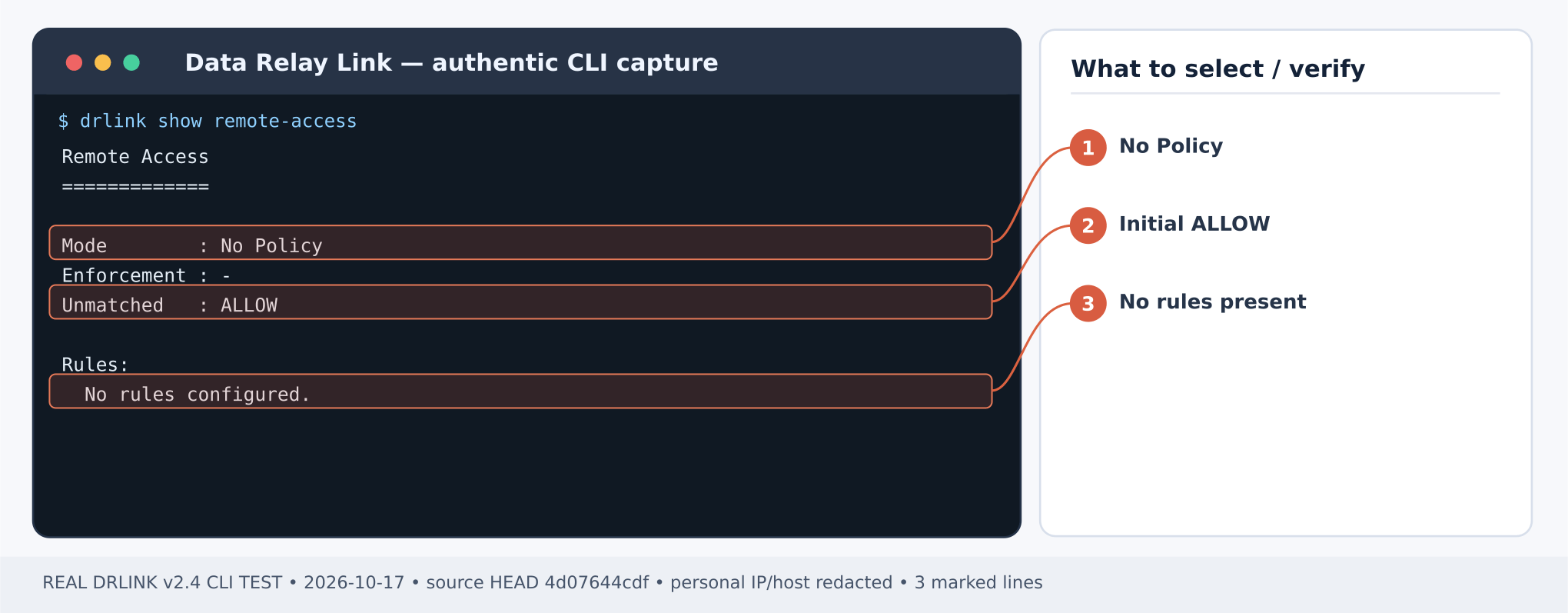
Without any configured Remote Access policy, v2.4 effective Remote Access is ALLOW. Disabling Remote Access enforcement also means ALLOW ALL. Do not use disabling enforcement as a lockdown or casually reset/delete the only WHITELIST rule.
Step 1 — identify the actual source and existing rules
Figure 1. Remote Access before any rules: No Policy, unmatched ALLOW. A new published service is not automatically source-restricted. CLI output example; sensitive addresses and hostnames are masked.Server REPL:
show managed-hostsshow service-objectsshow remote-accesssystem backup
The Server must already have branch-a enrolled with a valid SSH Service Object. Capture the current policy and the backup archive path. Determine the office’s public/NAT egress IP as seen at the Server; a workstation’s internal private IP may not be the observed source.
set network-object office-public type ip value 203.0.113.10set network-object unapproved-test type ip value 198.51.100.21show network-object office-public
Use a legitimate alternate public source for the negative test; the documentation addresses above are examples.
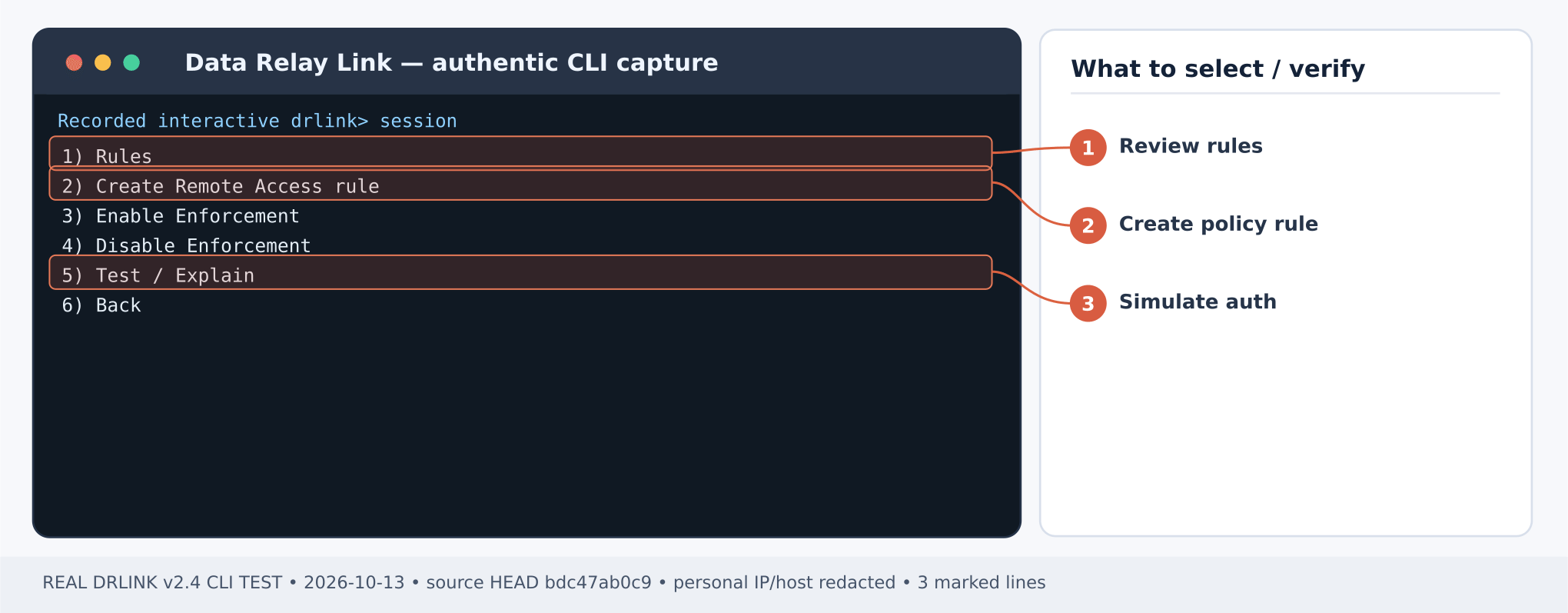
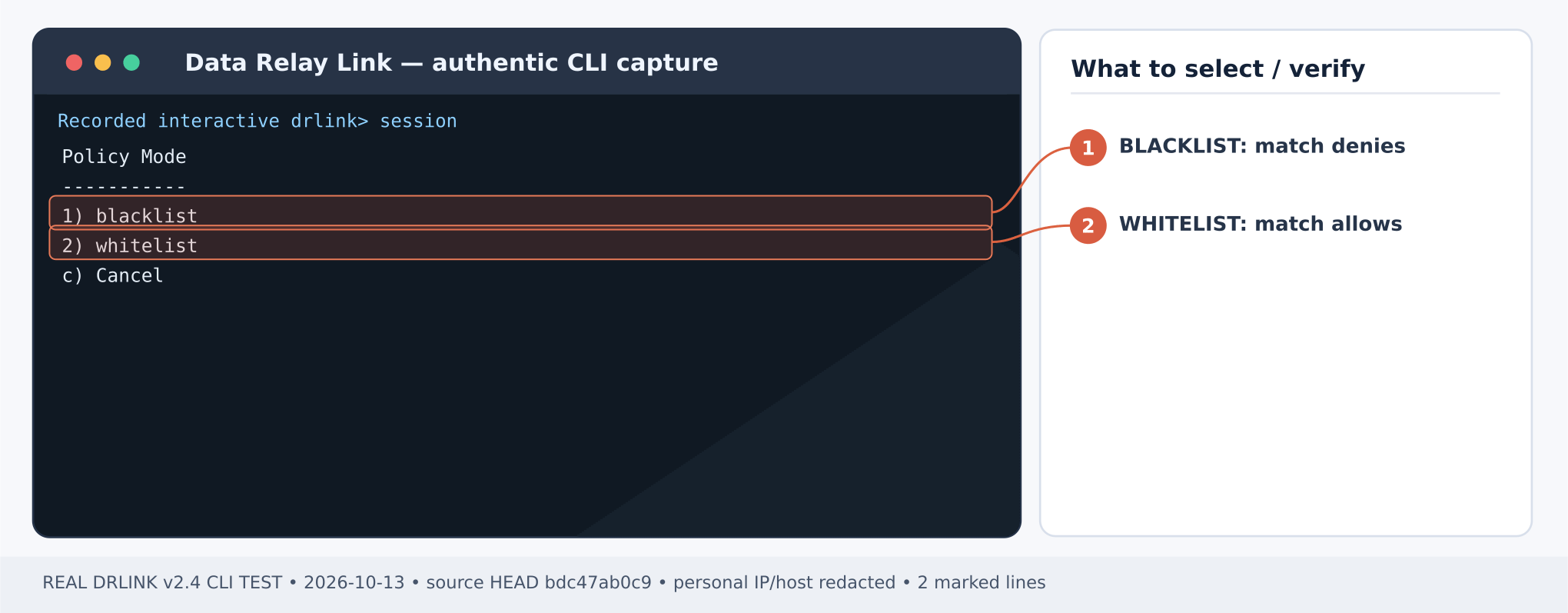
Figure 2. Remote Access guided menu: choose 2 Create rule, then 5 Test / Explain to validate. CLI output example; sensitive addresses and hostnames are masked.Figure 3. Policy Mode selection: use 2 whitelist to ALLOW matched sources; 1 blacklist has different behavior. CLI output example; sensitive addresses and hostnames are masked.Server REPL:
set remote-access office-ssh mode whitelist source office-public destination branch-a service ssh enabledset remote-access enabledshow remote-accessshow remote-access office-ssh
Review all pre-existing enabled Rules. WHITELIST entries may jointly authorize more sources than this single Rule. Rule changes may request confirmation based on the calculated security impact.
Step 4 — test policy without creating connectivity
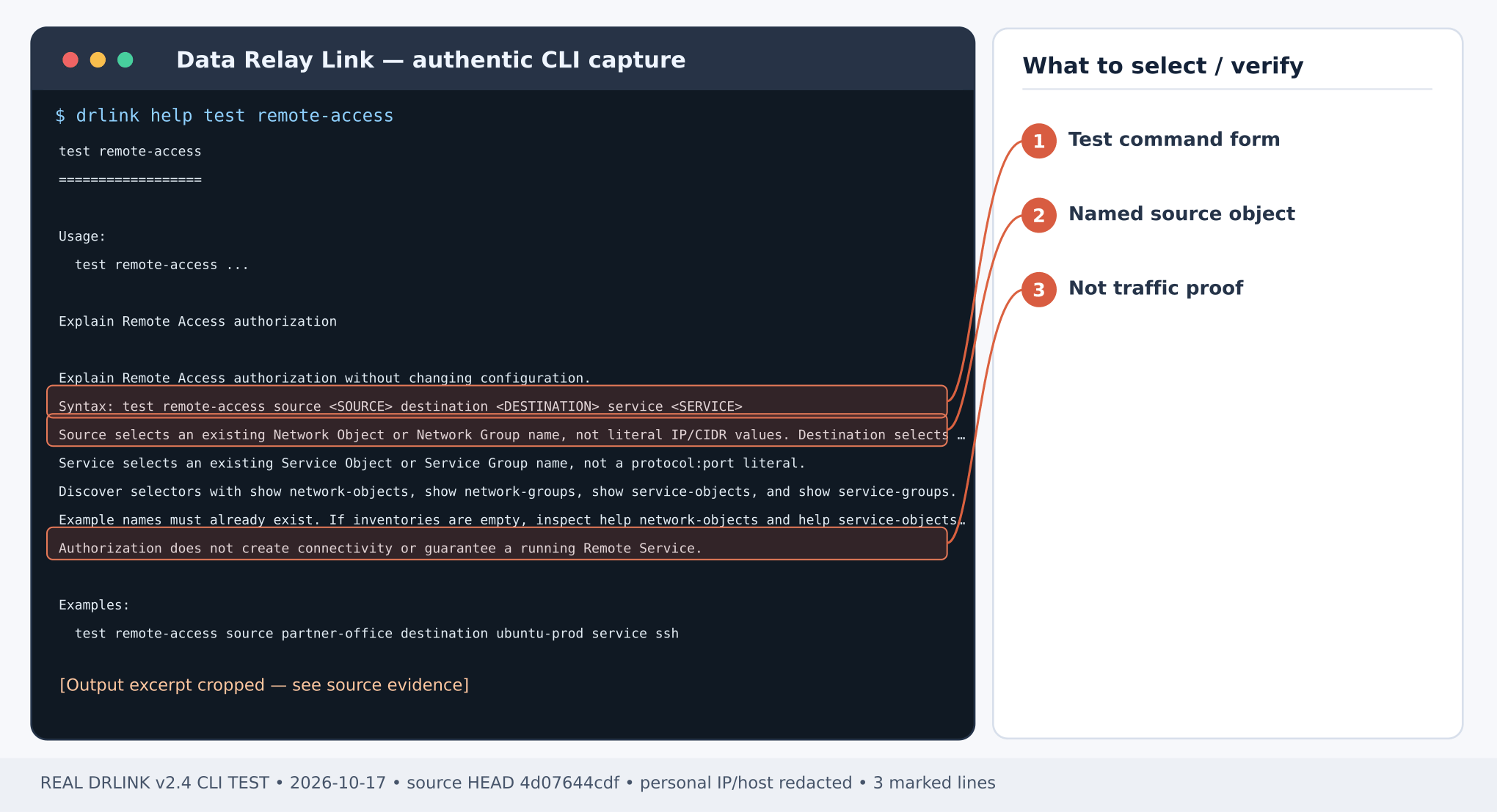
Figure 4. Real command help: test remote-access requires named source, destination and service selectors. CLI output example; sensitive addresses and hostnames are masked.Server REPL:
test remote-access source office-public destination branch-a service sshtest remote-access source unapproved-test destination branch-a service ssh
Expected: ALLOW for the office, DENY for the unapproved source if no other matching Rule exists. The test is read-only and does not prove an SSH endpoint works.
Repeat from an independently unapproved source. Confirm an explicit policy DENY / relevant audit record, not only a timeout or a separate firewall block. External firewall restrictions may additionally prevent traffic from reaching DRLink.
If the office cannot reach the service, verify the NAT-visible office IP, Service Object name, target Managed Host, tunnel health and matched Rules with test remote-access / system audit. To change access safely, edit or replace the Rule under a maintenance plan. unset remote-access policy resets to default ALLOW; set remote-access disabled is also ALLOW ALL. Do not use either to repair a failed restriction unless a deliberately approved broad-access change is intended.
Inspect every enabled Rule and referenced Group before the negative test. Remote Access disabled enforcement and full policy reset open access (ALLOW ALL/initial ALLOW); they are not safe ways to prove denial. Group policy tests require every expanded combination to allow before reporting aggregate ALLOW.Current CLI inventory · MCP compatibility
Last modified on October 28, 2026
{"docsConfig":{"theme":"mint","$schema":"https://mintlify.com/docs.json","name":"DataRelay Link","description":"Lightweight secure connectivity for isolated and restricted networks with controlled remote access and agentless outbound egress.","colors":{"primary":"#C2410C","light":"#FB923C","dark":"#C75A00"},"logo":{"light":"https://mintcdn.com/data-relay/QdSvVfPZ7NEJSOWl/logo/light.svg?fit=max\u0026auto=format\u0026n=QdSvVfPZ7NEJSOWl\u0026q=85\u0026s=888463e35ab49f73f9b174030b3263d6","dark":"https://mintcdn.com/data-relay/QdSvVfPZ7NEJSOWl/logo/dark.svg?fit=max\u0026auto=format\u0026n=QdSvVfPZ7NEJSOWl\u0026q=85\u0026s=78944f5be2786c960ab6daaaf7ca870b","href":"https://link.datarelay.run"},"favicon":"https://mintcdn.com/data-relay/QdSvVfPZ7NEJSOWl/favicon.svg?fit=max\u0026auto=format\u0026n=QdSvVfPZ7NEJSOWl\u0026q=85\u0026s=d6f1dea7850d21b0c157e4be3317c226","appearance":{"default":"system","strict":false},"navbar":{"links":[{"href":"https://datarelay.run/","label":"DataRelay"},{"href":"https://link.datarelay.run/","label":"Link"},{"href":"https://control.datarelay.run/","label":"Control"},{"href":"https://grant.datarelay.run/","label":"Grant"},{"href":"https://engineering.datarelay.run/","label":"Engineering"},{"href":"https://github.com/datarelay-labs/datarelay-link","type":"github"}]},"search":{"prompt":"Search DataRelay Link docs..."},"seo":{"metatags":{"canonical":"https://link.datarelay.run"},"indexing":"navigable"},"metadata":{"timestamp":true},"styling":{"latex":false},"navigation":{"languages":[{"language":"en","href":""},{"language":"ko","href":"ko"}]}},"deployment":{"deploymentMetadataValue":{"subdomain":"data-relay","hasAudioNarration":false,"actualSubdomain":"data-relay","customDomains":["link.datarelay.run"],"gitSource":{"type":"github","owner":"datarelay-labs","repo":"datarelay-link-docs","deployBranch":"main","contentDirectory":"","isPrivate":false,"mountPath":"","label":""},"chroma":{"latestBuiltDeploymentHistoryId":"6ae2b51eefa5e7bcbb87bc8e","collectionId":"a1f69361-66ae-435c-96ea-5f84e3b497ae","liveDeploymentHistoryId":"6ae2b51eefa5e7bcbb87bc8e","schemaVersion":"v3"},"entitlements":{"AI_CHAT":{"status":"DISABLED"}},"buildId":"6ae2b51eefa5e7bcbb87bc8e","clientVersion":"0.0.4044","searchFilterCounts":[{"language":"en","tag":"Practical Use Cases","count":13},{"language":"ko","tag":"실습: 활용 사례","count":13},{"language":"en","tag":"Getting Started","count":11},{"language":"ko","tag":"시작하기","count":10},{"language":"en","tag":"Security \u0026 Reference","count":9},{"language":"ko","tag":"보안 \u0026 참고","count":8},{"language":"en","tag":"Operations","count":7},{"language":"ko","tag":"운영 \u0026 문제 해결","count":7},{"language":"en","tag":"Remote Services \u0026 Access","count":5},{"language":"ko","tag":"Remote Service \u0026 Access","count":5},{"language":"en","tag":"AI Access","count":4},{"language":"ko","tag":"AI Access","count":4},{"language":"en","tag":"Deployment","count":3},{"language":"en","tag":"CLI \u0026 Configuration","count":3},{"language":"en","tag":"Managed Hosts \u0026 Objects","count":3},{"language":"ko","tag":"배포","count":3},{"language":"ko","tag":"CLI \u0026 Configuration","count":3},{"language":"ko","tag":"Managed Host \u0026 Object","count":3},{"language":"en","tag":"Internet Access","count":1},{"language":"ko","tag":"Internet Access","count":1}]},"assistantConfig":{"enableAskAiButton":false,"enableStarterQuestions":false,"enableContextualStarterQuestions":false,"enableAskAiSearchBar":true},"basePath":"","hasChatPermissions":false,"hasWebMcpPermissions":false,"toggles":[{"name":"kill-isr","enabled":true,"variant":{"name":"disabled","enabled":false,"feature_enabled":true},"impressionData":false},{"name":"agent-mintlify-slack","enabled":true,"variant":{"name":"disabled","enabled":false,"feature_enabled":true},"impressionData":false},{"name":"agent-integrations-settings","enabled":true,"variant":{"name":"disabled","enabled":false,"feature_enabled":true},"impressionData":false},{"name":"automations-pr-grouping","enabled":true,"variant":{"name":"disabled","enabled":false,"feature_enabled":true},"impressionData":false},{"name":"custom-prefix","enabled":true,"variant":{"name":"disabled","enabled":false,"feature_enabled":true},"impressionData":false},{"name":"analytics-v7","enabled":true,"variant":{"name":"disabled","enabled":false,"feature_enabled":true},"impressionData":false},{"name":"user-flows-analytics","enabled":true,"variant":{"name":"disabled","enabled":false,"feature_enabled":true},"impressionData":false},{"name":"no-publish-flow","enabled":true,"variant":{"name":"disabled","enabled":false,"feature_enabled":true},"impressionData":false},{"name":"workos-onboarding","enabled":true,"variant":{"name":"disabled","enabled":false,"feature_enabled":true},"impressionData":false},{"name":"llms-txt-v2","enabled":true,"variant":{"name":"disabled","enabled":false,"feature_enabled":true},"impressionData":false},{"name":"snapshot-serving-live","enabled":true,"variant":{"name":"disabled","enabled":false,"feature_enabled":true},"impressionData":false},{"name":"stripTemperatureMiddleware","enabled":true,"variant":{"name":"disabled","enabled":false,"feature_enabled":true},"impressionData":false},{"name":"support-platform-pylon-zendesk","enabled":true,"variant":{"name":"disabled","enabled":false,"feature_enabled":true},"impressionData":false},{"name":"snapshot-serving","enabled":true,"variant":{"name":"disabled","enabled":false,"feature_enabled":true},"impressionData":false},{"name":"instant-rollback","enabled":true,"variant":{"name":"disabled","enabled":false,"feature_enabled":true},"impressionData":false},{"name":"granular-notifications-server","enabled":true,"variant":{"name":"disabled","enabled":false,"feature_enabled":true},"impressionData":false},{"name":"granular-notifications","enabled":true,"variant":{"name":"disabled","enabled":false,"feature_enabled":true},"impressionData":false},{"name":"automations-fable","enabled":true,"variant":{"name":"disabled","enabled":false,"feature_enabled":true},"impressionData":false},{"name":"fixed-ai-action-pricing","enabled":true,"variant":{"name":"disabled","enabled":false,"feature_enabled":true},"impressionData":false},{"name":"automation-resolve-merge-conflict","enabled":true,"variant":{"name":"disabled","enabled":false,"feature_enabled":true},"impressionData":false},{"name":"scoped-publishing","enabled":true,"variant":{"name":"disabled","enabled":false,"feature_enabled":true},"impressionData":false},{"name":"mintql","enabled":true,"variant":{"name":"disabled","enabled":false,"feature_enabled":true},"impressionData":false},{"name":"page-level-analytics","enabled":true,"variant":{"name":"disabled","enabled":false,"feature_enabled":true},"impressionData":false},{"name":"editor-version-history-v2","enabled":true,"variant":{"name":"disabled","enabled":false,"feature_enabled":true},"impressionData":false},{"name":"billing-page-v2","enabled":true,"variant":{"name":"disabled","enabled":false,"feature_enabled":true},"impressionData":false},{"name":"full-page-search","enabled":true,"variant":{"name":"disabled","enabled":false,"feature_enabled":true},"impressionData":false},{"name":"workspace-projects","enabled":true,"variant":{"name":"disabled","enabled":false,"feature_enabled":true},"impressionData":false},{"name":"assistant-v5","enabled":true,"variant":{"name":"disabled","enabled":false,"feature_enabled":true},"impressionData":false},{"name":"byok-sep-25","enabled":true,"variant":{"name":"disabled","enabled":false,"feature_enabled":true},"impressionData":false},{"name":"fork-pr-previews","enabled":true,"variant":{"name":"disabled","enabled":false,"feature_enabled":true},"impressionData":false},{"name":"revalidation-jwt","enabled":true,"variant":{"name":"disabled","enabled":false,"feature_enabled":true},"impressionData":false},{"name":"vite-origin","enabled":true,"variant":{"name":"disabled","enabled":false,"feature_enabled":true},"impressionData":false},{"name":"billing-updated-9-15","enabled":true,"variant":{"name":"disabled","enabled":false,"feature_enabled":true},"impressionData":false},{"name":"workos-sso-scim","enabled":true,"variant":{"name":"disabled","enabled":false,"feature_enabled":true},"impressionData":false},{"name":"hobby-abuse-scan","enabled":true,"variant":{"name":"disabled","enabled":false,"feature_enabled":true},"impressionData":false},{"name":"dashboard-inbox","enabled":true,"variant":{"name":"disabled","enabled":false,"feature_enabled":true},"impressionData":false},{"name":"workos-signup","enabled":true,"variant":{"name":"disabled","enabled":false,"feature_enabled":true},"impressionData":false},{"name":"turbopuffer-dual-write","enabled":true,"variant":{"name":"disabled","enabled":false,"feature_enabled":true},"impressionData":false},{"name":"workos-enabled","enabled":true,"variant":{"name":"disabled","enabled":false,"feature_enabled":true},"impressionData":false},{"name":"approve-review-flow","enabled":true,"variant":{"name":"disabled","enabled":false,"feature_enabled":true},"impressionData":false},{"name":"sso-setup-deadline-banner","enabled":true,"variant":{"name":"disabled","enabled":false,"feature_enabled":true},"impressionData":false}],"googleFontsInlined":false},"customCss":[{"filePath":"style.css","content":":root{--dr-brand:#C2410C;--dr-brand-hover:#9A3412;--dr-brand-soft:#FFF7ED;--dr-product-accent:#0369A1;--dr-bg:#FFFFFF;--dr-surface:#FFFFFF;--dr-surface-subtle:#FAFAF9;--dr-ink:#1C1917;--dr-muted:#57534E;--dr-border:#E7E5E4;--dr-border-strong:#D6D3D1;--dr-shadow-sm:0 1px 2px rgb(28 25 23 / 0.05);--dr-shadow-md:0 14px 34px rgb(28 25 23 / 0.09);--dr-radius-sm:10px;--dr-radius-md:16px;--dr-radius-lg:24px}.dark{--dr-brand:#FB923C;--dr-brand-hover:#FDBA74;--dr-brand-soft:#2A160D;--dr-product-accent:#38BDF8;--dr-bg:#0C0A09;--dr-surface:#141210;--dr-surface-subtle:#1C1917;--dr-ink:#FAFAF9;--dr-muted:#C7C2BC;--dr-border:#292524;--dr-border-strong:#44403C;--dr-shadow-sm:0 1px 2px rgb(0 0 0 / 0.25);--dr-shadow-md:0 18px 42px rgb(0 0 0 / 0.32)}html{scroll-behavior:smooth}body{text-rendering:optimizeLegibility;-webkit-font-smoothing:antialiased}#navbar-transition{background:rgb(255 255 255/.9)!important;border-color:rgb(120 113 108/.16)!important;backdrop-filter:blur(16px) saturate(150%);-webkit-backdrop-filter:blur(16px) saturate(150%)}.dark #navbar-transition{background:rgb(12 10 9/.88)!important;border-color:rgb(231 229 228/.1)!important}.nav-logo{height:2rem!important}body,main h1,main h2{color:var(--dr-ink)}main h1{letter-spacing:-.038em;font-weight:760;line-height:1.08}main h2{letter-spacing:-.025em;font-weight:700}main h3{letter-spacing:-.015em}main li,main p{line-height:1.72}main blockquote{border-left:3px solid var(--dr-product-accent)!important;background:var(--dr-surface-subtle);border-radius:0 var(--dr-radius-sm) var(--dr-radius-sm) 0;padding:.8rem 1rem}main pre{border:1px solid var(--dr-border)!important;border-radius:var(--dr-radius-md)!important;box-shadow:var(--dr-shadow-sm)}main table{border-color:var(--dr-border)!important;border-radius:var(--dr-radius-sm)}.dr-hero-kicker{display:inline-flex;align-items:center;gap:.5rem;margin:0 0 1rem;padding:.42rem .7rem;border:1px solid #fed7aa;border-radius:999px;background:#fff7ed;color:#9a3412;font-size:.72rem;font-weight:760;letter-spacing:.12em;text-transform:uppercase}.dark .dr-hero-kicker{border-color:#7c2d12;background:#2a160d;color:#fdba74}.dr-hero-kicker+h1{max-width:950px;margin-top:0!important;font-size:clamp(2.7rem,6vw,4.85rem)!important;line-height:.98!important;letter-spacing:-.055em!important}.dr-hero-actions{display:flex;flex-wrap:wrap;gap:.7rem;margin:1.55rem 0 1.35rem}.dr-button{display:inline-flex;min-height:2.75rem;align-items:center;justify-content:center;border-radius:.72rem;padding:.68rem 1rem;border:1px solid transparent;font-size:.9rem;font-weight:680;line-height:1;text-decoration:none!important;transition:transform 150ms ease,border-color 150ms ease,background-color 150ms ease,box-shadow 150ms ease}.dr-button:hover{transform:translateY(-1px)}.dr-button-primary{background:var(--dr-brand);color:#fff!important;box-shadow:0 6px 18px rgb(194 65 12/.2)}.dr-button-primary:hover{background:var(--dr-brand-hover)}.dark .dr-button-primary{color:#1c1917!important}.dr-button-secondary{background:var(--dr-surface);color:var(--dr-ink)!important;border-color:var(--dr-border-strong);box-shadow:var(--dr-shadow-sm)}.dr-button-secondary:hover{border-color:var(--dr-product-accent)}.dr-family-strip{display:flex;align-items:center;gap:.35rem;margin:0 0 2rem;padding:.4rem;width:fit-content;max-width:100%;overflow-x:auto;border:1px solid var(--dr-border);border-radius:.85rem;background:var(--dr-surface-subtle);scrollbar-width:none}.dr-family-strip::-webkit-scrollbar{display:none}.dr-family-strip .dr-family-current,.dr-family-strip a{display:inline-flex;align-items:center;min-height:2rem;padding:.42rem .68rem;border-radius:.56rem;white-space:nowrap;color:var(--dr-muted)!important;font-size:.78rem;font-weight:650;text-decoration:none!important}.dr-family-strip a:hover{color:var(--dr-ink)!important;background:var(--dr-surface)}.dr-family-strip .dr-family-current{color:#fff!important;background:var(--dr-product-accent);box-shadow:var(--dr-shadow-sm)}.dark .dr-family-strip .dr-family-current{color:#0c0a09!important}.card{border-color:var(--dr-border)!important;border-radius:var(--dr-radius-md)!important;background:var(--dr-surface)!important;box-shadow:var(--dr-shadow-sm);transition:transform 160ms ease,box-shadow 160ms ease,border-color 160ms ease!important}.card:hover{transform:translateY(-2px);border-color:var(--dr-product-accent)!important;box-shadow:var(--dr-shadow-md)}[data-component-part=card-title]{letter-spacing:-.012em}[data-component-part=card-icon]{color:var(--dr-product-accent)!important}.callout{border-radius:var(--dr-radius-md)!important}footer{border-top-color:var(--dr-border)!important}:where(a, button, input, select, textarea):focus-visible{outline:3px solid var(--dr-product-accent)!important;outline-offset:3px!important}@media (max-width:768px){.dr-hero-kicker+h1{font-size:clamp(2.35rem,13vw,3.55rem)!important}.dr-hero-actions{display:grid;grid-template-columns:1fr}.dr-button,.dr-family-strip{width:100%}}@media (prefers-reduced-motion:reduce){html{scroll-behavior:auto}.card,.dr-button{transition:none!important}.card:hover,.dr-button:hover{transform:none}}"}],"page":{"pagePath":"use-cases/office-allowlist","slug":"/use-cases/office-allowlist","pageMetadata":{"title":"Use case: Office-only Remote Access","description":"Set a narrow inbound WHITELIST and prove both approved and denied sources.","href":"/use-cases/office-allowlist"},"description":{"compiledSource":"\"use strict\";\nconst {jsx: _jsx} = arguments[0];\nconst {useMDXComponents: _provideComponents} = arguments[0];\nfunction _createMdxContent(props) {\n const _components = {\n p: \"p\",\n ..._provideComponents(),\n ...props.components\n };\n return _jsx(_components.p, {\n children: \"Set a narrow inbound WHITELIST and prove both approved and denied sources.\"\n });\n}\nfunction MDXContent(props = {}) {\n const {wrapper: MDXLayout} = {\n ..._provideComponents(),\n ...props.components\n };\n return MDXLayout ? _jsx(MDXLayout, {\n ...props,\n children: _jsx(_createMdxContent, {\n ...props\n })\n }) : _createMdxContent(props);\n}\nreturn {\n default: MDXContent\n};\n","frontmatter":{},"scope":{}},"pageType":"default","mdx":{"mdxSource":{"compiledSource":"\"use strict\";const{Fragment:_Fragment,jsx:_jsx,jsxs:_jsxs}=arguments[0];const{useMDXComponents:_provideComponents}=arguments[0];function _createMdxContent(props){const _components={a:`a`,code:`code`,em:`em`,p:`p`,pre:`pre`,span:`span`,strong:`strong`,..._provideComponents(),...props.components},{CodeBlock,Heading,OptimizedImage,Warning}=_components;if(!CodeBlock)_missingMdxReference(`CodeBlock`,true);if(!Heading)_missingMdxReference(`Heading`,true);if(!OptimizedImage)_missingMdxReference(`OptimizedImage`,true);if(!Warning)_missingMdxReference(`Warning`,true);return _jsxs(_Fragment,{children:[_jsx(Heading,{level:`1`,id:`limit-remote-support-to-one-approved-office-ip`,children:`Limit remote support to one approved office IP`}),`\n`,_jsxs(_components.p,{children:[_jsx(_components.strong,{children:`Outcome:`}),` Only the office public source IP may access a specific Agent-owned SSH Remote Service. Other public sources receive a Remote Access policy denial.`]}),`\n`,_jsxs(_components.p,{children:[_jsx(_components.strong,{children:`Example:`}),` office egress IP 203.0.113.10 → Server → Managed Host `,_jsx(_components.strong,{children:`branch-a`}),`, service object `,_jsx(_components.strong,{children:`ssh`}),`. Substitute real public addresses.`]}),`\n`,_jsx(Warning,{children:_jsxs(_components.p,{children:[`Without any configured Remote Access policy, v2.4 effective Remote Access is `,_jsx(_components.strong,{children:`ALLOW`}),`. `,_jsx(_components.strong,{children:`Disabling`}),` Remote Access enforcement also means `,_jsx(_components.strong,{children:`ALLOW ALL`}),`. Do not use disabling enforcement as a lockdown or casually reset/delete the only WHITELIST rule.`]})}),`\n`,_jsx(Heading,{level:`2`,id:`step-1-—-identify-the-actual-source-and-existing-rules`,children:`Step 1 — identify the actual source and existing rules`}),`\n`,_jsx(OptimizedImage,{src:`https://mintcdn.com/data-relay/RzAl7zFhuZCRSIKj/images/cli-captures/server-inbound-default.png?fit=max\u0026auto=format\u0026n=RzAl7zFhuZCRSIKj\u0026q=85\u0026s=6ccc484894e73895ddf128ee290fe3a5`,alt:`Real Data Relay Link CLI capture — Remote Access before any rules: No Policy, unmatched ALLOW. A new published service is not automatically source-restricted.`,\"data-og-width\":`2040`,width:`2040`,\"data-og-height\":`797`,height:`797`,\"data-path\":`images/cli-captures/server-inbound-default.png`,\"data-optimize\":`true`,\"data-opv\":`3`,srcset:`https://mintcdn.com/data-relay/RzAl7zFhuZCRSIKj/images/cli-captures/server-inbound-default.png?w=280\u0026fit=max\u0026auto=format\u0026n=RzAl7zFhuZCRSIKj\u0026q=85\u0026s=b293453a759ecc5583f9fcbaff19ca5c 280w, https://mintcdn.com/data-relay/RzAl7zFhuZCRSIKj/images/cli-captures/server-inbound-default.png?w=560\u0026fit=max\u0026auto=format\u0026n=RzAl7zFhuZCRSIKj\u0026q=85\u0026s=214949d87a774afcc6773d8ac1bbb49e 560w, https://mintcdn.com/data-relay/RzAl7zFhuZCRSIKj/images/cli-captures/server-inbound-default.png?w=840\u0026fit=max\u0026auto=format\u0026n=RzAl7zFhuZCRSIKj\u0026q=85\u0026s=bd3d827c3af6ad82a62d56e06f614d93 840w, https://mintcdn.com/data-relay/RzAl7zFhuZCRSIKj/images/cli-captures/server-inbound-default.png?w=1100\u0026fit=max\u0026auto=format\u0026n=RzAl7zFhuZCRSIKj\u0026q=85\u0026s=a5cadd6208152ee0116bfa85a430019f 1100w, https://mintcdn.com/data-relay/RzAl7zFhuZCRSIKj/images/cli-captures/server-inbound-default.png?w=1650\u0026fit=max\u0026auto=format\u0026n=RzAl7zFhuZCRSIKj\u0026q=85\u0026s=b0b6e1cc74cef1731bc3200e8204676e 1650w, https://mintcdn.com/data-relay/RzAl7zFhuZCRSIKj/images/cli-captures/server-inbound-default.png?w=2500\u0026fit=max\u0026auto=format\u0026n=RzAl7zFhuZCRSIKj\u0026q=85\u0026s=7a425dde5ec7e7c07b27745013dbcaf2 2500w`}),`\n`,_jsx(_components.p,{children:_jsx(_components.em,{children:`Figure 1. Remote Access before any rules: No Policy, unmatched ALLOW. A new published service is not automatically source-restricted. CLI output example; sensitive addresses and hostnames are masked.`})}),`\n`,_jsx(_components.p,{children:_jsx(_components.strong,{children:`Server REPL:`})}),`\n`,_jsx(CodeBlock,{filename:``,numberOfLines:`5`,language:`text`,children:_jsx(_components.pre,{className:`shiki shiki-themes github-light-default dark-plus`,style:{backgroundColor:`#ffffff`,\"--shiki-dark-bg\":`#0B0C0E`,color:`#1f2328`,\"--shiki-dark\":`#D4D4D4`},language:`text`,children:_jsxs(_components.code,{language:`text`,numberOfLines:`5`,children:[_jsx(_components.span,{className:`line`,children:_jsx(_components.span,{children:`show managed-hosts`})}),`\n`,_jsx(_components.span,{className:`line`,children:_jsx(_components.span,{children:`show service-objects`})}),`\n`,_jsx(_components.span,{className:`line`,children:_jsx(_components.span,{children:`show remote-access`})}),`\n`,_jsx(_components.span,{className:`line`,children:_jsx(_components.span,{children:`system backup`})}),`\n`,_jsx(_components.span,{className:`line`,children:_jsx(_components.span,{})})]})})}),`\n`,_jsxs(_components.p,{children:[`The Server must already have `,_jsx(_components.strong,{children:`branch-a`}),` enrolled with a valid SSH Service Object. Capture the current policy and the backup archive path. Determine the office’s `,_jsx(_components.strong,{children:`public/NAT egress IP as seen at the Server`}),`; a workstation’s internal private IP may not be the observed source.`]}),`\n`,_jsx(Heading,{level:`2`,id:`step-2-—-create-explicit-source-selectors`,children:`Step 2 — create explicit source selectors`}),`\n`,_jsx(_components.p,{children:_jsx(_components.strong,{children:`Server REPL:`})}),`\n`,_jsx(CodeBlock,{filename:``,numberOfLines:`4`,language:`text`,children:_jsx(_components.pre,{className:`shiki shiki-themes github-light-default dark-plus`,style:{backgroundColor:`#ffffff`,\"--shiki-dark-bg\":`#0B0C0E`,color:`#1f2328`,\"--shiki-dark\":`#D4D4D4`},language:`text`,children:_jsxs(_components.code,{language:`text`,numberOfLines:`4`,children:[_jsx(_components.span,{className:`line`,children:_jsx(_components.span,{children:`set network-object office-public type ip value 203.0.113.10`})}),`\n`,_jsx(_components.span,{className:`line`,children:_jsx(_components.span,{children:`set network-object unapproved-test type ip value 198.51.100.21`})}),`\n`,_jsx(_components.span,{className:`line`,children:_jsx(_components.span,{children:`show network-object office-public`})}),`\n`,_jsx(_components.span,{className:`line`,children:_jsx(_components.span,{})})]})})}),`\n`,_jsx(_components.p,{children:`Use a legitimate alternate public source for the negative test; the documentation addresses above are examples.`}),`\n`,_jsx(Heading,{level:`2`,id:`step-3-—-create-the-whitelist`,children:`Step 3 — create the WHITELIST`}),`\n`,_jsx(OptimizedImage,{src:`https://mintcdn.com/data-relay/RzAl7zFhuZCRSIKj/images/cli-captures/remote-access-menu.png?fit=max\u0026auto=format\u0026n=RzAl7zFhuZCRSIKj\u0026q=85\u0026s=c54499e4c34413ef48fd101219bd25da`,alt:`Real Data Relay Link CLI capture — Remote Access guided menu: choose 2 Create rule, then 5 Test / Explain to validate.`,\"data-og-width\":`2040`,width:`2040`,\"data-og-height\":`797`,height:`797`,\"data-path\":`images/cli-captures/remote-access-menu.png`,\"data-optimize\":`true`,\"data-opv\":`3`,srcset:`https://mintcdn.com/data-relay/RzAl7zFhuZCRSIKj/images/cli-captures/remote-access-menu.png?w=280\u0026fit=max\u0026auto=format\u0026n=RzAl7zFhuZCRSIKj\u0026q=85\u0026s=b420eafcaed5655e5615c1598fce0976 280w, https://mintcdn.com/data-relay/RzAl7zFhuZCRSIKj/images/cli-captures/remote-access-menu.png?w=560\u0026fit=max\u0026auto=format\u0026n=RzAl7zFhuZCRSIKj\u0026q=85\u0026s=d6f21e7f2771c8b86d086d0396dc2690 560w, https://mintcdn.com/data-relay/RzAl7zFhuZCRSIKj/images/cli-captures/remote-access-menu.png?w=840\u0026fit=max\u0026auto=format\u0026n=RzAl7zFhuZCRSIKj\u0026q=85\u0026s=5aefbff941baf4cbb553284d57f8d1c2 840w, https://mintcdn.com/data-relay/RzAl7zFhuZCRSIKj/images/cli-captures/remote-access-menu.png?w=1100\u0026fit=max\u0026auto=format\u0026n=RzAl7zFhuZCRSIKj\u0026q=85\u0026s=a9a1508b921be2d9b2b8504c67580a99 1100w, https://mintcdn.com/data-relay/RzAl7zFhuZCRSIKj/images/cli-captures/remote-access-menu.png?w=1650\u0026fit=max\u0026auto=format\u0026n=RzAl7zFhuZCRSIKj\u0026q=85\u0026s=5c3436dadd3244a6325b650448eba204 1650w, https://mintcdn.com/data-relay/RzAl7zFhuZCRSIKj/images/cli-captures/remote-access-menu.png?w=2500\u0026fit=max\u0026auto=format\u0026n=RzAl7zFhuZCRSIKj\u0026q=85\u0026s=50d3e79e83b766d283e1051f9d5b277f 2500w`}),`\n`,_jsx(_components.p,{children:_jsx(_components.em,{children:`Figure 2. Remote Access guided menu: choose 2 Create rule, then 5 Test / Explain to validate. CLI output example; sensitive addresses and hostnames are masked.`})}),`\n`,_jsx(OptimizedImage,{src:`https://mintcdn.com/data-relay/RzAl7zFhuZCRSIKj/images/cli-captures/remote-access-mode.png?fit=max\u0026auto=format\u0026n=RzAl7zFhuZCRSIKj\u0026q=85\u0026s=2a6249c5614bc796d68c0efc639f0429`,alt:`Real Data Relay Link CLI capture — Policy Mode selection: use 2 whitelist to ALLOW matched sources; 1 blacklist has different behavior.`,\"data-og-width\":`2040`,width:`2040`,\"data-og-height\":`797`,height:`797`,\"data-path\":`images/cli-captures/remote-access-mode.png`,\"data-optimize\":`true`,\"data-opv\":`3`,srcset:`https://mintcdn.com/data-relay/RzAl7zFhuZCRSIKj/images/cli-captures/remote-access-mode.png?w=280\u0026fit=max\u0026auto=format\u0026n=RzAl7zFhuZCRSIKj\u0026q=85\u0026s=e75555be0d4f7aa3592ed5d91db57f6a 280w, https://mintcdn.com/data-relay/RzAl7zFhuZCRSIKj/images/cli-captures/remote-access-mode.png?w=560\u0026fit=max\u0026auto=format\u0026n=RzAl7zFhuZCRSIKj\u0026q=85\u0026s=2a7717bbc00c67e9d97e8fbda583256b 560w, https://mintcdn.com/data-relay/RzAl7zFhuZCRSIKj/images/cli-captures/remote-access-mode.png?w=840\u0026fit=max\u0026auto=format\u0026n=RzAl7zFhuZCRSIKj\u0026q=85\u0026s=d5ac5cbdfe8a5e27ec6523ac9436ede5 840w, https://mintcdn.com/data-relay/RzAl7zFhuZCRSIKj/images/cli-captures/remote-access-mode.png?w=1100\u0026fit=max\u0026auto=format\u0026n=RzAl7zFhuZCRSIKj\u0026q=85\u0026s=d3c4a9b0225210bc3c09b189f0fdffc2 1100w, https://mintcdn.com/data-relay/RzAl7zFhuZCRSIKj/images/cli-captures/remote-access-mode.png?w=1650\u0026fit=max\u0026auto=format\u0026n=RzAl7zFhuZCRSIKj\u0026q=85\u0026s=2acfe08adc5adb76b2744929a1c54113 1650w, https://mintcdn.com/data-relay/RzAl7zFhuZCRSIKj/images/cli-captures/remote-access-mode.png?w=2500\u0026fit=max\u0026auto=format\u0026n=RzAl7zFhuZCRSIKj\u0026q=85\u0026s=fb9cd1d1db9af33a1713bfe0a06f6e87 2500w`}),`\n`,_jsx(_components.p,{children:_jsx(_components.em,{children:`Figure 3. Policy Mode selection: use 2 whitelist to ALLOW matched sources; 1 blacklist has different behavior. CLI output example; sensitive addresses and hostnames are masked.`})}),`\n`,_jsx(_components.p,{children:_jsx(_components.strong,{children:`Server REPL:`})}),`\n`,_jsx(CodeBlock,{filename:``,numberOfLines:`5`,language:`text`,children:_jsx(_components.pre,{className:`shiki shiki-themes github-light-default dark-plus`,style:{backgroundColor:`#ffffff`,\"--shiki-dark-bg\":`#0B0C0E`,color:`#1f2328`,\"--shiki-dark\":`#D4D4D4`},language:`text`,children:_jsxs(_components.code,{language:`text`,numberOfLines:`5`,children:[_jsx(_components.span,{className:`line`,children:_jsx(_components.span,{children:`set remote-access office-ssh mode whitelist source office-public destination branch-a service ssh enabled`})}),`\n`,_jsx(_components.span,{className:`line`,children:_jsx(_components.span,{children:`set remote-access enabled`})}),`\n`,_jsx(_components.span,{className:`line`,children:_jsx(_components.span,{children:`show remote-access`})}),`\n`,_jsx(_components.span,{className:`line`,children:_jsx(_components.span,{children:`show remote-access office-ssh`})}),`\n`,_jsx(_components.span,{className:`line`,children:_jsx(_components.span,{})})]})})}),`\n`,_jsx(_components.p,{children:`Review all pre-existing enabled Rules. WHITELIST entries may jointly authorize more sources than this single Rule. Rule changes may request confirmation based on the calculated security impact.`}),`\n`,_jsx(Heading,{level:`2`,id:`step-4-—-test-policy-without-creating-connectivity`,children:`Step 4 — test policy without creating connectivity`}),`\n`,_jsx(OptimizedImage,{src:`https://mintcdn.com/data-relay/RzAl7zFhuZCRSIKj/images/cli-captures/remote-test-syntax.png?fit=max\u0026auto=format\u0026n=RzAl7zFhuZCRSIKj\u0026q=85\u0026s=942deb416fa251df5dc7f38efdeede47`,alt:`Real Data Relay Link CLI capture — Real command help: test remote-access requires named source, destination and service selectors.`,\"data-og-width\":`2040`,width:`2040`,\"data-og-height\":`1107`,height:`1107`,\"data-path\":`images/cli-captures/remote-test-syntax.png`,\"data-optimize\":`true`,\"data-opv\":`3`,srcset:`https://mintcdn.com/data-relay/RzAl7zFhuZCRSIKj/images/cli-captures/remote-test-syntax.png?w=280\u0026fit=max\u0026auto=format\u0026n=RzAl7zFhuZCRSIKj\u0026q=85\u0026s=9b2ebc52b7ebf19916c29228d3a6075b 280w, https://mintcdn.com/data-relay/RzAl7zFhuZCRSIKj/images/cli-captures/remote-test-syntax.png?w=560\u0026fit=max\u0026auto=format\u0026n=RzAl7zFhuZCRSIKj\u0026q=85\u0026s=7b8fb512d0812305edd7c1e3ff03bf81 560w, https://mintcdn.com/data-relay/RzAl7zFhuZCRSIKj/images/cli-captures/remote-test-syntax.png?w=840\u0026fit=max\u0026auto=format\u0026n=RzAl7zFhuZCRSIKj\u0026q=85\u0026s=7bb35bf53599362869c0607c1dad4017 840w, https://mintcdn.com/data-relay/RzAl7zFhuZCRSIKj/images/cli-captures/remote-test-syntax.png?w=1100\u0026fit=max\u0026auto=format\u0026n=RzAl7zFhuZCRSIKj\u0026q=85\u0026s=a5cabfcee1dada7db87a28ac9f8f1e5f 1100w, https://mintcdn.com/data-relay/RzAl7zFhuZCRSIKj/images/cli-captures/remote-test-syntax.png?w=1650\u0026fit=max\u0026auto=format\u0026n=RzAl7zFhuZCRSIKj\u0026q=85\u0026s=3d9c2fdab91d0836c54bdff295acd8cb 1650w, https://mintcdn.com/data-relay/RzAl7zFhuZCRSIKj/images/cli-captures/remote-test-syntax.png?w=2500\u0026fit=max\u0026auto=format\u0026n=RzAl7zFhuZCRSIKj\u0026q=85\u0026s=d321a105d0867526aa189b7abc112b94 2500w`}),`\n`,_jsx(_components.p,{children:_jsx(_components.em,{children:`Figure 4. Real command help: test remote-access requires named source, destination and service selectors. CLI output example; sensitive addresses and hostnames are masked.`})}),`\n`,_jsx(_components.p,{children:_jsx(_components.strong,{children:`Server REPL:`})}),`\n`,_jsx(CodeBlock,{filename:``,numberOfLines:`3`,language:`text`,children:_jsx(_components.pre,{className:`shiki shiki-themes github-light-default dark-plus`,style:{backgroundColor:`#ffffff`,\"--shiki-dark-bg\":`#0B0C0E`,color:`#1f2328`,\"--shiki-dark\":`#D4D4D4`},language:`text`,children:_jsxs(_components.code,{language:`text`,numberOfLines:`3`,children:[_jsx(_components.span,{className:`line`,children:_jsx(_components.span,{children:`test remote-access source office-public destination branch-a service ssh`})}),`\n`,_jsx(_components.span,{className:`line`,children:_jsx(_components.span,{children:`test remote-access source unapproved-test destination branch-a service ssh`})}),`\n`,_jsx(_components.span,{className:`line`,children:_jsx(_components.span,{})})]})})}),`\n`,_jsxs(_components.p,{children:[`Expected: `,_jsx(_components.strong,{children:`ALLOW`}),` for the office, `,_jsx(_components.strong,{children:`DENY`}),` for the unapproved source `,_jsx(_components.em,{children:`if no other matching Rule exists`}),`. The test is read-only and does not prove an SSH endpoint works.`]}),`\n`,_jsx(Heading,{level:`2`,id:`step-5-—-test-real-traffic-from-both-networks`,children:`Step 5 — test real traffic from both networks`}),`\n`,_jsxs(_components.p,{children:[`Use the reserved SSH public port printed by `,_jsx(_components.code,{children:`show remote-service`}),` on the Agent. From the actual office network:`]}),`\n`,_jsx(CodeBlock,{filename:``,numberOfLines:`1`,language:`shellscript`,children:_jsx(_components.pre,{className:`shiki shiki-themes github-light-default dark-plus`,style:{backgroundColor:`#ffffff`,\"--shiki-dark-bg\":`#0B0C0E`,color:`#1f2328`,\"--shiki-dark\":`#D4D4D4`},language:`shellscript`,children:_jsxs(_components.code,{language:`shellscript`,numberOfLines:`1`,children:[_jsxs(_components.span,{className:`line`,children:[_jsx(_components.span,{style:{color:`#953800`,\"--shiki-dark\":`#DCDCAA`},children:`ssh`}),_jsx(_components.span,{style:{color:`#0550AE`,\"--shiki-dark\":`#569CD6`},children:` -p`}),_jsx(_components.span,{style:{color:`#CF222E`,\"--shiki-dark\":`#D4D4D4`},children:` \u003c`}),_jsx(_components.span,{style:{color:`#0A3069`,\"--shiki-dark\":`#CE9178`},children:`reserved-public-por`}),_jsx(_components.span,{style:{color:`#0A3069`,\"--shiki-dark\":`#CE9178`},children:`t`}),_jsx(_components.span,{style:{color:`#CF222E`,\"--shiki-dark\":`#D4D4D4`},children:`>`}),_jsx(_components.span,{style:{color:`#CF222E`,\"--shiki-dark\":`#D4D4D4`},children:` \u003c`}),_jsx(_components.span,{style:{color:`#0A3069`,\"--shiki-dark\":`#CE9178`},children:`actual-os-use`}),_jsx(_components.span,{style:{color:`#0A3069`,\"--shiki-dark\":`#CE9178`},children:`r`}),_jsx(_components.span,{style:{color:`#CF222E`,\"--shiki-dark\":`#D4D4D4`},children:`>`}),_jsx(_components.span,{style:{color:`#0A3069`,\"--shiki-dark\":`#CE9178`},children:`@`}),_jsx(_components.span,{style:{color:`#CF222E`,\"--shiki-dark\":`#D4D4D4`},children:`\u003c`}),_jsx(_components.span,{style:{color:`#0A3069`,\"--shiki-dark\":`#CE9178`},children:`drlink-public-hos`}),_jsx(_components.span,{style:{color:`#0A3069`,\"--shiki-dark\":`#CE9178`},children:`t`}),_jsx(_components.span,{style:{color:`#CF222E`,\"--shiki-dark\":`#D4D4D4`},children:`>`})]}),`\n`]})})}),`\n`,_jsx(_components.p,{children:`Repeat from an independently unapproved source. Confirm an explicit policy DENY / relevant audit record, not only a timeout or a separate firewall block. External firewall restrictions may additionally prevent traffic from reaching DRLink.`}),`\n`,_jsx(Heading,{level:`2`,id:`recovery-and-safety`,children:`Recovery and safety`}),`\n`,_jsxs(_components.p,{children:[`If the office cannot reach the service, verify the NAT-visible office IP, Service Object name, target Managed Host, tunnel health and matched Rules with `,_jsx(_components.code,{children:`test remote-access`}),` / `,_jsx(_components.code,{children:`system audit`}),`. To change access safely, edit or replace the Rule under a maintenance plan. `,_jsx(_components.code,{children:`unset remote-access policy`}),` resets to default ALLOW; `,_jsx(_components.code,{children:`set remote-access disabled`}),` is also ALLOW ALL. Do not use either to repair a failed restriction unless a deliberately approved broad-access change is intended.`]}),`\n`,_jsx(Heading,{level:`2`,id:`current-behavior-check-—-2026-10-28`,children:`Current behavior check — 2026-10-28`}),`\n`,_jsx(_components.p,{children:`Inspect every enabled Rule and referenced Group before the negative test. Remote Access disabled enforcement and full policy reset open access (ALLOW ALL/initial ALLOW); they are not safe ways to prove denial. Group policy tests require every expanded combination to allow before reporting aggregate ALLOW.`}),`\n`,_jsxs(_components.p,{children:[_jsx(_components.a,{href:`/drlink/cli-reference`,children:`Current CLI inventory`}),` · `,_jsx(_components.a,{href:`/reference/mcp-validation`,children:`MCP compatibility`})]})]})}function MDXContent(props={}){const{wrapper:MDXLayout}={..._provideComponents(),...props.components};return MDXLayout?_jsx(MDXLayout,{...props,children:_jsx(_createMdxContent,{...props})}):_createMdxContent(props)}return{default:MDXContent};function _missingMdxReference(id,component){throw new Error(`Expected `+(component?`component`:`object`)+\" `\"+id+\"` to be defined: you likely forgot to import, pass, or provide it.\")}","frontmatter":{},"scope":{"config":{},"pageMetadata":{"title":"Use case: Office-only Remote Access","description":"Set a narrow inbound WHITELIST and prove both approved and denied sources.","href":"/use-cases/office-allowlist"}}},"mdxSourceWithNoJs":null},"mdxExtracts":{"tableOfContents":[{"title":"Limit remote support to one approved office IP","slug":"limit-remote-support-to-one-approved-office-ip","depth":1,"children":[]},{"title":"Step 1 — identify the actual source and existing rules","slug":"step-1-—-identify-the-actual-source-and-existing-rules","depth":2,"children":[]},{"title":"Step 2 — create explicit source selectors","slug":"step-2-—-create-explicit-source-selectors","depth":2,"children":[]},{"title":"Step 3 — create the WHITELIST","slug":"step-3-—-create-the-whitelist","depth":2,"children":[]},{"title":"Step 4 — test policy without creating connectivity","slug":"step-4-—-test-policy-without-creating-connectivity","depth":2,"children":[]},{"title":"Step 5 — test real traffic from both networks","slug":"step-5-—-test-real-traffic-from-both-networks","depth":2,"children":[]},{"title":"Recovery and safety","slug":"recovery-and-safety","depth":2,"children":[]},{"title":"Current behavior check — 2026-10-28","slug":"current-behavior-check-—-2026-10-28","depth":2,"children":[]}],"codeExamples":{}},"jsLinks":[],"subdomain":"data-relay","siteName":"DataRelay Link","title":"Use case: Office-only Remote Access - DataRelay Link","navMaps":{"firstHrefInVersion":{},"firstHrefInLanguage":{"en":{"href":"/use-cases/office-allowlist","matchLevel":0},"ko":{"href":"/ko/use-cases/office-allowlist","matchLevel":1}}},"lastModified":"2026-10-28T14:45:52.449Z","gitLastModified":"2026-10-28T14:44:41.000Z","originalFileLocation":"use-cases/office-allowlist.mdx","locale":"en"},"headHtml":"\u003cscript data-mint-head>(function(){var d=document.documentElement,p=null;if(!p){try{p=localStorage.getItem(\"isDarkMode\")}catch(e){}if(p==='true')p='dark';else if(p==='false')p='light';if(p!=='light'\u0026\u0026p!=='dark'\u0026\u0026p!=='system')p=\"system\"}var r=p==='system'?(matchMedia(\"(prefers-color-scheme: dark)\").matches?'dark':'light'):p;d.classList.remove(r==='dark'?'light':'dark');d.classList.add(r);d.setAttribute(\"data-theme-preference\",p)})();\u003c/script>\u003cmeta data-mint-head name=\"description\" content=\"Set a narrow inbound WHITELIST and prove both approved and denied sources.\">\u003cmeta data-mint-head name=\"application-name\" content=\"DataRelay Link\">\u003cmeta data-mint-head name=\"generator\" content=\"Mintlify\">\u003clink data-mint-head rel=\"icon\" type=\"image/png\" sizes=\"192x192\" href=\"/mintlify-assets/_mintlify/favicons/data-relay/gMMMsFWCyqO9qwwH/_generated/favicon/android-chrome-192x192.png\" media=\"(prefers-color-scheme: light)\">\u003clink data-mint-head rel=\"apple-touch-icon\" type=\"image/png\" sizes=\"180x180\" href=\"/mintlify-assets/_mintlify/favicons/data-relay/gMMMsFWCyqO9qwwH/_generated/favicon/apple-touch-icon.png\">\u003clink data-mint-head rel=\"icon\" type=\"image/png\" sizes=\"16x16\" href=\"/mintlify-assets/_mintlify/favicons/data-relay/gMMMsFWCyqO9qwwH/_generated/favicon/favicon-16x16.png\" media=\"(prefers-color-scheme: light)\">\u003clink data-mint-head rel=\"icon\" type=\"image/png\" sizes=\"32x32\" href=\"/mintlify-assets/_mintlify/favicons/data-relay/gMMMsFWCyqO9qwwH/_generated/favicon/favicon-32x32.png\" media=\"(prefers-color-scheme: light)\">\u003clink data-mint-head rel=\"shortcut icon\" type=\"image/x-icon\" href=\"/mintlify-assets/_mintlify/favicons/data-relay/gMMMsFWCyqO9qwwH/_generated/favicon/favicon.ico\" media=\"(prefers-color-scheme: light)\">\u003clink data-mint-head rel=\"icon\" type=\"image/png\" sizes=\"192x192\" href=\"/mintlify-assets/_mintlify/favicons/data-relay/gMMMsFWCyqO9qwwH/_generated/favicon-dark/android-chrome-192x192.png\" media=\"(prefers-color-scheme: dark)\">\u003clink data-mint-head rel=\"icon\" type=\"image/png\" sizes=\"16x16\" href=\"/mintlify-assets/_mintlify/favicons/data-relay/gMMMsFWCyqO9qwwH/_generated/favicon-dark/favicon-16x16.png\" media=\"(prefers-color-scheme: dark)\">\u003clink data-mint-head rel=\"icon\" type=\"image/png\" sizes=\"32x32\" href=\"/mintlify-assets/_mintlify/favicons/data-relay/gMMMsFWCyqO9qwwH/_generated/favicon-dark/favicon-32x32.png\" media=\"(prefers-color-scheme: dark)\">\u003clink data-mint-head rel=\"shortcut icon\" type=\"image/x-icon\" href=\"/mintlify-assets/_mintlify/favicons/data-relay/gMMMsFWCyqO9qwwH/_generated/favicon-dark/favicon.ico\" media=\"(prefers-color-scheme: dark)\">\u003cmeta data-mint-head property=\"og:title\" content=\"Use case: Office-only Remote Access - DataRelay Link\">\u003cmeta data-mint-head property=\"og:description\" content=\"Set a narrow inbound WHITELIST and prove both approved and denied sources.\">\u003cmeta data-mint-head property=\"og:site_name\" content=\"DataRelay Link\">\u003cmeta data-mint-head property=\"og:url\" content=\"https://link.datarelay.run/use-cases/office-allowlist\">\u003cmeta data-mint-head property=\"og:type\" content=\"website\">\u003cmeta data-mint-head property=\"og:image\" content=\"https://data-relay.mintlify.app/_mintlify/api/og/v2?division=Practical+Use+Cases\u0026amp;title=Use+case%3A+Office-only+Remote+Access\u0026amp;description=Set+a+narrow+inbound+WHITELIST+and+prove+both+approved+and+denied+sources.\u0026amp;theme=60d049ab3c70b24e2c2b6ae4\u0026amp;signature=407273701b19105d9bd7c8504e66528bf4dbbd3f25b10de86f857aeab076bcc7\">\u003cmeta data-mint-head property=\"og:image:width\" content=\"1200\">\u003cmeta data-mint-head property=\"og:image:height\" content=\"630\">\u003cmeta data-mint-head name=\"twitter:card\" content=\"summary_large_image\">\u003cmeta data-mint-head name=\"twitter:title\" content=\"Use case: Office-only Remote Access - DataRelay Link\">\u003cmeta data-mint-head name=\"twitter:description\" content=\"Set a narrow inbound WHITELIST and prove both approved and denied sources.\">\u003cmeta data-mint-head name=\"twitter:image\" content=\"https://data-relay.mintlify.app/_mintlify/api/og/v2?division=Practical+Use+Cases\u0026amp;title=Use+case%3A+Office-only+Remote+Access\u0026amp;description=Set+a+narrow+inbound+WHITELIST+and+prove+both+approved+and+denied+sources.\u0026amp;theme=60d049ab3c70b24e2c2b6ae4\u0026amp;signature=407273701b19105d9bd7c8504e66528bf4dbbd3f25b10de86f857aeab076bcc7\">\u003cmeta data-mint-head name=\"twitter:image:width\" content=\"1200\">\u003cmeta data-mint-head name=\"twitter:image:height\" content=\"630\">\u003cmeta data-mint-head name=\"msapplication-config\" content=\"/mintlify-assets/_mintlify/favicons/data-relay/gMMMsFWCyqO9qwwH/_generated/favicon/browserconfig.xml\">\u003cmeta data-mint-head name=\"apple-mobile-web-app-title\" content=\"DataRelay Link\">\u003cmeta data-mint-head name=\"msapplication-TileColor\" content=\"#C2410C\">\u003clink data-mint-head rel=\"canonical\" href=\"https://link.datarelay.run/use-cases/office-allowlist\">\u003clink data-mint-head rel=\"alternate\" type=\"application/xml\" href=\"/sitemap.xml\">\u003clink data-mint-head rel=\"alternate\" type=\"text/markdown\" href=\"/use-cases/office-allowlist.md\">\u003clink data-mint-head rel=\"alternate\" hreflang=\"en\" href=\"https://link.datarelay.run/use-cases/office-allowlist\">\u003clink data-mint-head rel=\"alternate\" hreflang=\"ko\" href=\"https://link.datarelay.run/ko/use-cases/office-allowlist\">\u003clink data-mint-head rel=\"alternate\" hreflang=\"x-default\" href=\"https://link.datarelay.run/use-cases/office-allowlist\">\u003cscript data-mint-head type=\"application/ld+json\">{\"@context\":\"https://schema.org\",\"@graph\":[{\"@type\":\"Organization\",\"@id\":\"https://link.datarelay.run/#organization\",\"name\":\"DataRelay Link\",\"url\":\"https://link.datarelay.run\",\"logo\":{\"@type\":\"ImageObject\",\"url\":\"https://mintcdn.com/data-relay/QdSvVfPZ7NEJSOWl/logo/light.svg?fit=max\u0026auto=format\u0026n=QdSvVfPZ7NEJSOWl\u0026q=85\u0026s=888463e35ab49f73f9b174030b3263d6\"}},{\"@type\":\"WebSite\",\"@id\":\"https://link.datarelay.run#website\",\"name\":\"DataRelay Link\",\"url\":\"https://link.datarelay.run\",\"publisher\":{\"@id\":\"https://link.datarelay.run/#organization\"}},{\"@type\":\"WebPage\",\"@id\":\"https://link.datarelay.run/use-cases/office-allowlist#webpage\",\"url\":\"https://link.datarelay.run/use-cases/office-allowlist\",\"name\":\"Use case: Office-only Remote Access\",\"description\":\"Set a narrow inbound WHITELIST and prove both approved and denied sources.\",\"dateModified\":\"2026-10-28T14:44:41.000Z\",\"isPartOf\":{\"@id\":\"https://link.datarelay.run#website\"},\"breadcrumb\":{\"@id\":\"https://link.datarelay.run/use-cases/office-allowlist#breadcrumb\"}},{\"@type\":\"BreadcrumbList\",\"@id\":\"https://link.datarelay.run/use-cases/office-allowlist#breadcrumb\",\"itemListElement\":[{\"@type\":\"ListItem\",\"position\":1,\"name\":\"Practical Use Cases\",\"item\":\"https://link.datarelay.run/use-cases/index\"},{\"@type\":\"ListItem\",\"position\":2,\"name\":\"Use case: Office-only Remote Access\",\"item\":\"https://link.datarelay.run/use-cases/office-allowlist\"}]},{\"@type\":[\"Article\",\"TechArticle\"],\"@id\":\"https://link.datarelay.run/use-cases/office-allowlist#article\",\"headline\":\"Use case: Office-only Remote Access\",\"name\":\"Use case: Office-only Remote Access\",\"description\":\"Set a narrow inbound WHITELIST and prove both approved and denied sources.\",\"url\":\"https://link.datarelay.run/use-cases/office-allowlist\",\"mainEntityOfPage\":{\"@id\":\"https://link.datarelay.run/use-cases/office-allowlist#webpage\"},\"dateModified\":\"2026-10-28T14:44:41.000Z\",\"publisher\":{\"@id\":\"https://link.datarelay.run/#organization\"},\"isPartOf\":{\"@id\":\"https://link.datarelay.run#website\"}}]}\u003c/script>\u003cscript data-mint-head type=\"application/ld+json\">{\"@context\":\"https://schema.org\",\"@type\":\"WebSite\",\"name\":\"DataRelay Link\",\"creator\":{\"@type\":\"Organization\",\"name\":\"Mintlify\",\"url\":\"https://mintlify.com\"}}\u003c/script>","siteName":"DataRelay Link","nav":{"global":null,"languages":[{"language":"en","groups":[{"group":"Getting Started","icon":"rocket","pages":[{"title":"DataRelay Link","href":""},{"title":"What is DataRelay Link?","sidebarTitle":"What is DataRelay Link?","href":"/getting-started/overview"},{"title":"Concepts \u0026 Mental Model","sidebarTitle":"Concepts \u0026 Mental Model","icon":"diagram-project","href":"/getting-started/concepts"},{"title":"OCI Free Tier Server Preparation","sidebarTitle":"OCI Free Tier Server","icon":"cloud","href":"/getting-started/oci-free-tier-server"},{"title":"OCI Network and VM","sidebarTitle":"OCI Network \u0026 VM","icon":"cloud","href":"/getting-started/oci-network-vm"},{"title":"Install DataRelay Link on OCI","sidebarTitle":"Install DataRelay Link","icon":"server","href":"/getting-started/oci-drlink-install"},{"title":"Quick Start","href":"/getting-started/quickstart"},{"title":"Server Installation","href":"/getting-started/server-installation"},{"title":"Linux Agent Host","sidebarTitle":"Linux Agent Host","href":"/getting-started/linux-client"},{"title":"macOS Agent Host","sidebarTitle":"macOS Agent Host","href":"/getting-started/macos-client"},{"title":"Windows Agent Host","sidebarTitle":"Windows Agent Host","href":"/getting-started/windows-client"}]},{"group":"Practical Use Cases","icon":"list-check","pages":[{"title":"Scenario Playbooks","sidebarTitle":"Use Cases","href":"/use-cases/index"},{"title":"Use case: Remote SSH through NAT","href":"/use-cases/remote-ssh"},{"title":"Use case: One LAN gateway, multiple services","href":"/use-cases/lan-relay"},{"title":"Use case: Private HTTPS console","description":"Access an internal HTTPS management application through a controlled Remote Service.","href":"/use-cases/private-web"},{"title":"Use case: Office-only Remote Access","href":"/use-cases/office-allowlist"},{"title":"Use case: Fixed TCP remote database","description":"Reach a legacy TCP database through an Agent-owned Fixed TCP Remote Service.","href":"/use-cases/fixed-tcp-database"},{"title":"Use case: Ubuntu APT in a restricted network","href":"/use-cases/ubuntu-updates"},{"title":"Use case: Git and HTTPS API from a restricted host","href":"/use-cases/github-egress"},{"title":"Use case: Read-only AI / MCP access","href":"/use-cases/ai-readonly"},{"title":"Use case: AI Server files, Git and jobs","href":"/use-cases/ai-server-control"},{"title":"Use case: Enroll multiple branch hosts","href":"/use-cases/bulk-onboarding"},{"title":"Use case: ConfigurationBundle safely","href":"/use-cases/configuration-bundle"},{"title":"Use case: Backup and restore","href":"/use-cases/backup-recovery"}]},{"group":"Managed Hosts \u0026 Objects","icon":"network-wired","pages":[{"title":"Managed Host Enrollment","sidebarTitle":"Managed Host Enrollment","href":"/guides/enrollment"},{"title":"Zero-Touch Enrollment","href":"/guides/zero-touch"},{"title":"Objects \u0026 Groups","sidebarTitle":"Objects \u0026 Groups","href":"/guides/groups"}]},{"group":"Remote Services \u0026 Access","icon":"arrow-right-to-bracket","pages":[{"title":"SSH","href":"/guides/ssh"},{"title":"Remote Services","sidebarTitle":"Remote Services","href":"/guides/services"},{"title":"HTTP \u0026 HTTPS","href":"/guides/http-https"},{"title":"Custom TCP \u0026 LAN Targets","href":"/guides/custom-tcp-lan"},{"title":"Remote Access","href":"/guides/remote-access"}]},{"group":"Internet Access","icon":"globe","pages":[{"title":"Internet Access","href":"/guides/internet-access"}]},{"group":"AI Access","icon":"robot","pages":[{"title":"AI Access \u0026 MCP","href":"/guides/ai-access"},{"title":"Claude \u0026 ChatGPT MCP Setup","href":"/guides/mcp-clients"},{"title":"MCP Tool Reference","href":"/reference/mcp-tools"},{"title":"MCP Compatibility","href":"/reference/mcp-validation"}]},{"group":"CLI \u0026 Configuration","icon":"terminal","pages":[{"title":"drlink Guide","href":"/drlink/overview"},{"title":"CLI Reference","href":"/drlink/cli-reference"},{"title":"ConfigurationBundle","href":"/drlink/configuration-bundle"}]},{"group":"Deployment","icon":"route","pages":[{"title":"Deployment Modes","href":"/deployment/modes"},{"title":"Firewall \u0026 NAT","href":"/deployment/firewall-nat"},{"title":"DNS \u0026 Public Hostname","href":"/deployment/dns-hostname"}]},{"group":"Operations","icon":"screwdriver-wrench","pages":[{"title":"Operations Overview","sidebarTitle":"Operations Overview","icon":"screwdriver-wrench","href":"/operations/maintenance"},{"title":"Updates","href":"/operations/updates"},{"title":"Backup \u0026 Restore","href":"/operations/backup-restore"},{"title":"Diagnostics","href":"/operations/diagnostics"},{"title":"Lifecycle Semantics","href":"/operations/lifecycle"},{"title":"Troubleshooting","href":"/troubleshooting/overview"},{"title":"Feedback","href":"/feedback/index"}]},{"group":"Security \u0026 Reference","icon":"shield-halved","pages":[{"title":"Security Overview","href":"/security/overview"},{"title":"Architecture","sidebarTitle":"Architecture","icon":"sitemap","href":"/reference/architecture"},{"title":"DataRelay Link and Managed Alternatives","sidebarTitle":"Compare Alternatives","href":"/reference/alternatives"},{"title":"Supported Platforms","href":"/reference/platforms"},{"title":"Network Ports","href":"/reference/network-ports"},{"title":"Version \u0026 Updates","href":"/reference/release-status"},{"title":"Glossary","sidebarTitle":"Glossary","icon":"book-open","href":"/reference/glossary"},{"title":"Known Limits","href":"/reference/limitations"},{"title":"License","sidebarTitle":"License","icon":"scale-balanced","href":"/reference/license"}]}]},{"language":"ko","pages":[{"title":"ko","href":"/ko/use-cases/office-allowlist"}]}]},"basePath":"","title":"Use case: Office-only Remote Access - DataRelay Link","buildId":"dpl_DeHjVRGfFnhYQwHnfC2pjeXXv8h9","deploymentId":"dpl_DeHjVRGfFnhYQwHnfC2pjeXXv8h9","dynamics":["a74be98ba7"],"chunks":["zoom-image-lightbox-BG6oD64b.js","lightbox-handle-r17bVUz3.js"]}